
Bluetooth headphones can seem confusing at first.
Many beginners worry they might:
- press the wrong button
- connect incorrectly
- break something
The good news is:
👉 Connecting Bluetooth headphones is usually very simple.
This guide will show you exactly what to do step by step.
You do not need any technical knowledge.
What Are Bluetooth Headphones?
Bluetooth headphones connect wirelessly to devices such as:
- smartphones
- tablets
- laptops
- smart TVs
They work without cables by using Bluetooth technology.

Step 1: Charge Your Headphones
Before connecting:
- make sure your headphones have battery power
- charge them if needed
Many connection problems happen because the battery is low.
Step 2: Turn On Bluetooth
On your phone or tablet:
- open Settings
- press Bluetooth
- turn Bluetooth ON
Your device will now search for nearby Bluetooth devices.

Step 3: Put Headphones Into Pairing Mode
Most Bluetooth headphones have a power button.
Usually:
- press and hold the button for a few seconds
- wait for a flashing light
This means the headphones are ready to connect.
Some devices may also make a sound.
Step 4: Select Your Headphones
Your phone or tablet should now show the headphone name.
Press the headphone name on the screen.
After a few seconds:
👉 the devices should connect.
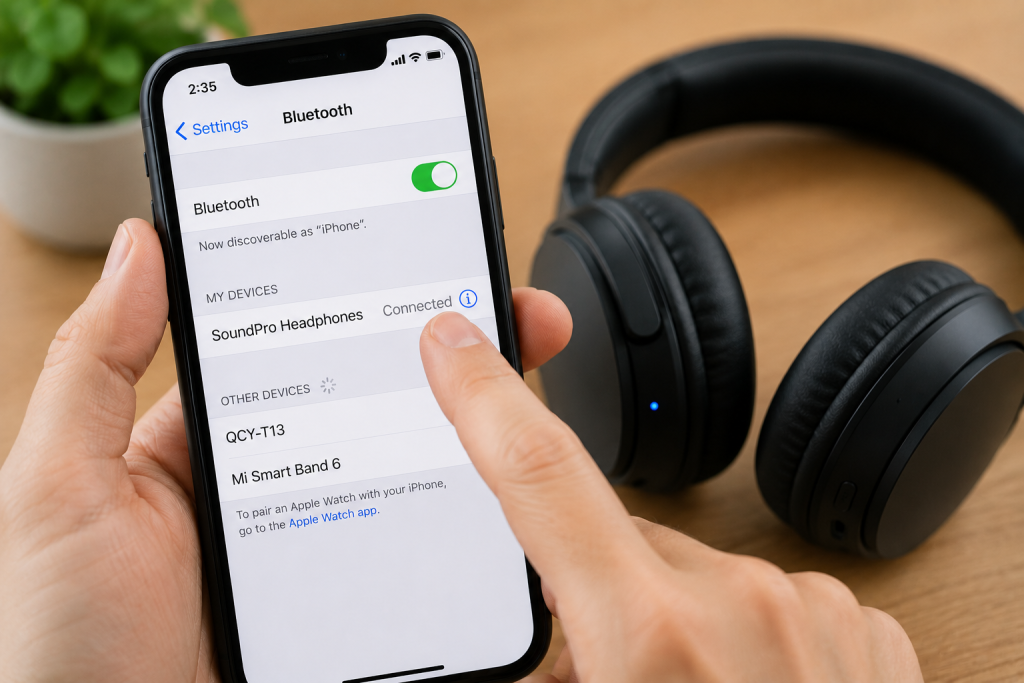
Step 5: Test the Sound
Play:
- music
- YouTube
- a video
to check the sound works properly.
If you hear sound through the headphones:
👉 the connection worked.
What If My Headphones Won’t Connect?
Try:
- turning Bluetooth off and back on
- restarting your phone
- charging the headphones
- moving closer to the device
Sometimes restarting both devices helps.

Common Questions
Do Bluetooth headphones need WiFi?
No. Bluetooth works separately from WiFi.
Can Bluetooth headphones connect automatically later?
Yes. Most reconnect automatically after the first setup.
Why is only one headphone working?
This can happen if:
- battery is low
- one earbud disconnected
- pairing needs resetting
Simple Tips for Beginners
- Keep headphones charged
- Stay close to the device while connecting
- Do not panic if pairing takes a minute
- Restart devices if needed
You Are Not Alone
Many people find Bluetooth confusing at first.
Once connected the first time, it usually becomes much easier.
Take your time and follow one step at a time.
You May Also Find These Helpful
- What Is Alexa and How Does It Work?
- Why Can’t I Connect to WiFi?
- How to Use a Smartphone for the First Time
- What Are Apps and How Do They Work?
- How to Pay for Parking With Your Phone: A Simple Beginner’s Guide
- How to Use a Car Park Payment Machine: A Simple Beginner’s Guide
- How to Use a Supermarket Self-Service Checkout: A Simple Beginner’s Guide
- What Is a Smart Speaker and How Does It Work? A Beginner’s Guide
- What Is a Smart Plug and How Does It Work? A Beginner’s Guide