
Car park payment machines can be confusing if you haven’t used one before.
Some ask you to enter your car registration number, some want you to choose how long you are staying, and others don’t ask you to pay until you are ready to leave.
You may also find machines that accept contactless cards but not cash, or a sign telling you to pay using a parking app instead.
The good news is that most car park machines become much easier once you know what to look for.
This beginner-friendly guide explains how to use a car park payment machine step by step, including how to enter your registration, choose your parking time and pay.
Quick answer: Before paying, read the instructions on the machine or nearby sign. Check whether you need to pay when you arrive or before you leave, enter your vehicle registration if requested, choose the correct parking time or tariff, then follow the instructions to pay.
On this page
- First: Check What Type of Parking Machine It Is
- What You Need Before You Start
- Step 1: Enter Your Car Registration
- Step 2: Choose How Long You Want to Park
- Step 3: Check the Price
- Step 4: Pay for Your Parking
- Do I Need to Display a Ticket?
- What If I Pay When I Leave?
- What If the Machine Doesn’t Work?
- What If I Enter the Wrong Registration?
- What If It Says I Need a Parking App?
- Simple Parking Machine Checklist
- Frequently Asked Questions
<a id=”types”></a>
First: Check What Type of Parking Machine It Is
Not every car park payment machine works in exactly the same way.
Before pressing anything, look at the machine and the signs around the car park.
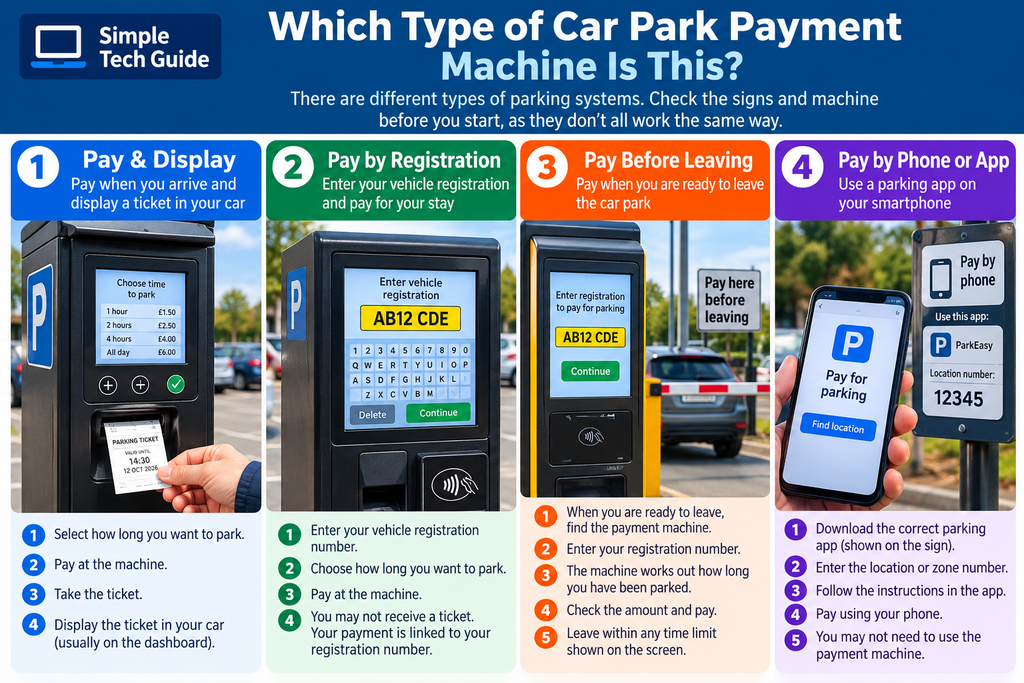
You will usually find one of these systems:
Pay and display
You pay when you arrive and the machine prints a ticket.
You may need to put the ticket somewhere visible inside your car.
Pay by registration
You enter your vehicle registration number into the machine and pay for the amount of time you need.
Because your payment is linked to the registration number, you may not receive a ticket that needs displaying.
Pay before leaving
Some car parks record your vehicle when you enter.
When you are ready to leave, you use the payment machine and may be asked to enter your registration number.
The machine calculates what you owe based on how long you have been parked.
Pay by phone or app
Some car parks allow or require you to pay using your smartphone rather than the machine.
Don’t assume which system is being used. Always read the parking sign first.
<a id=”before”></a>
What You Need Before You Start
Before approaching the machine, it helps to know:
- your vehicle registration number
- approximately how long you want to park
- how you intend to pay
- where you have parked if the car park uses numbered spaces or zones
Your registration number is the combination of letters and numbers shown on your vehicle’s number plate.
For example:
AB12 CDE
If you don’t know it, check your car before using the machine.
Take your time
Don’t worry if somebody is waiting behind you.
It is better to read the screen carefully and enter the correct information than rush through the process.
<a id=”registration”></a>
Step 1: Enter Your Car Registration
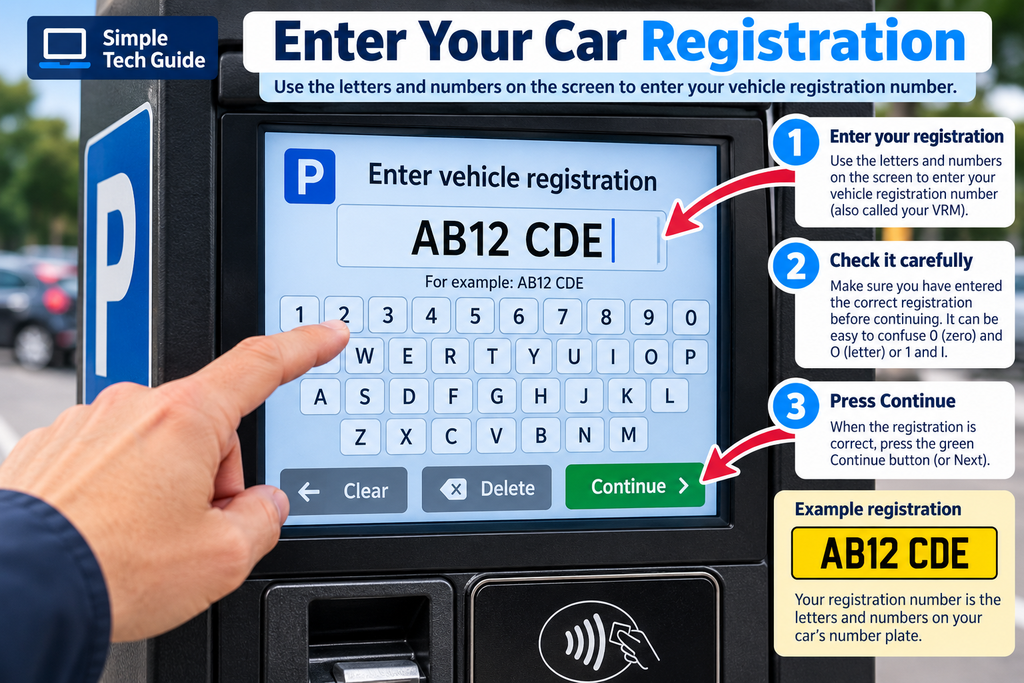
Many modern parking machines ask for your vehicle registration.
You might see:
Enter vehicle registration
Enter registration
or
Enter VRM
VRM simply means Vehicle Registration Mark — your number plate.
Use the letters and numbers on the screen or keypad to enter your registration.
For example:
AB12 CDE
Then press something such as:
Continue
Next
or the green tick ✓.
Check it before continuing
Make sure you haven’t accidentally entered the wrong letter or number.
For example, it can be easy to confuse:
O and 0
or
I and 1
If you make a mistake, look for:
Delete, Clear, Backspace, Cancel or an arrow symbol.
Step 2: Choose How Long You Want to Park
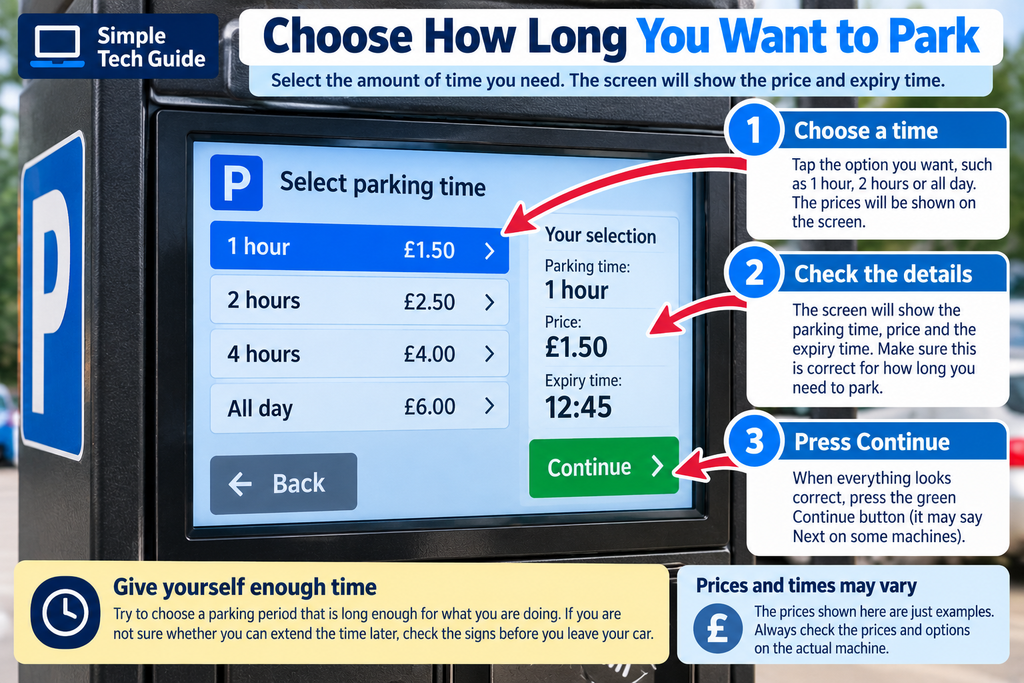
If you are paying when you arrive, the machine may ask you to select how long you want to stay.
For example:
1 hour — £1.50
2 hours — £2.50
4 hours — £4.00
All day — £6.00
These are only examples. Always use the prices displayed at the actual car park.
Some machines instead have + and − buttons that increase or decrease your parking time.
Watch the screen as you change the time.
It should show your:
- parking duration
- expiry time
- amount to pay
Give yourself enough time
Try not to choose a parking period that is obviously too short for what you are doing.
If you aren’t sure whether parking can be extended later, check the signs before leaving your vehicle.
<a id=”price”></a>
Step 3: Check the Price
Before paying, stop for a moment and check the screen.
Make sure the:
registration is correct
parking time is correct
and
price looks correct
Also check the parking signs for restrictions that may apply.
For example, a car park may have:
- maximum stay rules
- different prices at different times
- free periods
- disabled parking rules
- customer-only parking
- no-return periods
The payment machine does not necessarily tell you every condition of using the car park.
The signs are important too.
<a id=”pay”></a>
Step 4: Pay for Your Parking
When everything is correct, choose the payment option shown on the machine.
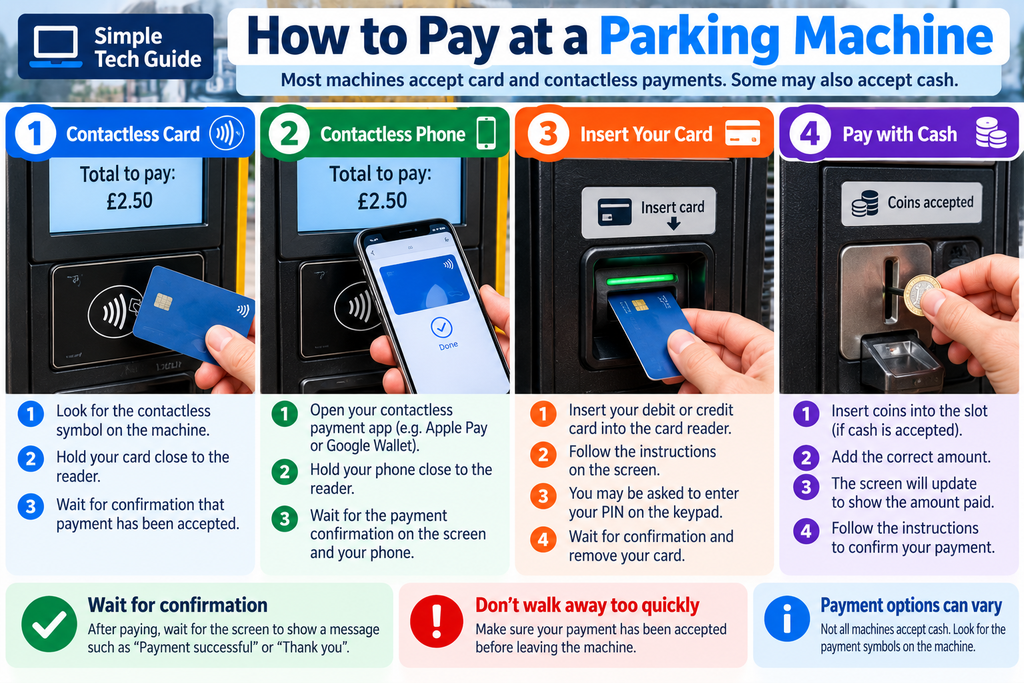
Depending on the car park, you may be able to pay using:
Contactless card
Look for the contactless symbol:
))))
Hold your debit or credit card close to the contactless reader.
Wait until the machine confirms that payment has been accepted.
Contactless phone
If you already have a payment card set up on a compatible phone, you may be able to use services such as Apple Pay or Google Wallet.
Follow the instructions on your phone and hold it close to the contactless reader.
Insert your card
Some machines may ask you to insert your bank card into the card reader.
Follow the instructions on the screen or payment terminal.
You may occasionally be asked for your PIN.
Cash
Some machines still accept coins, but many parking machines are now cashless.
Look for the payment symbols on the machine before trying to insert money.
Don’t walk away too quickly
After paying, wait for the screen to say something such as:
Payment successful
Payment accepted
or
Thank you
Do I Need to Display a Ticket?
It depends on the car park.
If the machine prints a ticket and the instructions say Pay & Display, take the ticket back to your vehicle.
Place it where the instructions tell you, usually somewhere it can easily be seen through the windscreen.
Make sure any important information isn’t hidden.
However, many newer systems record your registration electronically.
You may see a message such as:
No ticket required
or
No need to display
In that situation, follow the instructions provided by the car park.
Don’t assume that receiving or not receiving a ticket means something has gone wrong.
<a id=”leaving”></a>
What If I Pay When I Leave?
This works differently.
You don’t normally choose a parking duration in advance.
When you are ready to leave:
- Go to the payment machine.
- Select the option to pay for parking.
- Enter your registration if requested.
- Check that the correct vehicle or parking session appears.
- Check the amount due.
- Pay using one of the available methods.
- Wait for confirmation.
- Return to your car and leave within any time limit stated.
Some car parks use cameras to record vehicles entering and leaving.
If the machine shows a picture of your vehicle or number plate after entering your registration, check that it is yours before paying.
<a id=”problems”></a>
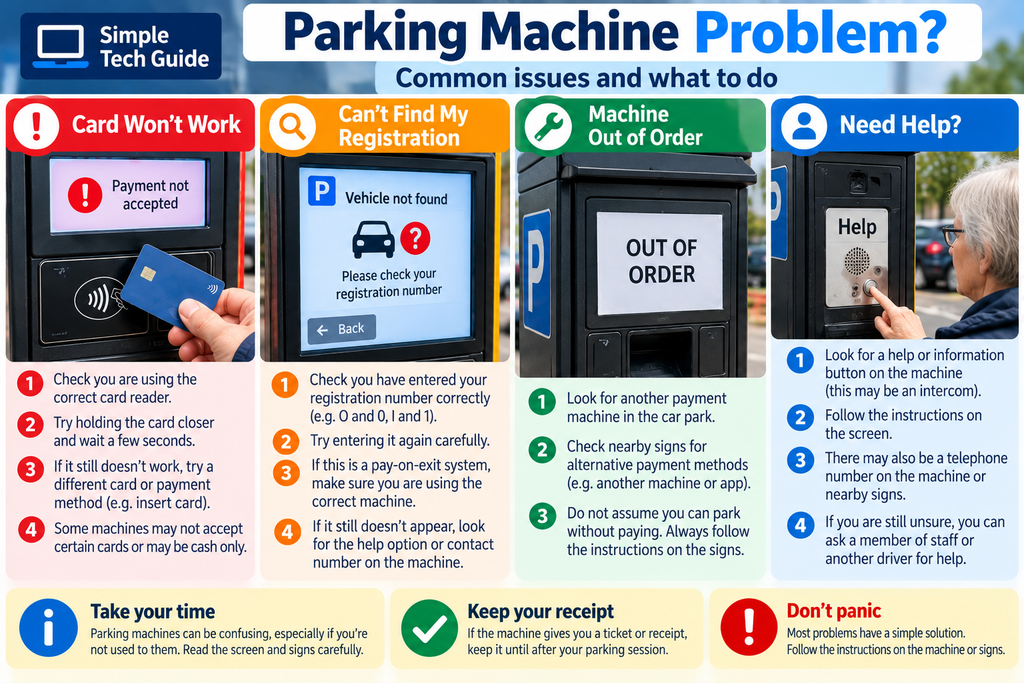
What If the Parking Machine Doesn’t Work?
Don’t panic and don’t keep pressing buttons randomly.
Here are some common problems.
The screen doesn’t respond
Try pressing the screen once firmly but gently.
If nothing happens, look for physical buttons beside the screen.
The machine won’t accept my card
Check that you’re presenting the card to the correct reader.
If contactless fails, the machine may offer another payment method.
The machine won’t accept cash
Check whether the machine actually accepts cash. It may be card only.
I can’t find my registration
If it is a pay-on-exit system, check that you entered the registration correctly.
If you still can’t find the vehicle, look for instructions or a help button.
It says “Out of Order”
Look for another payment machine or read the nearby signs for alternative payment instructions.
I’m completely stuck
Look for:
Help
Information
Call
or an assistance/intercom button.
There may also be a telephone number on the machine or parking sign.
What If I Enter the Wrong Car Registration?
If you notice the mistake before paying, use the delete or back button and correct it.
If you have already paid, don’t simply assume it doesn’t matter.
The correct action depends on the particular car park and parking operator.
Look at the signs, machine or receipt for the operator’s contact details and follow their instructions.
If possible, keep your receipt or other evidence of payment.
What If It Says I Need a Parking App?
You may see signs asking you to pay using a parking app.
The sign should tell you:
- which parking service to use
- the location or zone number
- the parking charges
- how to pay
If you’ve never used a parking app before, don’t rush into downloading something from an advert or an unfamiliar website.
Use the information on the official parking sign and check that you are downloading the correct app.
We will cover this separately in our beginner’s guide:
How to Pay for Parking With Your Phone
This is particularly useful if you find parking apps confusing.
<a id=”checklist”></a>
Simple Parking Machine Checklist
Before walking away from the machine, check:
☐ Have I used the correct car park instructions?
☐ Is my registration correct?
☐ Have I selected enough parking time?
☐ Has the payment definitely been accepted?
☐ Do I need to display a ticket?
☐ Do I know when my parking expires?
☐ Have I kept the ticket or receipt if I might need it?
Taking an extra 20 seconds to check these things can prevent a lot of confusion later.
One Important Thing to Remember
You don’t need to know how every parking machine works.
There are many different machines and parking systems.
The useful habit is simply:
Stop → read the sign → identify the type of parking → follow the screen one step at a time → check before paying.
If you’re unsure, asking somebody for help is completely reasonable.
<a id=”faq”></a>
Frequently Asked Questions
What does VRM mean on a parking machine?
VRM means Vehicle Registration Mark. It is your vehicle registration or number plate.
Do I have to enter the space in my registration number?
Follow the instructions on the machine. Some machines automatically format registration numbers while others may not require the space.
Can I pay for parking using contactless?
Many modern parking machines accept contactless debit and credit cards, but payment methods vary between car parks. Look for the contactless symbol on the machine.
Can I use my phone to pay at the machine?
If the machine has a contactless reader, you may be able to use a phone with a compatible payment service already set up. Some car parks instead require payment through a separate parking app.
What happens if the machine doesn’t give me a ticket?
Check the screen and signs. If your payment is linked electronically to your vehicle registration, a ticket may not be required.
What should I do if the parking machine is broken?
Read the signs and machine for instructions. There may be another machine, an alternative payment method, an app or a telephone/help number. Don’t assume that a broken machine automatically means you can park without paying.
Should I keep my parking receipt?
If the machine provides one, keeping it until after your parking session can be useful as evidence of payment.
Why can’t I find my car registration on a pay-on-exit machine?
Check that you entered the registration correctly. If it still doesn’t appear, use the help option or follow the assistance instructions provided by the car park.
More Simple Out & About Tech Guides
Technology is increasingly part of everyday activities outside the home.
You may also find these Simple Tech Guide articles useful:
How to Use a Supermarket Self-Service Checkout: A Simple Beginner’s Guide
How to Pay for Parking With Your Phone: A Beginner’s Guide (coming soon)
How to Scan a QR Code With Your Phone (coming soon)
How to Use Contactless Payments (coming soon)
How to Use a Train Ticket Machine (coming soon)
At Simple Tech Guide, we explain everyday technology in straightforward language, without assuming you already know how it works.