
Updated August 2026
If your email won’t send, don’t worry.
This is one of the most common email problems and, in most cases, it’s easy to fix.
Whether you use Gmail, Outlook, Yahoo Mail or another email service, the problem is usually caused by a poor internet connection, a large attachment, or a temporary issue with your email app.
This beginner-friendly guide explains the most common causes and shows you exactly how to fix them step by step.
Quick Answer
Why won’t my email send?
If your email won’t send, the most common reasons are:
- No internet connection
- Attachment is too large
- Email is stuck in the Outbox
- Wrong email address
- Email app has frozen
- Mail server is temporarily unavailable
- Email account storage is full
Most people solve the problem by checking their internet connection, waiting for attachments to finish uploading, or restarting their email app.
Before You Start
✔ You have not broken anything.
✔ This problem happens every day.
✔ Most email problems can be fixed in just a few minutes.
Simply work through the steps below one at a time.
1. Check Your Internet Connection
Emails need an internet connection before they can be sent.
Check that:
- Wi-Fi is connected
- Mobile data is switched on
- Airplane Mode is turned off
If your internet isn’t working, reconnect and try sending the email again.

2. Check the Email Address
A simple typing mistake can stop an email from being delivered.
Look carefully for:
- Missing letters
- Extra spaces
- Incorrect spelling
- Missing @ symbol
Example:
3. Is Your Attachment Too Large?
Most email providers only allow attachments of around 20–25 MB.
Large photos, videos and PDF files may stop the email from sending.
Try:
- Sending fewer photos
- Compressing files
- Splitting files across two emails
Helpful guide:
➡ How to Send Multiple Photos by Email
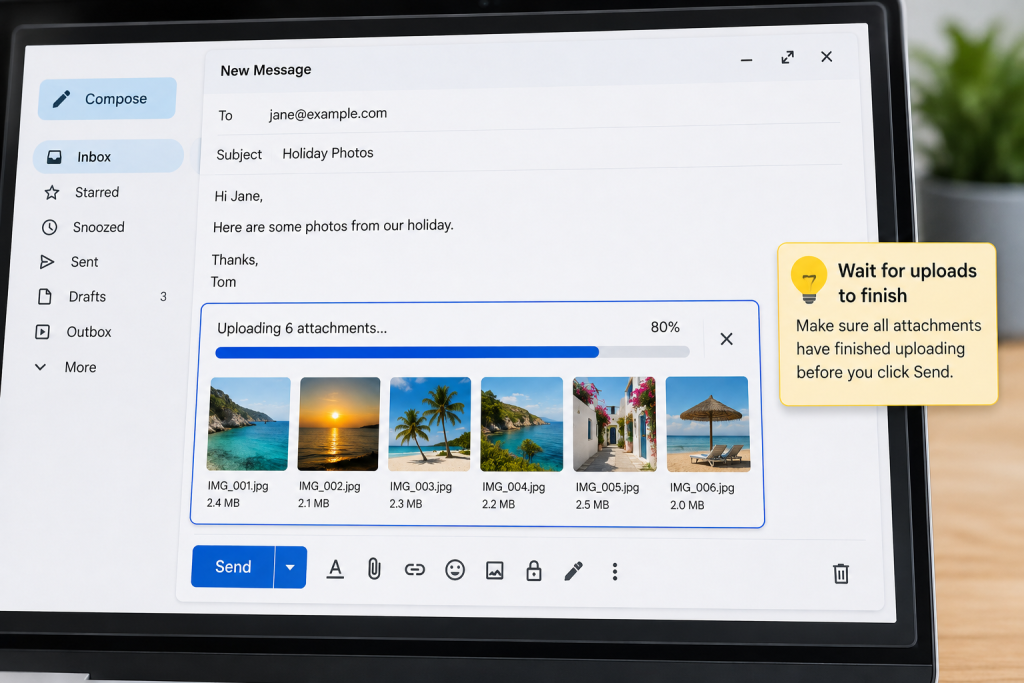
4. Wait for Attachments to Upload
Many people press Send before the files have finished uploading.
Look for:
- Upload progress bar
- Loading circle
- Photo previews
Wait until uploading has completely finished before pressing Send.
5. Check Your Outbox
Sometimes your email hasn’t failed—it is simply waiting to be sent.
Open your Outbox.
If the email is there:
- Wait a few minutes
- Press Send again
- Edit and resend if needed
6. Restart Your Email App
Small software glitches happen.
Close the app completely.
Open it again.
Try sending the email once more.
7. Restart Your Device
A restart often clears temporary problems.
- Turn your device off.
- Wait 30 seconds.
- Turn it back on.
- Try sending your email again.
8. Check Your Email Storage
Some email accounts stop working if your storage becomes full.
Delete:
- Large emails
- Spam
- Trash
- Old attachments
Freeing storage may solve the problem immediately.
9. Is Gmail, Outlook or Yahoo Having Problems?
Sometimes the problem isn’t your device.
Your email provider may be experiencing a temporary outage.
If everything else looks correct, wait a little while and try again later.
10. Update Your Email App
Older versions sometimes develop bugs.
Open:
- Google Play Store
- Apple App Store
Install any available updates.
11. Sign Out and Back In
Refreshing your account often fixes syncing problems.
- Sign out.
- Restart your device.
- Sign back in.
- Try sending your email again.
12. Send Yourself a Test Email
Create a brand-new email.
Don’t attach any files.
Send it to yourself.
If it works, the original email probably contains an attachment or formatting issue.
Frequently Asked Questions
Why does my email say “Failed to Send”?
Usually because:
- your internet connection dropped
- your attachment is too large
- the email server is temporarily unavailable
- the recipient’s email address is incorrect
Why is my email stuck in the Outbox?
This usually happens because your internet connection was lost while the email was uploading.
Reconnect to the internet and press Send again.
Can large photos stop emails sending?
Yes.
Large photo attachments are one of the most common reasons emails fail to send.
If needed, send fewer photos or reduce their size.
Why won’t Gmail send emails?
Common reasons include:
- weak internet connection
- oversized attachments
- Gmail syncing problems
- temporary Google server issues
Why won’t Outlook send emails?
Common causes include:
- Outlook Offline Mode
- oversized attachments
- account syncing issues
- temporary Microsoft server problems
Good to Know
Most email sending problems are temporary.
You haven’t damaged your email account.
Work through each step slowly and test your email after each fix.
In most cases, the problem is solved within a few minutes.
Related Guides
➡ Why Won’t My Email Send Photos? (Simple Fix Guide)
➡ How to Send Multiple Photos by Email
➡ How to Attach a Photo to an Email
➡ How to Send Photos From Your Phone by Email
➡ Why Are My Emails Going to Spam?
➡ How to Recover a Deleted Email
➡ What Is Email and How Does It Work?
Latest posts:
- How to Pay for Parking With Your Phone: A Simple Beginner’s Guide
- How to Use a Car Park Payment Machine: A Simple Beginner’s Guide
- How to Use a Supermarket Self-Service Checkout: A Simple Beginner’s Guide
- What Is a Smart Speaker and How Does It Work? A Beginner’s Guide
- What Is a Smart Plug and How Does It Work? A Beginner’s Guide
l