
Have you ever received a text message saying:
- “Your parcel could not be delivered.”
- “Your bank account has been suspended.”
- “You owe a parking fine.”
- “Your account will be closed today.”
If so, you are not alone.
Scam text messages are becoming more common every year. Criminals send millions of fake text messages hoping that somebody will click a link or provide personal information.
The good news is that most scam texts share the same warning signs.
This guide explains how to spot a scam text message and what to do if you receive one.
What Is a Scam Text Message?
A scam text message is a fake message sent by criminals.
The goal is usually to:
- Steal personal information
- Obtain passwords
- Collect banking details
- Install harmful software
- Trick you into making a payment
These messages often pretend to come from trusted organisations.
Examples include:
- Banks
- Delivery companies
- Government departments
- Mobile phone providers
- Online retailers
Common Types of Scam Text Messages
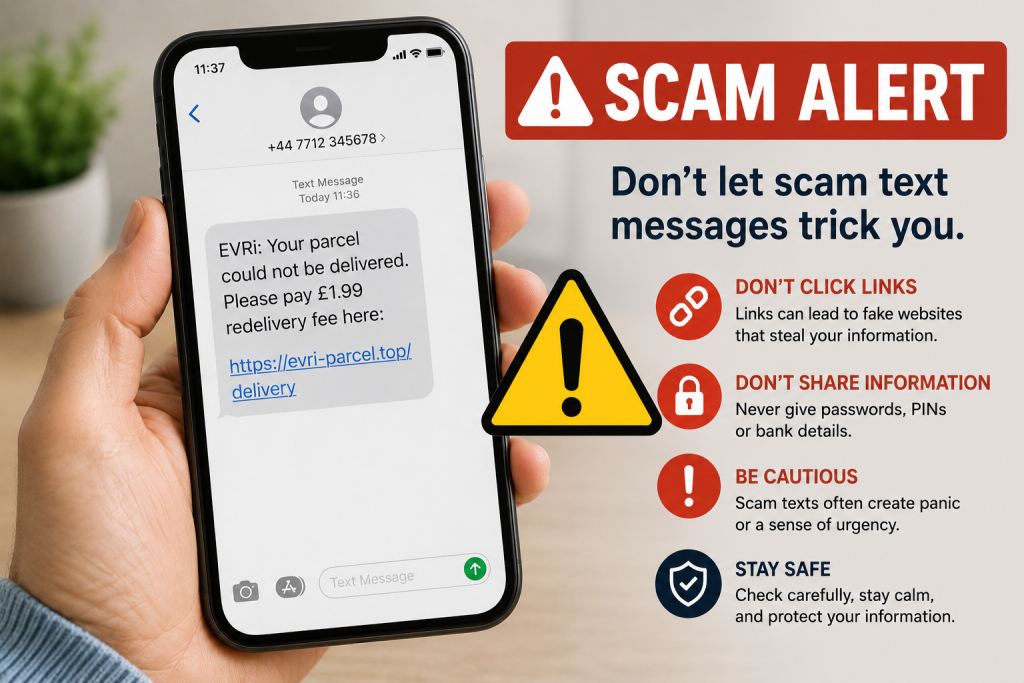
Fake Parcel Delivery Messages
One of the most common scams.
Examples:
“Your parcel could not be delivered. Please pay £1.99 delivery fee.”
“Your package is waiting. Confirm your details now.”
These messages often pretend to be from:
- Royal Mail
- Evri
- DPD
- DHL
The link usually leads to a fake website designed to steal your details.
Bank Account Scams
These messages try to create panic.
Examples:
“Suspicious activity detected on your account.”
“Your online banking has been suspended.”
“Verify your account immediately.”
Remember:
Banks do not normally ask for passwords or security codes by text message.
Government and Tax Scams
Criminals sometimes pretend to be:
- HMRC
- DVLA
- Government departments
Examples:
“You are owed a tax refund.”
“Your driving licence has been suspended.”
These messages often contain fake links.

7 Warning Signs of a Scam Text Message
1. The Message Creates Panic
Scammers want you to act quickly without thinking.
Watch for phrases such as:
- Immediate action required
- Account suspended
- Final warning
- Urgent response needed
Legitimate organisations rarely use panic tactics.
2. The Link Looks Strange
Check website links carefully.
Example:
❌ royal-mail-delivery123.com
❌ secure-bank-login.net
A genuine company will normally use its official website address.
3. The Message Asks For Personal Information
Be suspicious if a text asks for:
- Passwords
- PIN numbers
- Banking details
- Security codes
Legitimate organisations rarely request these by text.
4. Poor Grammar or Spelling
Many scam messages contain:
- Spelling mistakes
- Strange wording
- Awkward grammar
While some scams are sophisticated, poor language remains a common warning sign.
5. Unexpected Messages
Ask yourself:
“Was I expecting this?”
If you have not ordered a parcel, a delivery notification should raise suspicion.
6. Unknown Phone Numbers
Many scam texts come from unfamiliar numbers.
However, scammers can sometimes disguise their number, so this is not always reliable.
7. The Offer Seems Too Good To Be True
Examples:
- Unexpected refunds
- Prize wins
- Free gifts
- Large discounts
If it sounds unbelievable, it probably is.
What Should You Do If You Receive a Scam Text?
Do Not Click Any Links
This is the most important rule.
Even clicking a link can sometimes lead to further scam attempts.
Do Not Reply
Replying confirms that your number is active.
This may lead to more scam messages.
Delete The Message
Once you have identified it as a scam, delete it.
Block The Number
Most smartphones allow you to block unwanted numbers.
This helps reduce future messages.

What If I Already Clicked The Link?
Don’t panic.
Many people accidentally click scam links.
Take these steps:
If You Didn’t Enter Any Information
- Close the website immediately.
- Clear your browser history if you wish.
- Monitor your device for unusual behaviour.
If You Entered Personal Information
Act quickly.
- Change passwords immediately.
- Contact your bank if financial information was provided.
- Enable two-factor authentication where possible.
The sooner you act, the better.
How To Protect Yourself From Future Scam Texts
Keep Your Phone Updated
Updates often improve security.
Use Strong Passwords
Avoid using the same password everywhere.
Enable Two-Factor Authentication
This adds an extra layer of protection.
Stay Informed
Scammers constantly create new tricks.
Understanding common scams is one of the best defences.
Frequently Asked Questions
Can opening a text message infect my phone?
Usually no. Simply opening a text message is normally safe. The biggest risk comes from clicking links or downloading files.
Can scammers fake phone numbers?
Yes. This is known as number spoofing.
Should I reply STOP?
Only if you are certain the message comes from a legitimate company. For suspected scams, do not reply.
What is phishing?
Phishing is a scam designed to trick people into revealing personal information such as passwords or banking details.
Should older adults be concerned about scam texts?
Yes. Scammers often target people of all ages, especially those who may be less familiar with technology.
Quick Scam Text Checklist
Before clicking anything, ask:
✅ Was I expecting this message?
✅ Does the link look genuine?
✅ Is somebody asking for personal information?
✅ Does the message create panic?
✅ Does it sound too good to be true?
If something feels wrong, trust your instincts.

Final Thoughts
Scam text messages are becoming more convincing, but the warning signs are usually the same.
Remember:
✔ Never share passwords
✔ Never share banking details
✔ Never click suspicious links
✔ Never rush because a message says “urgent”
Taking a few seconds to stop and think can protect your money, your information, and your peace of mind.
If in doubt, contact the organisation directly using its official website or phone number rather than using information provided in the text message.
Internal Links
- Keeping Children Safe Online
- What Is Phishing? (future article)
- How To Spot and Avoid Online Scams
- What Should You Never Tell AI?
- Online Safety category page
Latest posts:
- How to Pay for Parking With Your Phone: A Simple Beginner’s Guide
- How to Use a Car Park Payment Machine: A Simple Beginner’s Guide
- How to Use a Supermarket Self-Service Checkout: A Simple Beginner’s Guide
- What Is a Smart Speaker and How Does It Work? A Beginner’s Guide
- What Is a Smart Plug and How Does It Work? A Beginner’s Guide