
Artificial intelligence might sound complicated, but using AI doesn’t have to be.
AI tools such as ChatGPT, Gemini and Copilot allow you to ask questions or give instructions using everyday language. You don’t need to understand computer programming or know special commands.
The most important skill is simply learning how to explain what you want clearly.
In this beginner’s guide, we’ll show you how to use AI step by step, what you can use it for, how to get better answers and how to use it more safely.
Quick Answer: How Do Beginners Use AI?
To start using AI, open an AI chatbot, type a question or describe what you need help with, and send your message.
For example, you could ask:
“Explain Wi-Fi to me in simple terms.”
or:
“Give me five easy dinner ideas using chicken and potatoes.”
If the answer isn’t quite right, you don’t have to start again. Tell the AI what you want changed and continue the conversation.
For beginners, the best approach is to start with simple tasks, give clear instructions, ask follow-up questions and check important information before relying on it.
What Is AI?
Artificial intelligence, usually shortened to AI, is technology that can perform tasks that normally require aspects of human intelligence.
Modern AI tools can help with things such as:
- answering questions;
- explaining difficult subjects;
- writing and rewriting text;
- generating ideas;
- summarising information;
- planning;
- analysing information;
- working with images and documents.
An AI chatbot lets you interact with this technology by typing or speaking in normal language.
You ask something, the AI processes your request and generates a response.
You can then continue the conversation.

15 AI Beginner Tips
1. Start With a Simple Question
You don’t need to write complicated instructions.
Start by asking AI something you would normally ask another person.
For example:
“What is cloud storage?”
“How do I make the text bigger on my phone?”
“What can I cook with eggs, potatoes and cheese?”
Once you’re comfortable with simple questions, you can gradually try more complicated tasks.
2. Tell AI Exactly What You Want
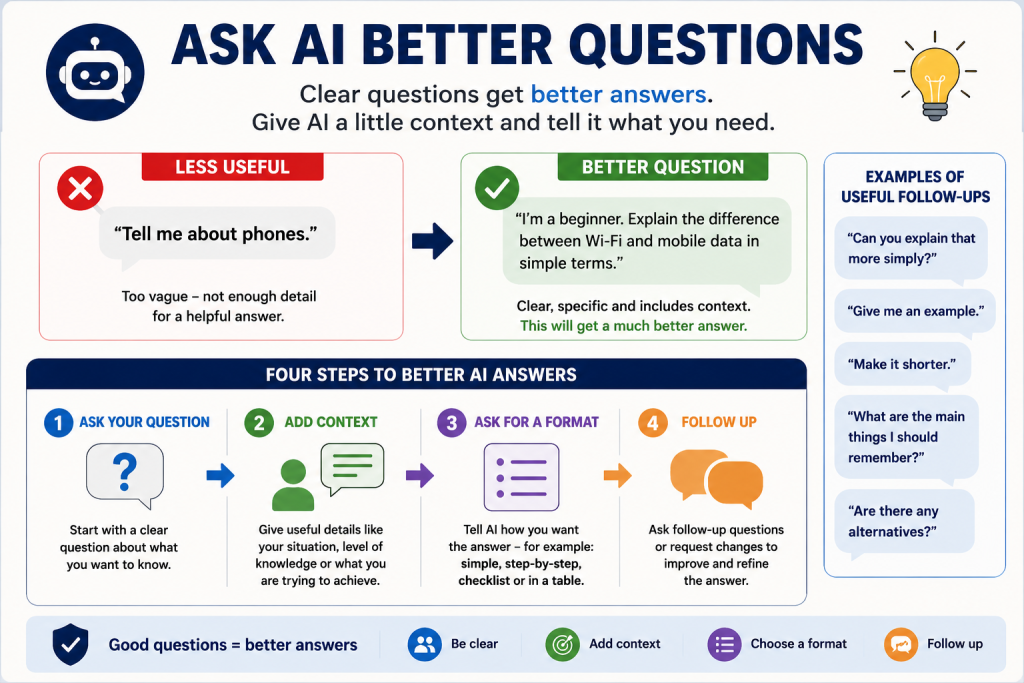
Clear instructions usually produce better answers.
Instead of:
“Tell me about smartphones.”
Try:
“Explain what a smartphone is to someone who has never used one before. Keep the explanation simple.”
You’ve told the AI:
- the subject;
- who the answer is for;
- how complicated it should be.
That gives the AI much more useful direction.
3. Give AI Useful Context
Sometimes AI needs a little background information.
Suppose you ask:
“Which laptop should I buy?”
The AI doesn’t know whether you want one for gaming, work, browsing the internet or simply checking email.
A better question would be:
“I’m a beginner and mainly need a laptop for email, browsing the internet and watching Netflix. What features should I look for?”
You don’t need to provide private information.
Just give the context that actually helps answer the question.
4. Ask AI to Explain Things More Simply
This is one of the most useful AI tips for beginners.
If an answer is too complicated, say:
“Explain that in simpler language.”
Or:
“Explain that as if I’ve never used this technology before.”
You can also ask:
“Can you give me an example?”
AI can often explain the same subject in several different ways until you understand it.
5. Ask Follow-Up Questions
You don’t have to fit everything into one question.
AI chatbots are designed for conversations.
For example:
You: “What is Bluetooth?”
AI answers.
You: “Does Bluetooth need the internet?”
AI answers.
You: “How do I turn it on on an Android phone?”
This can be much easier for beginners than trying to write one enormous question.
6. Tell AI How You Want the Answer
You can ask AI to present information in a particular way.
Try instructions such as:
“Give me a short answer.”
“Explain it step by step.”
“Give me a checklist.”
“Use bullet points.”
“Compare these in a simple table.”
“Avoid technical jargon.”
This can make AI considerably easier to use.
7. Ask AI to Help With Everyday Tasks
AI isn’t only for technical subjects.
Beginners can use it for ordinary everyday tasks.
For example:
- creating a shopping list;
- planning meals;
- explaining a confusing letter;
- brainstorming birthday present ideas;
- creating a holiday packing list;
- improving the wording of an email;
- planning jobs around the house;
- explaining unfamiliar terminology.
Start with tasks where mistakes would not have serious consequences while you learn how AI works.
8. Use AI to Help You Write
AI can help when you know what you want to say but aren’t sure how to word it.
For example:
“Help me write a polite email asking a company when my order will arrive.”
You can then say:
“Make it shorter.”
or:
“Make it friendlier.”
or:
“Make it more formal.”
Always read the finished message before sending it.
Make sure it still says what you intended to say.
9. Don’t Be Afraid to Correct AI
You don’t have to accept the first response.
If the answer isn’t what you wanted, tell the AI.
For example:
“That’s too complicated. Make it simpler.”
“I meant an Android phone, not an iPhone.”
“Give me three options instead of ten.”
“I don’t understand step three. Explain it differently.”
Working with AI is often an iterative process.
Your second or third instruction may produce a much better result than the first.
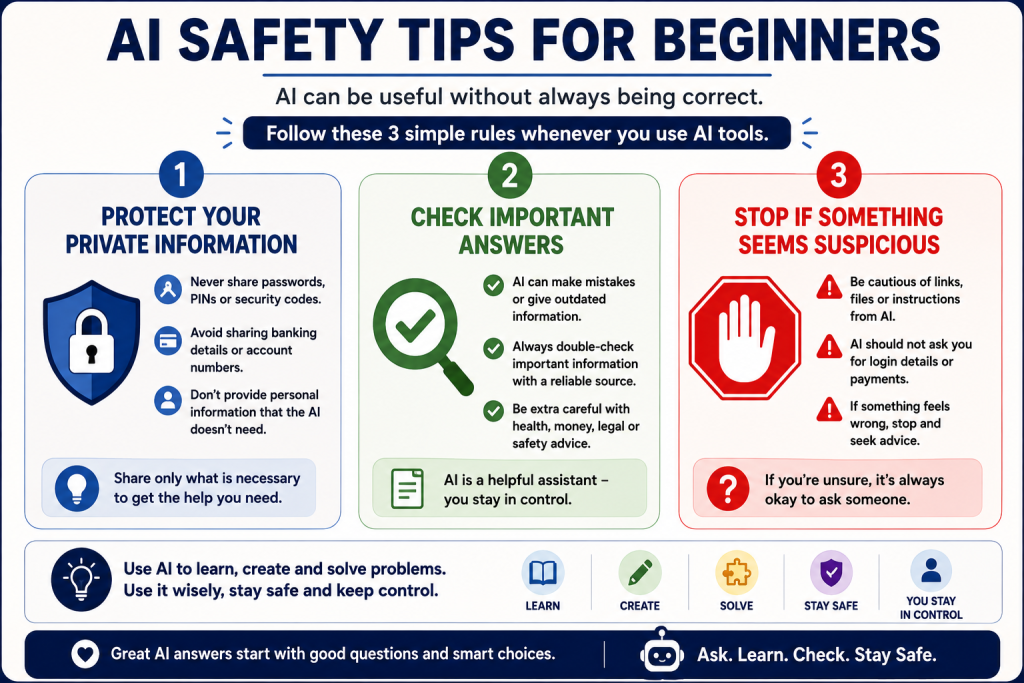
10. Remember That AI Can Be Wrong
This is one of the most important things for every beginner to understand.
AI can produce incorrect information.
Sometimes an answer may even sound confident when it is wrong, outdated or missing important context.
For casual brainstorming this may not matter much.
But be much more careful with information involving:
- health;
- medication;
- money;
- investments;
- law;
- taxes;
- contracts;
- government rules;
- personal safety.
Check important information using an appropriate reliable source before acting on it.
Related guide: Link Can AI Be Wrong? here.
11. Don’t Give AI Information It Doesn’t Need
You can get useful AI answers without revealing unnecessary private information.
Avoid entering things such as:
- passwords;
- PINs;
- security codes;
- unnecessary banking information;
- account login details;
- confidential information about other people.
Before sharing something, ask:
“Does the AI actually need this information to answer my question?”
If it doesn’t, leave it out.
Related guide: Link What Never to Tell AI here.
12. Use Placeholders for Private Details
Suppose you want AI to improve a letter containing your home address.
Instead of entering the real address, you could write:
[MY ADDRESS]
Other useful placeholders include:
[MY NAME]
[ACCOUNT NUMBER]
[COMPANY NAME]
[CUSTOMER REFERENCE]
Let AI help with the wording, then add the real information yourself afterwards.
13. Check Before Uploading Documents or Photos
Some AI tools allow you to upload:
- photographs;
- PDFs;
- letters;
- spreadsheets;
- screenshots;
- other files.
This can be useful, but check what’s inside the file first.
A document might contain information you didn’t intend to share, such as an address, signature, account number or private correspondence.
Only upload what is appropriate for the task.
14. Use AI as an Assistant, Not an Automatic Authority
A useful way for beginners to think about AI is as an assistant.
It can help you:
understand → brainstorm → organise → draft → compare → learn
But an AI-generated answer isn’t automatically true just because it sounds professional.
You remain responsible for deciding whether an answer makes sense and whether important information needs checking.
15. Learn One AI Skill at a Time
You don’t need to become an AI expert overnight.
Start with something useful to you.
For example:
Week 1: Ask AI questions.
Week 2: Use it to explain unfamiliar subjects.
Week 3: Try drafting an email.
Week 4: Ask it to create a checklist or plan.
The more you practise giving clear instructions and follow-up questions, the easier AI becomes to use.
10 Easy AI Prompts for Beginners
If you’re unsure what to type into an AI chatbot, try one of these:
- “Explain [subject] to me in simple terms.”
- “Give me step-by-step instructions for [task].”
- “What’s the difference between [A] and [B]?”
- “Help me write a polite email about [subject].”
- “Give me five ideas for [subject].”
- “Explain this without technical jargon.”
- “Turn this information into a simple checklist.”
- “What questions should a beginner ask about [subject]?”
- “I don’t understand this. Can you explain it another way?”
- “Check my understanding: does this mean [your explanation]?”
You can replace the words in brackets with whatever you’re interested in.
What Can Beginners Use AI For?
There are hundreds of possibilities.
Some simple starting points include:
Learning
Ask AI to explain an unfamiliar word, technology or idea.
Writing
Get help drafting emails, letters, lists or notes.
Planning
Create shopping lists, schedules, itineraries or simple project plans.
Ideas
Brainstorm meals, presents, activities or hobbies.
Technology Help
Ask for explanations of smartphone, computer or internet terminology.
Comparing Options
Ask AI to explain the differences between products or services.
For current prices, specifications or availability, verify the information before buying.
What Should Beginners Avoid Using AI For?
AI isn’t equally suitable for every task.
Take particular care when a mistake could have serious consequences.
Do not automatically rely on AI alone for important:
- medical decisions;
- legal decisions;
- financial decisions;
- investment decisions;
- emergency situations;
- security decisions.
AI may help you understand terminology or prepare questions, but important decisions may require an authoritative source or qualified professional.
Do You Need to Know Special AI Prompts?
No.
You may hear people talking about prompts or prompt engineering.
A prompt is simply the instruction or question you give an AI.
You don’t need complicated formulas to start.
For beginners, a good prompt usually contains three things:
What you want + useful context + how you want the answer
For example:
“I’m new to smartphones. Explain how Bluetooth works in simple terms using five bullet points.”
That’s already a good AI prompt.
Is AI Difficult to Learn?
For basic everyday use, usually not.
If you can type a question into a search box or send a text message, you can start experimenting with an AI chatbot.
The main difference is that you can continue the conversation.
If the first answer isn’t right, ask another question.
That’s one of AI’s biggest advantages for beginners.
Is AI Safe for Beginners?
AI can be used safely for many everyday tasks, but beginners should understand some basic precautions.
Remember:
Don’t unnecessarily share private information.
Don’t assume every answer is correct.
Check important information independently.
Be especially cautious when money, health, security or personal safety are involved.
We’ve created a simple printable version of these principles:
Frequently Asked Questions
What is the easiest way to start using AI?
Start by asking a simple question about something you already understand reasonably well. This helps you learn how AI responds without relying on it for something important.
Do I need to know computer programming?
No. Everyday AI chatbots are designed to understand ordinary written or spoken language.
What should I ask AI first?
Try something simple such as:
“Explain what Wi-Fi is in simple terms.”
Then ask a follow-up question.
Can AI help me write emails?
Yes. AI can help draft or improve emails. Always read the finished message before sending it and remove unnecessary private information from your prompt.
Does AI always tell the truth?
No. AI can generate incorrect, outdated or incomplete information. Important answers should be checked against reliable sources.
Should I give AI personal information?
Only provide information genuinely necessary for the task and appropriate for the service you’re using. Avoid passwords, security codes and unnecessary sensitive information.
Can older adults use AI?
Yes. AI chatbots can actually be useful for people who prefer conversational technology because you can ask questions using ordinary language and request simpler explanations.
Free AI Guides for Beginners
If you’re learning AI for the first time, continue with:
Safe AI Checklist
Seven simple rules for using AI more safely.
What Never to Tell AI
Learn which information should be kept private.
Can AI Be Wrong?
Understand why AI can make mistakes and when answers should be checked.
Final Thoughts
Learning how to use AI doesn’t require technical expertise.
Start small.
Ask simple questions, explain what you need, request simpler answers when necessary and use follow-up questions to improve the result.
Most importantly, remember that AI is a tool rather than an unquestionable authority.
Use it to help you think, learn and work — while protecting your private information and checking anything important before acting on it.
Latest Posts:
- How to Pay for Parking With Your Phone: A Simple Beginner’s Guide
- How to Use a Car Park Payment Machine: A Simple Beginner’s Guide
- How to Use a Supermarket Self-Service Checkout: A Simple Beginner’s Guide
- What Is a Smart Speaker and How Does It Work? A Beginner’s Guide
- What Is a Smart Plug and How Does It Work? A Beginner’s Guide