
Buying a new laptop can feel much more complicated than it needs to be.
You may see words such as RAM, SSD, Ryzen, Intel, Full HD and USB-C and wonder whether you need to understand all of them before spending your money.
You don’t.
If you mainly want a laptop for emails, browsing the internet, online shopping and banking, photographs, video calls, documents and watching programmes, you don’t need an expensive gaming computer or the fastest laptop in the shop.
You need something that’s easy to live with, comfortable to use and fast enough that everyday jobs don’t become frustrating.
This guide will help you choose one without all the jargon.
Last checked: September 2026
The Quick Answer
Don’t want to learn about computer specifications?
Start here.
We’ve narrowed the huge number of laptops available down to three models we’d consider for a beginner.
| Our choice | Best for | What to look for |
|---|---|---|
| 🏆 ASUS Vivobook Go 15 | Most beginners | Ryzen 5, 16GB, 512GB |
| 💷 Acer Aspire Go 15 | Good value | 16GB, 512GB, Full HD |
| 👓 HP OmniBook 3 17.3″ | Larger screen/home use | 16GB, 512GB, Full HD |
If you don’t want to read the whole guide, remember this:
For a new everyday Windows laptop, we’d look for Windows 11, at least 8GB RAM (preferably 16GB), a 512GB SSD and a Full HD screen.
🏆 1. ASUS Vivobook Go 15
Best Everyday Choice
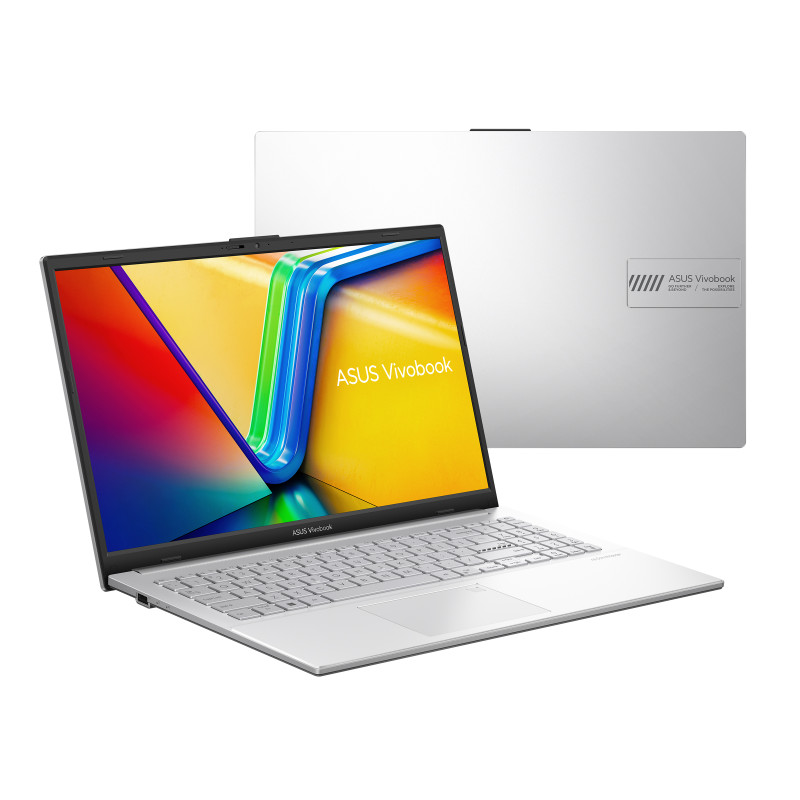
For most beginners, the ASUS Vivobook Go 15 is the type of laptop we’d look at first.
It’s a conventional 15.6-inch Windows laptop, which is a useful size for everyday home computing without being excessively large.
ASUS offers the Vivobook Go 15 (E1504F) in several configurations, including versions with an AMD Ryzen 5 processor, 16GB RAM and a 512GB SSD.
Why do we like it for beginners?
✓ Sensible 15.6-inch screen
✓ Windows 11 configurations
✓ 16GB memory available
✓ 512GB storage available
✓ Normal USB connections
✓ HDMI connection
✓ Physical webcam privacy shutter
✓ Established manufacturer
One little feature particularly stands out:
The webcam has a physical privacy shutter.
Instead of wondering whether you’ve switched the camera off correctly, you can physically cover it.
ASUS confirms that the Vivobook Go 15 includes a webcam privacy shutter.
That’s exactly the kind of straightforward feature we like for a beginner.
What can I use it for?
This type of laptop is more than capable of normal jobs such as:
- Browsing websites
- Shopping and banking
- Looking at photographs
- Video calls
- Microsoft Office or similar programs
- YouTube
- Netflix and other streaming
- Everyday household tasks
⚠️ Check the version before buying
This is important.
There are several versions of the ASUS Vivobook Go 15.
ASUS lists configurations ranging from 4GB to 16GB RAM and 128GB to 512GB storage.
So don’t simply buy the cheapest one with the same name.
Our preferred specification:
AMD Ryzen 5
16GB RAM
512GB SSD
Windows 11
Full HD screen
Simple Tech Guide verdict
Best suited to: Someone who wants a normal, straightforward everyday laptop.
What we like most: Good balance of size, specification and simple features.
What we’d check: Make sure you’re buying the correct 16GB/512GB version.
💷 2. Acer Aspire Go 15
Good-Value Alternative
💷 2. Acer Aspire Go 15
Good-Value Alternative
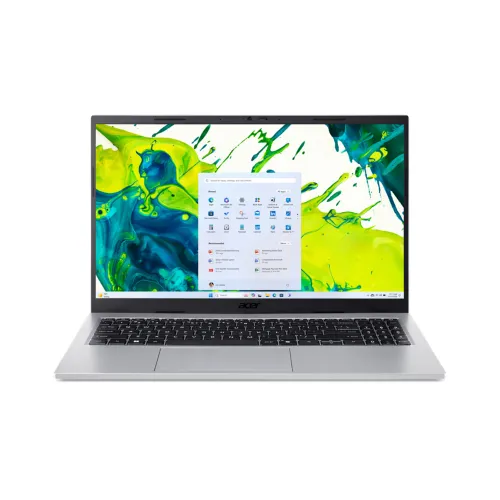
The Acer Aspire Go 15 AG15-72P is our recommended good-value alternative to the ASUS.
This model combines a 15.6-inch Full HD screen, Intel Core 5 120U processor, 16GB RAM, 512GB SSD and Windows 11. That’s a strong specification for everyday home computing without paying for specialist gaming features.
Why might a beginner choose it?
✓ Familiar 15.6-inch size
✓ Windows 11
✓ 16GB RAM
✓ 512GB SSD
✓ Full HD screen
✓ Established manufacturer
It should comfortably handle everyday tasks such as email, web browsing, shopping and banking, photographs, video calls, documents and streaming.
⚠️ Check the exact model before buying
Acer sells several laptops under the Aspire Go 15 name, and their processors, memory and screens can differ.
The version we’re referring to in this guide is:
Model: Acer Aspire Go 15 AG15-72P
Processor: Intel Core 5 120U
RAM: 16GB
Storage: 512GB SSD
Screen: 15.6-inch Full HD
Operating system: Windows 11
So don’t buy another Aspire Go 15 simply because the name looks the same.
Simple Tech Guide verdict
Best suited to: Someone looking for a well-specified 15.6-inch everyday laptop to compare with our ASUS choice.
What we like: 16GB RAM and 512GB storage in a straightforward everyday Windows laptop.
What we’d check: The current price and exact model number before ordering.y.
👓 3. HP OmniBook 3 17.3-inch
Best Large-Screen Choice
Not everybody wants a small laptop.
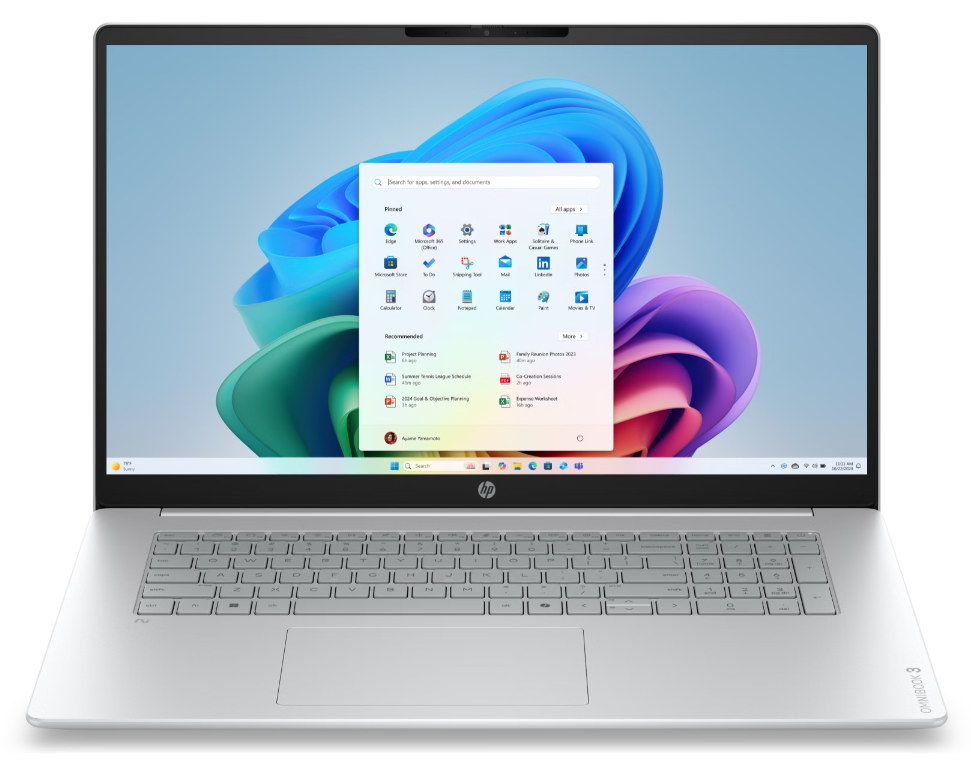
If your computer will spend most of its time on a desk or dining table, the HP OmniBook 3 17.3-inch is particularly interesting.
The current Ryzen AI 5 version has:
Model checked: HP OmniBook 3 17-dm0002nax (DQ8P5EA#ABU).
17.3-inch Full HD IPS display
16GB RAM
512GB SSD
Windows 11 Home
Full-size keyboard with number pad
1080p webcam
USB-A, USB-C and HDMI
At the time of our September 2026 check, HP UK listed this configuration at £599. Prices and offers can change, so check the current price before buying.
Why might the larger screen help?
It gives you more physical viewing space for:
- Websites
- Emails
- Documents
- Photographs
- Video calls
- Streaming
The display is Full HD, IPS, anti-glare and rated at 300 nits.
That’s more meaningful to us than simply saying “it’s a 17-inch laptop.”
It also has a good webcam
HP specifies a 1080p Full HD camera with dual microphones, and this model also includes a camera privacy shutter.
That’s useful if video calling family and friends is important.
What’s the disadvantage?
Size and weight.
At approximately 2kg, this isn’t the laptop we’d choose if you regularly carry your computer around.
But if it mainly travels between the dining table, spare room and sofa, that may not matter.
Simple Tech Guide verdict
Best suited to: Home users who would rather have a larger screen than maximum portability.
What we like most: Big Full HD IPS screen and straightforward everyday specification.
What we’d consider: It’s larger and more expensive than a basic 15.6-inch laptop.
Still Not Sure Which One to Choose?
Keep it simple.
“I just want a good normal laptop.”
Start with the ASUS Vivobook Go 15.
“I want another good-value option to compare.”
Look at the Acer Aspire Go 15.
“I want a bigger screen and it will mainly stay at home.”
Look at the HP OmniBook 3 17.3-inch.
You don’t need to compare 25 laptops.
For a beginner, narrowing the choice down is part of the point of this guide.
What Makes a Good Laptop for a Beginner?
There isn’t really such a thing as an “older person’s laptop.”
And that’s a good thing.
We’d rather recommend a normal, good-quality computer with features that make everyday use straightforward.
Here’s what matters.
1. A Comfortable Screen
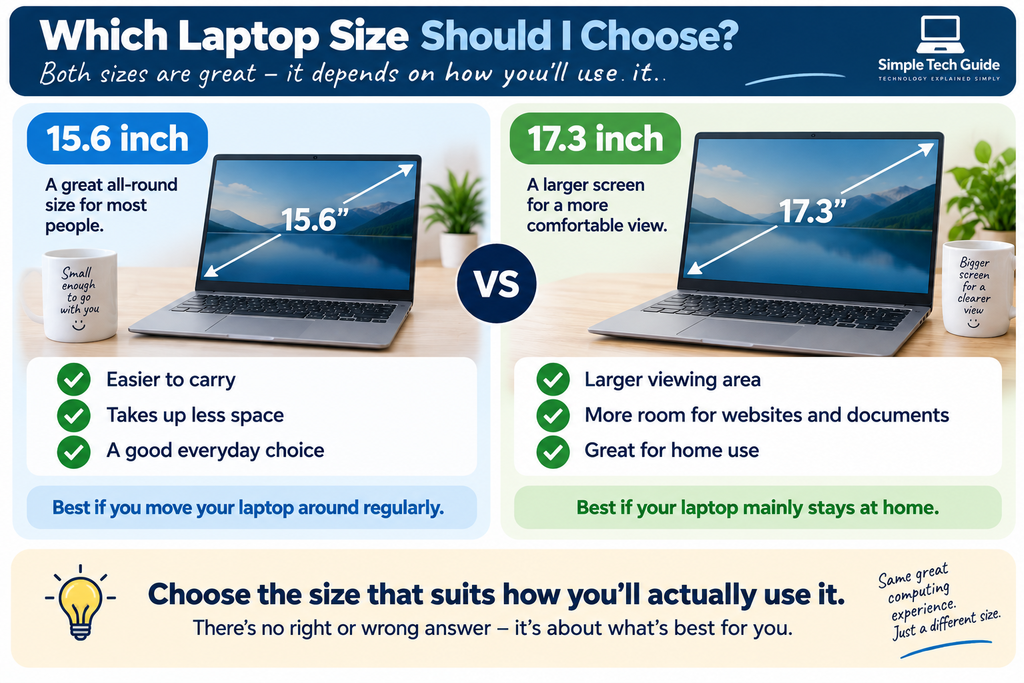
For most people, 15–16 inches is a good size.
It’s large enough for everyday use but still relatively easy to move around.
If the laptop will mainly stay at home, consider 17.3 inches.
2. Enough Memory
Computer memory is usually called RAM.
You don’t need to understand the technology behind it.
Think of RAM as the computer’s working space.
For a new Windows laptop:
8GB = acceptable for lighter use
16GB = our preferred choice
If the price difference is reasonable, we’d choose 16GB.
3. Enough Storage
Storage is where your photographs, documents, programs and other files live.
Modern laptops generally use an SSD.
For most beginners:
256GB = usable
512GB = what we’d recommend
1TB = useful if you store lots of photographs or video
For an ordinary home computer, 512GB is our sweet spot.
4. Windows 11
We recommend Windows 11 for the laptops in this guide.
That doesn’t mean computer security isn’t important, but you don’t need to automatically purchase every antivirus package you’re offered.
5. Normal USB Connections
This is easy to overlook.
A normal rectangular USB-A port can be useful for connecting things you may already own, including:
- A mouse
- USB memory stick
- Printer
- Camera
- External hard drive
USB-C is useful too, but we like beginners to have access to familiar connections.
6. A Webcam
A built-in webcam is useful for video calls.
A physical privacy shutter is even better because you can visibly cover the camera when you aren’t using it.
The Simple Tech Guide Laptop Checklist
If our three recommended laptops aren’t available when you’re shopping, use this instead.
| Feature | What we’d look for |
|---|---|
| Operating system | Windows 11 |
| Screen size | 15.6–17.3 inches |
| Screen resolution | Full HD or better |
| RAM | 16GB preferred; 8GB minimum |
| Storage | 512GB SSD preferred |
| Processor | Recent AMD Ryzen 5 or Intel Core i5 (or similar) |
| Webcam | Built in |
| USB-A | Yes |
| USB-C | Desirable |
| HDMI | Useful |
| Wi-Fi | Wi-Fi 6 or newer desirable |
Don’t try to memorise it.
Take a screenshot of this table and use it while you’re shopping.
What Do RAM and SSD Actually Mean?
These two terms confuse lots of first-time buyers.
They’re actually quite easy to understand.
RAM = your working space
Imagine working at a desk.
A bigger desk gives you more room to have different things open at the same time.
RAM works a little like that.
16GB gives your computer more working room than 8GB.
SSD = your filing cabinet
The SSD stores things.
That includes:
- Photographs
- Documents
- Downloads
- Programs
So:
16GB RAM + 512GB SSD
simply means:
16GB of working memory
and
512GB of storage space.
That’s enough technical knowledge for most buyers.
What About Intel and AMD?
You’ll probably see both names while shopping.
They are two major processor manufacturers.
You may see:
Intel Core
or
AMD Ryzen
Don’t worry too much about choosing between the two.
For the everyday tasks covered by this guide, we’d rather have a sensible modern processor combined with enough RAM, a good SSD and a decent screen than choose a laptop purely because of the processor badge.
What Should a Beginner Avoid?
Knowing what not to buy can be just as useful.
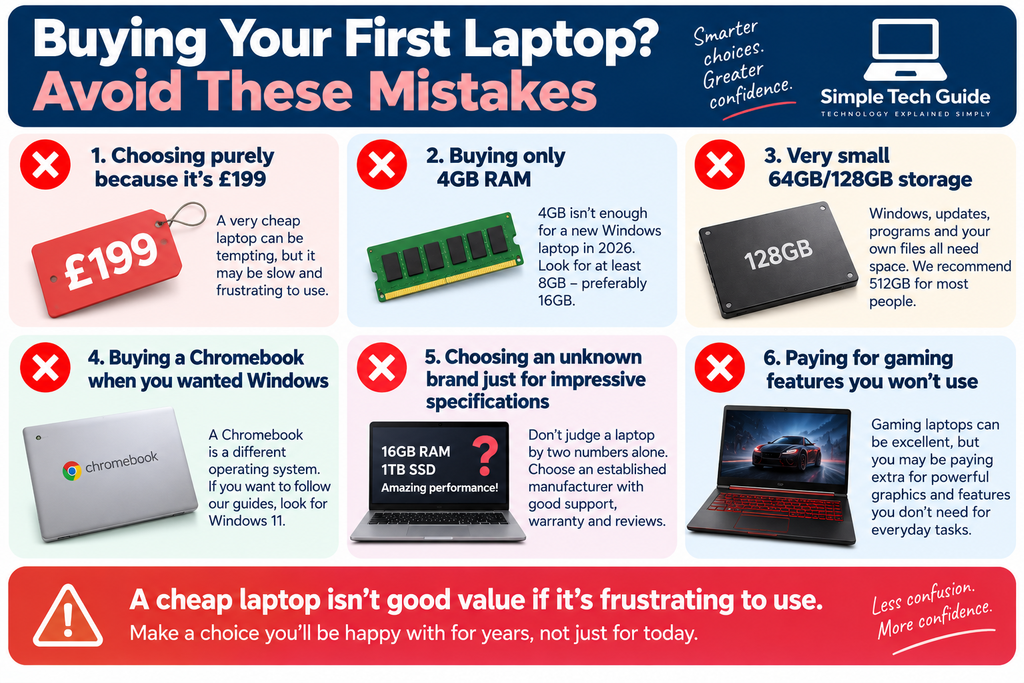
❌ Don’t buy purely because it’s £199
An extremely cheap Windows laptop can be tempting.
But saving £100 isn’t good value if the computer becomes frustratingly slow.
❌ Avoid 4GB RAM for a new everyday Windows laptop
We’d look for at least 8GB.
We’d prefer 16GB.
❌ Be careful with 64GB or 128GB storage
Windows, programs, updates, photographs and documents all need room.
We’d prefer 512GB.
❌ Don’t accidentally buy a Chromebook
Chromebooks can be good computers.
But they don’t run Windows.
If you want Windows, make sure the laptop specifically says:
Windows 11
❌ Don’t buy an unfamiliar brand just because the numbers look amazing
Specifications aren’t everything.
For a beginner, manufacturer support, warranty, updates, documentation and build quality matter too.
❌ Don’t pay for a gaming laptop if you don’t play demanding games
If you’re browsing websites, emailing, shopping and looking at photographs, expensive gaming hardware is unlikely to improve your experience enough to justify the extra cost.
Do I Need a Touchscreen?
Probably not.
Touchscreens can be useful, but we wouldn’t pay considerably more for one unless you know you want it.
A normal keyboard and mouse remain perfectly good ways to use a Windows laptop.
Do I Need Microsoft 365?
Not necessarily.
You may be offered Microsoft 365 when buying or setting up your laptop.
Don’t feel you have to subscribe immediately.
There are other options, including free ones.
Do I Need Antivirus Software?
Windows 11 already includes built-in security.
That doesn’t mean computer security isn’t important, but you don’t need to automatically purchase every antivirus package you’re offered.
What Else Do I Need With My Laptop?
Probably not much.
A mouse
Many beginners find a normal mouse easier than a laptop touchpad.
A laptop case
Worth having if the computer leaves the house.
A backup
Important photographs and documents shouldn’t exist in only one place.
That’s about it.
Don’t feel you need to buy a huge bundle of accessories with your new computer.
How Much Should I Spend?
You don’t need to spend £1,000 on a laptop for ordinary home computing.
As a general guide, we’d investigate approximately:
£350–£600
for a good everyday Windows laptop.
Below that, compromises can become more significant.
Above it, you may start paying for performance and features that an ordinary home user doesn’t need.
Sale prices obviously change this.
Should I Buy a 17-inch Laptop Because I’m Older?
Not necessarily.
Age isn’t what determines your ideal computer.
But if you prefer a larger display and the computer will mainly stay at home, a 17.3-inch laptop may be more comfortable.
Windows can also make text, icons and other things on screen larger.
That’s often more useful than simply buying the biggest computer available.
Already Bought Your Laptop?
This is where Simple Tech Guide can really help.
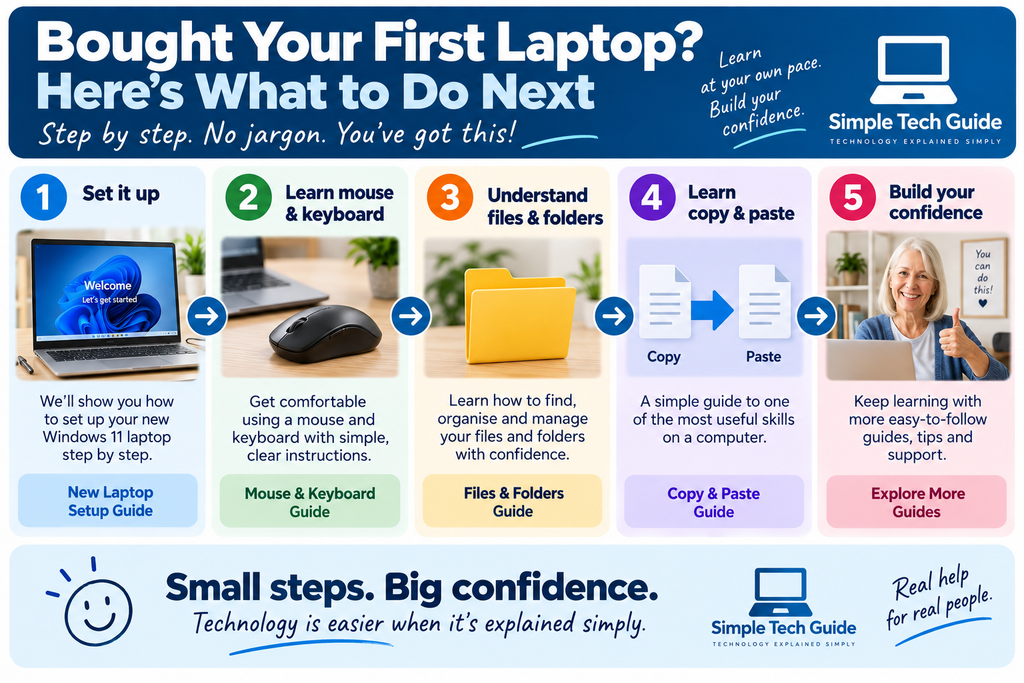
New Windows 11 laptop? Start here:
→ How to Set Up a New Windows 11 Laptop or PC: Beginner’s Guide
→ Computer Basics for Beginners
→ How to Use a Mouse and Keyboard
→ Understanding Files and Folders
→ How to Open and Save a File
→ How to Copy and Paste on a Computer
You don’t have to open the box and work everything out yourself.
Choose your laptop → Buy it → Set it up → Learn the basics → Solve problems
Frequently Asked Questions
What is the best laptop for a beginner?
For most beginners, we’d look for a straightforward Windows 11 laptop with a 15–16-inch Full HD screen, at least 8GB RAM and SSD storage.
If the budget allows, our preferred specification is 16GB RAM and 512GB SSD.
Is 8GB RAM enough?
For light everyday use, yes.
If you’re buying a laptop you hope to keep for several years, we’d choose 16GB when the additional cost is reasonable.
Is 512GB enough?
For most people, yes.
512GB provides plenty of room for normal applications, documents and a reasonable collection of photographs.
What size laptop should a beginner buy?
For most people, 15–16 inches provides a good balance.
Consider 17.3 inches if you want a larger viewing area and the computer will mainly stay at home.
Is HP or ASUS better?
We wouldn’t choose on brand alone.
Both manufacture suitable laptops.
The exact model, screen, RAM, storage, connections and price matter more.
Is Acer suitable for beginners?
Yes, the right Acer can be. As with ASUS and HP, check the exact configuration rather than buying purely by brand name.
Should I buy a Chromebook?
Only if you specifically want ChromeOS.
If you’re expecting a conventional Windows computer or want to follow Windows tutorials, buy a laptop running Windows 11.
Can I make the writing bigger?
Yes.
Windows 11 allows you to increase text size and display scaling, which can make things considerably easier to see.
How We Choose Our Recommendations
Simple Tech Guide is designed for people who want technology explained without unnecessary jargon.
We prioritised:
✓ Clear screens
✓ Straightforward everyday use
✓ Sufficient memory
✓ Sensible storage
✓ Useful connections
✓ Video-call capability
✓ Established manufacturers
✓ Windows 11
✓ Sensible pricing
We haven’t personally laboratory-tested these laptops.
Our selections are based on manufacturer specifications, UK market research and our assessment of the features likely to be useful to beginners and everyday home users.
Prices, specifications and availability change, so always check the exact model before buying.
Buying Guide Disclosure
About our recommendations: Simple Tech Guide independently selects products we believe may be useful to our readers. We haven’t been paid by the manufacturers to include these products. Prices and availability can change, so please check the exact specification before ordering.
Our Final Advice
If you’re still unsure, don’t get lost comparing dozens of laptops.
Remember these four things:
🪟 Windows 11
💻 Full HD screen
🧠 16GB RAM if affordable
💾 512GB SSD
For most beginners, we’d start with a 15–16-inch laptop.
If your laptop will mainly stay at home and you’d prefer more screen space, consider 17.3 inches.
You don’t need to understand every number on the box.
You just need a laptop that makes everyday computing straightforward rather than frustrating.