Best Mobile Phones for Beginners & Older Adults UK (2026)
Choosing a new mobile phone should be straightforward, but with so many models available, it can be difficult to know where to start.
This is especially true if you’re buying your first mobile phone, replacing an older model or helping a parent or grandparent choose something easy to use.
The good news is that you don’t need an expensive smartphone to stay in touch with family and friends.
Some people want WhatsApp, photographs, video calls and internet access. Others simply want a reliable mobile phone with proper buttons for making calls and sending text messages.
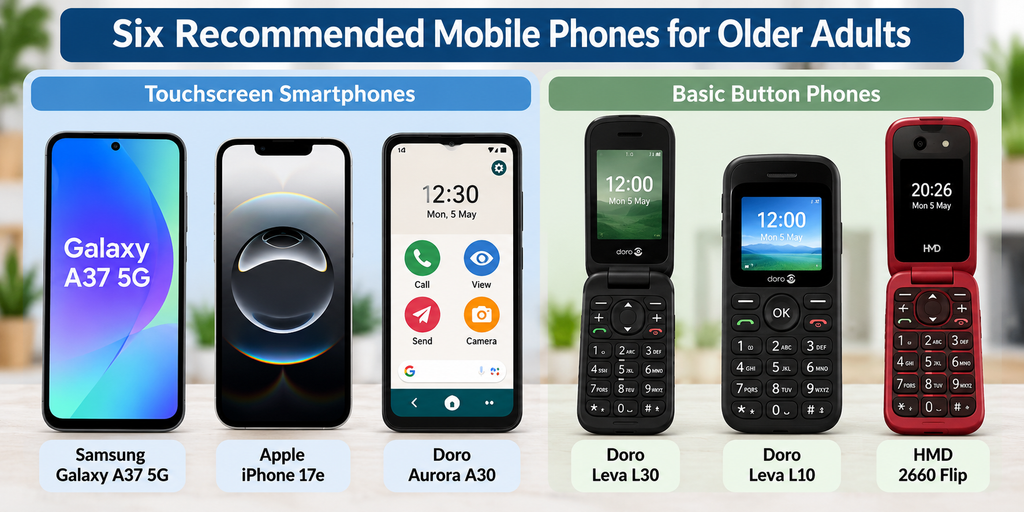
In this guide, we’ve selected six mobile phones worth considering in the UK in 2026: three touchscreen smartphones and three traditional button phones.
We’ll explain what each phone does well, its limitations and who it’s best suited to, using plain English rather than complicated technical specifications.
Quick Answer: What Is the Best Mobile Phone for Older Adults?
For most beginners who want a smartphone, our top choice is the Samsung Galaxy A37 5G. It offers a large screen, useful accessibility settings and long-term software support without the price of a premium flagship phone.
However, not everyone needs a smartphone.
If you mainly want to make calls and send text messages, the Doro Leva L30 is a strong alternative, with physical buttons, a flip design and an assistance feature.
Our six recommendations are:
- Best overall smartphone: Samsung Galaxy A37 5G.
- Best iPhone: Apple iPhone 17e.
- Best specialist easy-use smartphone: Doro Aurora A30.
- Best overall button phone: Doro Leva L30.
- Best traditional keypad phone: Doro Leva L10.
- Best alternative flip phone: HMD 2660 Flip.
Start here: Decide whether you need WhatsApp, video calls, internet browsing and downloadable apps. If you do, choose a touchscreen smartphone. If you only want calls and texts, a basic button phone may be easier and considerably cheaper.
Best Mobile Phones for Older Adults UK: Comparison Table
| Mobile phone | Type | Approximate UK price | Best for |
|---|---|---|---|
| Samsung Galaxy A37 5G | Touchscreen smartphone | £399 launch RRP | Best all-round choice |
| Apple iPhone 17e | Touchscreen smartphone | From £699 | People who prefer Apple |
| Doro Aurora A30 | Simplified touchscreen smartphone | £290 | Extra assistance and simple menus |
| Doro Leva L30 | 4G flip phone | £91.99 sale price / £114.99 regular price | Calls, texts and large buttons |
| Doro Leva L10 | 4G keypad phone | £84.99 | Traditional phone users |
| HMD 2660 Flip | 4G flip phone | Check current retailer price | Straightforward flip-phone alternative |
Prices are manufacturer prices or indicative UK prices checked in October 2026. Offers, availability and retailer prices may change.
Part One: Best Touchscreen Smartphones for Beginners and Older Adults
A touchscreen smartphone is the best option if you want to use WhatsApp, make video calls, take photographs, browse the internet or install apps.
Modern smartphones can also be made easier to use by increasing text size, simplifying the home screen and adjusting accessibility settings.
Here are our three recommended options.
1. Samsung Galaxy A37 5G — Best Overall Smartphone
The Samsung Galaxy A37 5G is our best all-round recommendation for beginners and older adults who want a modern smartphone without spending a fortune.
Its large 6.7-inch screen provides plenty of room for reading messages, viewing photographs and using everyday apps.
It also offers Samsung’s accessibility settings, which can make the phone easier to see and operate.
Why We Recommend It
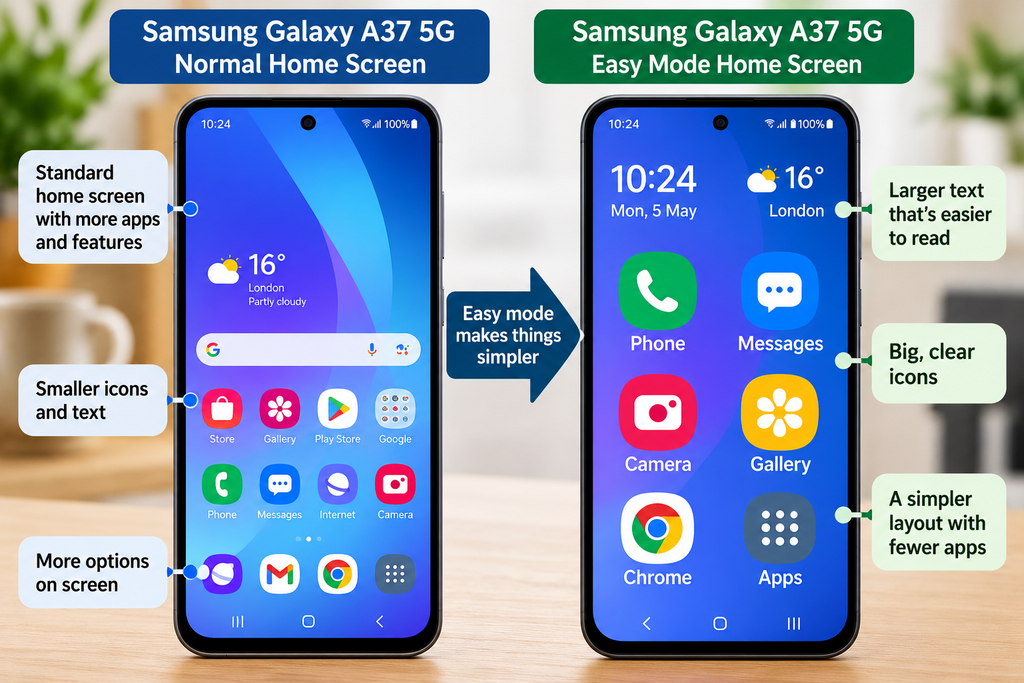
One of Samsung’s most useful features for beginners is Easy mode.
On supported Samsung phones, Easy mode provides a simpler home-screen layout with larger items and easier-to-read text.
This can make a significant difference for someone who finds an ordinary smartphone screen confusing.
You can also adjust the font size, display zoom and other settings to suit your eyesight.
The Galaxy A37 offers up to six generations of operating-system upgrades and six years of security updates from its launch, making it a sensible option for someone planning to keep their phone for several years.
What We Like
- Large, clear 6.7-inch display.
- Samsung Easy mode and accessibility settings.
- Suitable for WhatsApp, email, photographs and video calls.
- Good everyday performance.
- Long-term software support.
What Could Be Better?
The phone is relatively large, which may make it less comfortable for people who prefer smaller devices.
It also costs more than a basic budget smartphone.
If you only make occasional calls and send messages, you may not need to spend this much.
Who Should Buy It?
Choose the Samsung Galaxy A37 if you want a dependable smartphone for everyday use, with a large screen and features that can be adjusted to make it easier to use.
UK launch price: From £399.
2. Apple iPhone 17e — Best iPhone for Beginners
The Apple iPhone 17e is our recommended option for someone who prefers Apple phones or has family members who already use iPhones.
Its 6.1-inch screen is smaller than the Samsung Galaxy A37, making it a little more manageable for people who don’t want a very large phone.
Why We Recommend It
Apple includes a wide range of accessibility features on the iPhone.
You can enlarge text, adjust display settings, use voice commands and make the screen easier to navigate.
One particularly useful feature is Assistive Access.
Assistive Access provides a simplified iPhone experience with a more focused interface for supported activities.
It can be useful for someone who finds ordinary smartphone menus overwhelming, although it requires some initial setup.
The iPhone also supports FaceTime, WhatsApp and other popular communication apps.
What We Like
- Familiar Apple interface.
- Adjustable text and accessibility settings.
- Assistive Access for a simplified experience.
- Good camera and everyday performance.
- Convenient for families who already use iPhones.
What Could Be Better?
Price is the biggest disadvantage.
At £699 from Apple, the iPhone 17e is considerably more expensive than many Android smartphones.
Its smaller display may also be less appealing to someone who prefers a very large screen.
Who Should Buy It?
Choose the iPhone 17e if you’re already comfortable with Apple products or have family members who can help you learn the phone.
If you’re completely new to smartphones and have no preference for Apple, a Samsung may offer better value.
UK Apple price: From £699.
3. Doro Aurora A30 — Best Simplified Smartphone for Older Adults
The Doro Aurora A30 is designed for people who want the benefits of a smartphone but would prefer a simpler interface and additional assistance features.
Unlike a traditional button phone, it has a touchscreen and can run popular Android apps.
Why We Recommend It
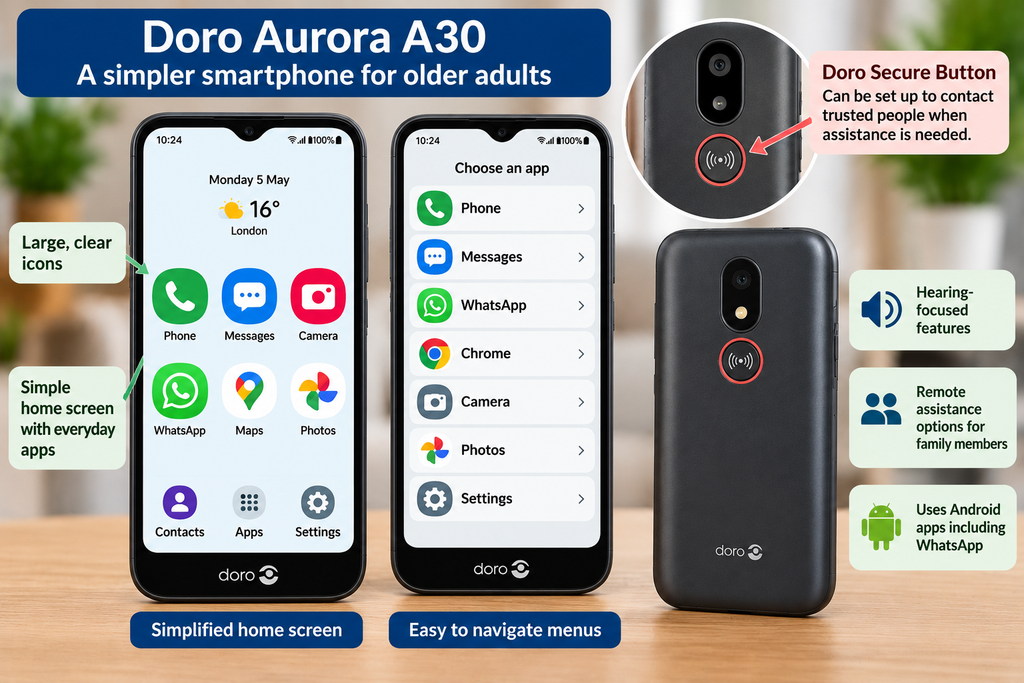
The Aurora A30 includes Doro’s simplified interface, which aims to make everyday tasks easier to understand.
It also offers hearing-focused features and a dedicated assistance button.
The Doro Secure Button can be configured to contact trusted people when assistance is needed.
Another useful feature is remote support.
With the appropriate setup and permission, a trusted family member may be able to help with certain phone problems remotely.
This can be particularly valuable when relatives live some distance away.
What We Like
- Simplified interface designed for easier operation.
- Dedicated assistance button.
- Hearing-related features.
- Supports WhatsApp and other Android apps.
- Remote assistance options.
- Designed with older users in mind.
What Could Be Better?
The Aurora A30 costs more than some standard budget Android smartphones.
Its specialist features may not be necessary for someone who is already comfortable using a normal Samsung or iPhone.
Also, its assistance button should not be treated as a replacement for a professionally monitored emergency alarm.
Who Should Buy It?
Choose the Doro Aurora A30 if you want WhatsApp, photographs and internet access but would benefit from simpler menus and additional assistance features.
Doro UK price: £290.
Part Two: Best Basic Button Phones for Older Adults
Not everybody wants a touchscreen smartphone.
For someone who mainly makes calls and sends occasional text messages, a traditional mobile phone with physical buttons may be more comfortable.
These phones generally have simpler menus and fewer distractions.
However, most basic button phones cannot run modern smartphone apps such as WhatsApp or support ordinary app-based video calling.
That is an important distinction when choosing between a smartphone and a basic phone.
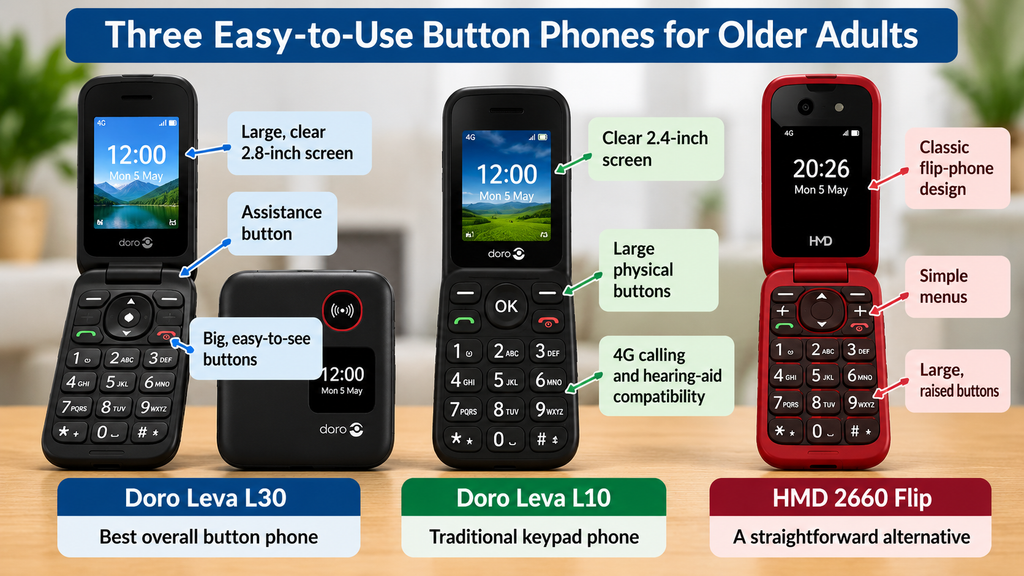
4. Doro Leva L30 — Best Overall Button Phone
The Doro Leva L30 is our recommended basic mobile phone for people who want large physical buttons and straightforward calling.
It uses a traditional flip design, meaning the phone folds closed when not in use.
Why We Recommend It
The Leva L30 includes a 2.8-inch main display and a keypad with clearly labelled physical buttons.
It also supports 4G calling and includes hearing-aid compatibility.
A dedicated assistance feature can be configured to help contact trusted people.
For someone who finds touchscreen controls difficult, pressing a proper physical button can feel more predictable.
What We Like
- Large, clearly labelled buttons.
- Practical flip-phone design.
- 4G connectivity.
- Hearing-aid compatibility.
- Assistance feature.
- Designed primarily for calls and texts.
What Could Be Better?
The screen is much smaller than a smartphone screen.
Typing longer text messages on a numeric keypad can also take more time.
It doesn’t provide the same range of downloadable apps as an Android phone or iPhone.
Who Should Buy It?
Choose the Doro Leva L30 if you mainly want calls and texts, prefer physical buttons and would find a folding phone convenient.
Doro UK price: £114.99 regular price, with a £91.99 offer listed at the time of review.
5. Doro Leva L10 — Best Traditional Keypad Phone
The Doro Leva L10 is a straightforward mobile phone with a conventional shape.
Unlike a flip phone, it doesn’t fold open and closed.
This may suit someone who prefers the familiar design of older mobile phones.
Why We Recommend It
The Leva L10 has a 2.4-inch screen and physical buttons.
It is intended for straightforward communication rather than running lots of apps.
It also includes hearing-aid compatibility and 4G connectivity.
The simple design makes it a practical choice for someone who wants to avoid learning a complicated touchscreen interface.
What We Like
- Traditional straight-bodied design.
- Physical keypad.
- Compact and lightweight.
- 4G calling.
- Hearing-aid compatibility.
- More affordable than the larger smartphones.
What Could Be Better?
The screen is relatively small.
It is not suitable if you want a full smartphone experience, including WhatsApp, video calls or mobile banking apps.
Who Should Buy It?
Choose the Doro Leva L10 if you want a familiar, traditional mobile phone mainly for making calls and sending texts.
Doro UK price: £84.99.
6. HMD 2660 Flip — Best Alternative Flip Phone
The HMD 2660 Flip is worth considering if you prefer a traditional folding mobile phone but don’t necessarily want a Doro.
It offers a classic flip-phone design with physical buttons and a simpler approach to everyday communication.
Why We Recommend It
The main attraction is its straightforward design.
You open the phone to use the keypad and close it when you’ve finished.
For someone who wants to make calls without navigating a touchscreen, this can be appealing.
It also offers 4G connectivity, making it more suitable for modern UK mobile networks than older 3G-only handsets.
What We Like
- Traditional flip-phone design.
- Physical buttons.
- Straightforward calls and text messages.
- 4G connectivity.
- An alternative to Doro’s specialist phones.
What Could Be Better?
The HMD is not specifically designed around the same specialist assistance features as Doro’s phones.
It also lacks the broad app support of a touchscreen smartphone.
Before buying, check the current UK model’s accessibility features, warranty and compatibility with your mobile network.
Who Should Buy It?
Choose the HMD 2660 Flip if you want a straightforward flip phone for calls and texts and don’t require Doro’s specialist assistance features.
UK price: Check current retailer pricing before purchase.
Smartphone or Button Phone: Which Is Better for Older Adults?
The most important decision isn’t which brand to buy.
It’s whether you actually need a smartphone.
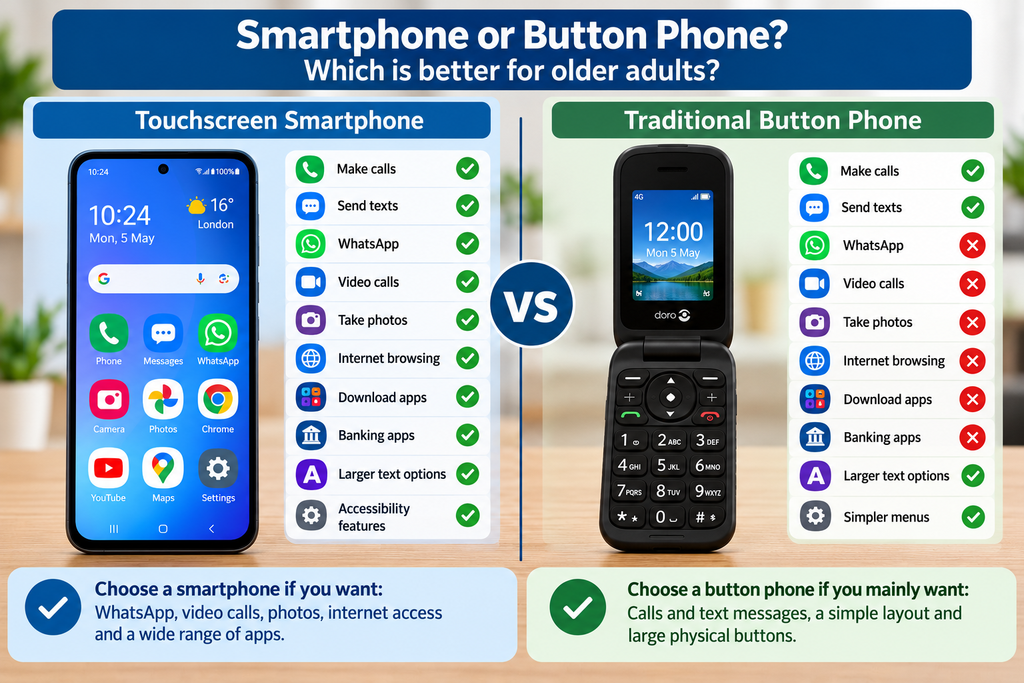
| Feature | Touchscreen smartphone | Basic button phone |
|---|---|---|
| Making calls | Yes | Yes |
| Sending text messages | Yes | Yes |
| Yes | Usually no | |
| Video calls | Yes | Generally no |
| Taking photographs | Yes | Often basic camera only |
| Internet browsing | Yes | Limited or unavailable |
| Physical number buttons | Usually no | Yes |
| Banking apps | Yes | Generally no |
| Larger screens | Usually | Much smaller |
| Assistance features | Available on some models | Available on some models |
Our advice: If you want WhatsApp, video calls or everyday internet access, choose a smartphone.
If you only want calls and text messages, a basic button phone may be easier, cheaper and more appropriate.
What Makes a Mobile Phone Easy to Use?
Different people find different features helpful.
A phone that suits one person may be frustrating for another.
Here are the main things worth considering.
1. Clear, Readable Text
If you struggle to read small writing, look for adjustable text sizes and a clear display.
Most modern smartphones let you enlarge text without changing the phone itself.
2. Comfortable Buttons or Touchscreen Controls
Some people prefer a touchscreen because it provides large, clearly labelled icons.
Others find physical buttons easier because they can feel each key when pressing it.
Neither approach is automatically better.
If possible, try both types in a shop before buying.
3. Clear Call Audio
If you have difficulty hearing conversations, check the phone’s call volume, speakerphone and hearing-aid compatibility.
A loud ringtone does not necessarily mean the earpiece will be equally clear.
4. Battery Life
A phone that comfortably lasts through the day is easier to manage.
Traditional button phones often last longer between charges because they have smaller screens and fewer demanding features.
However, actual battery life depends on use, signal strength and battery condition.
5. Assistance and Emergency Features
Some phones include dedicated buttons that can contact trusted people.
These features can be useful, but check exactly how they work.
Some require initial setup, an active mobile connection or nominated contacts.
A phone’s assistance button should not be assumed to provide direct emergency-service monitoring.
6. Familiarity
Someone who has used Samsung phones for years may find another Samsung easier than an iPhone.
Someone who has always used a traditional keypad may prefer a basic phone.
The easiest phone is often the one that feels familiar.
Is an iPhone or Samsung Easier for Older Adults?
Both can be good choices.
Samsung offers useful features such as Easy mode on supported models, along with adjustable text and display settings.
Apple provides accessibility features including Assistive Access, larger text and voice controls.
For most people, the best choice depends on familiarity, budget and whether friends or family can help with the phone.
If you’ve always used an iPhone, there’s usually no reason to change to Samsung simply because someone says Android is easier.
Equally, there’s no need to spend £699 on an iPhone if a less expensive Samsung meets your needs.
How Much Should You Spend on a Mobile Phone?
You don’t need to spend hundreds of pounds unless you want smartphone features.
Here’s a practical guide.
| Budget | What to consider |
|---|---|
| £50–£100 | Basic keypad phones |
| £100–£150 | Better-equipped basic and flip phones |
| £150–£250 | Affordable touchscreen smartphones |
| £250–£400 | Mid-range smartphones and specialist easy-use models |
| £500–£750 | iPhones and more premium smartphones |
| £750+ | Usually unnecessary for basic everyday needs |
For someone who only wants calls and texts, a basic phone costing around £80–£120 may be perfectly adequate.
For someone who wants WhatsApp, photographs, internet access and everyday apps, a smartphone costing around £200–£400 is often a sensible choice.
Important: Check UK Mobile Network Compatibility
Before buying a basic mobile phone, make sure it works with your chosen UK network.
This is particularly important if you’re replacing a very old handset.
UK mobile networks have been retiring older 3G services, so a modern 4G phone with compatible voice calling is generally a safer choice.
Check that the exact phone supports 4G voice calls, often called VoLTE or 4G Calling, on the network you intend to use.
Don’t assume that every phone labelled 4G will automatically work for voice calls on every UK network.
If you’re unsure, ask the retailer or mobile provider to confirm compatibility before buying.
Should You Buy a Mobile Phone Outright or on Contract?
Buying a phone outright means paying for the handset in full and then choosing a separate mobile plan.
For many beginners, this is the simplest way to understand the costs.
A basic button phone may work well with an inexpensive pay-as-you-go or SIM-only plan.
For smartphones, compare the total cost of buying outright with the total cost of a 24-month or 36-month contract.
Always check:
- The full cost of the phone.
- Monthly payments.
- Any annual price increases.
- The amount of mobile data included.
- Whether the phone is unlocked.
- The contract length and cancellation conditions.
Don’t choose a contract based only on the advertised monthly price.
Five Things to Do When Setting Up a New Mobile Phone
1. Save Important Contacts
Add family members, friends and any important contact numbers.
Make sure the user knows how to find and call them.
2. Practise Making and Answering Calls
Try calling the phone from another number.
Practise answering, ending calls and adjusting the volume.
3. Set Up Assistance Features
If the phone has an assistance button, configure it properly and test it with the nominated contacts.
Explain exactly what happens when the button is pressed.
4. Adjust the Display
On smartphones, increase the text size or simplify the home screen if needed.
For help with Samsung controls, see our Samsung Navigation Buttons Explained guide.
5. Keep the Phone Charged
Show the user how to connect the charger and check the battery level.
For someone who rarely uses their phone, establishing a regular charging routine can be particularly helpful.
Frequently Asked Questions
What Is the Best Mobile Phone for a 70-Year-Old?
There isn’t one phone that suits everyone of a particular age.
For someone who wants WhatsApp, photographs and internet access, the Samsung Galaxy A37 is a good all-round choice.
For someone who mainly wants calls and texts, the Doro Leva L30 may be more appropriate.
What Is the Easiest Mobile Phone for an Elderly Person?
A traditional Doro button phone may be easiest for someone who only wants basic calling and texting.
However, someone who already uses WhatsApp or video calls may find a simplified touchscreen smartphone more useful.
Can You Get a Mobile Phone With Big Buttons?
Yes. Models such as the Doro Leva L30 and Leva L10 have physical keypads designed to be easier to see and operate than small touchscreen controls.
What Is the Best Mobile Phone for Someone Who Struggles With Technology?
If they only want calls and texts, consider a basic button phone.
If they need WhatsApp and other apps, consider the Doro Aurora A30 or a Samsung smartphone with Easy mode enabled.
Can You Use WhatsApp on a Doro Phone?
It depends on the model.
The touchscreen Doro Aurora A30 supports Android apps, including WhatsApp.
Traditional Doro button phones such as the Leva L10 and L30 are not equivalent to Android smartphones and should not be purchased on the assumption that WhatsApp will work.
Are Flip Phones Still Available in the UK?
Yes. Modern flip phones such as the Doro Leva L30 and HMD 2660 Flip provide traditional physical buttons with modern mobile-network connectivity.
Do Basic Mobile Phones Still Work After the 3G Switch-Off?
Many modern 4G button phones can continue working, provided they support compatible 4G voice calling on the chosen network.
Very old 3G-only phones may no longer work as expected.
Always check the exact model and network before buying.
Is a Button Phone Safer Than a Smartphone?
A basic phone has fewer internet-connected features and may be simpler to operate.
However, no phone is automatically scam-proof.
Fraudulent calls and text messages can reach both smartphones and basic phones.
Never share banking details, passwords or security codes with unexpected callers.
Do Older Adults Need a 5G Phone?
No. A compatible 4G phone is sufficient for ordinary calls, text messages and many everyday activities.
5G can provide faster internet access, but it isn’t essential for most beginners.
Our Final Verdict: Which Mobile Phone Should You Buy?
Best overall smartphone: Samsung Galaxy A37 5G
Choose this if you want a modern, dependable smartphone with a large display, accessibility settings and long-term software support.
Best iPhone: Apple iPhone 17e
Choose this if you’re already comfortable with Apple products or have family members who can help you use an iPhone.
Best simplified smartphone: Doro Aurora A30
Choose this if you want smartphone apps but would benefit from simpler menus, hearing-focused features and assistance options.
Best button phone: Doro Leva L30
Choose this if you mainly want calls and texts, prefer proper physical buttons and like the convenience of a flip design.
Best traditional keypad phone: Doro Leva L10
Choose this if you prefer a familiar straight-bodied phone without a touchscreen.
Best alternative flip phone: HMD 2660 Flip
Choose this if you want a straightforward flip phone and don’t require Doro’s specialist assistance features.
The most important advice is simple: buy the phone that suits the person using it, not the most expensive phone in the shop.
For many people, an affordable basic phone is all they need. Others will benefit enormously from WhatsApp, photographs, video calls and the flexibility of a smartphone.
Both are perfectly sensible choices.
More Helpful Guides From Simple Tech Guide
- Why Have My Phone or Computer Layout Suddenly Changed? — Understand unexpected changes to your screen.
- Why Are My Phone Icons So Big? — Learn how to make oversized icons smaller.
- Samsung Navigation Buttons Explained — Learn the basics of navigating a Samsung phone.
- Best Laptops for Beginners & Older Adults UK (2026) — Our beginner-friendly laptop buying guide.
Last reviewed: October 2026. Prices, specifications and availability may change. Product recommendations are based on published specifications and manufacturer information rather than hands-on testing by Simple Tech Guide.
Need Help With Something Else?
Search our free, easy-to-follow technology guides. Just describe your problem.
Found this useful? Save Simple Tech Guide in your bookmarks for next time.
Pingback: Why Are My Phone Icons So Big? Easy Fixes
Pingback: Why Is My Phone Not Ringing? Easy Fixes for iPhone and Android
Pingback: Phone Layout Changed? How to Get It Back to Normal
Pingback: How to Make Your Phone Ring Louder | iPhone & Android