
Spotify is a service that lets you listen to music, podcasts and other audio content using your phone, tablet, computer, smart TV, speaker and many other devices.
You don’t have to buy individual songs or albums. Instead, you open Spotify, search for something you want to hear and play it over the internet.
There is a free version of Spotify, or you can pay for Spotify Premium, which adds benefits such as ad-free music listening and downloading music for offline listening.
Quick answer: Spotify is an app and online service for listening to music, podcasts and more. You can use it for free with some limitations, or pay for Spotify Premium for additional features.
What Is Spotify?
Spotify is a digital streaming service.
The easiest way to think about it is:
Instead of owning a collection of CDs or downloading individual songs, Spotify gives you access to a huge online library that you can listen to whenever you want.
You can search for:
- singers and bands
- individual songs
- albums
- playlists
- podcasts
- audiobooks and other supported content
Spotify can also recommend things it thinks you’ll enjoy based on what you’ve listened to previously.

How Does Spotify Work?
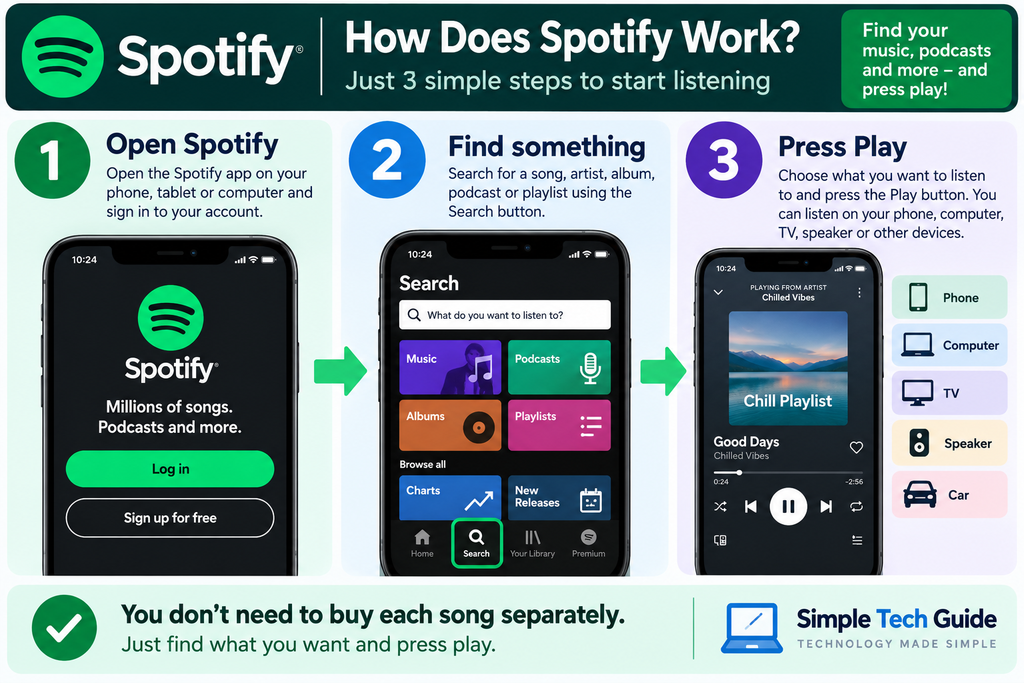
Spotify normally streams music over the internet.
Streaming simply means the music is sent to your device while you’re listening rather than you having to buy and permanently download each song first.
You choose something to listen to, press Play, and Spotify plays it through your device.
Spotify normally needs Wi-Fi or mobile data when streaming. If you use Spotify on a phone without Wi-Fi, it can use your mobile-data allowance.
With eligible Premium features, music can also be downloaded in the Spotify app so you can listen when you don’t have an internet connection.
Is Spotify Free?
Yes.
Spotify offers a free service, so you don’t have to pay simply to start using it.
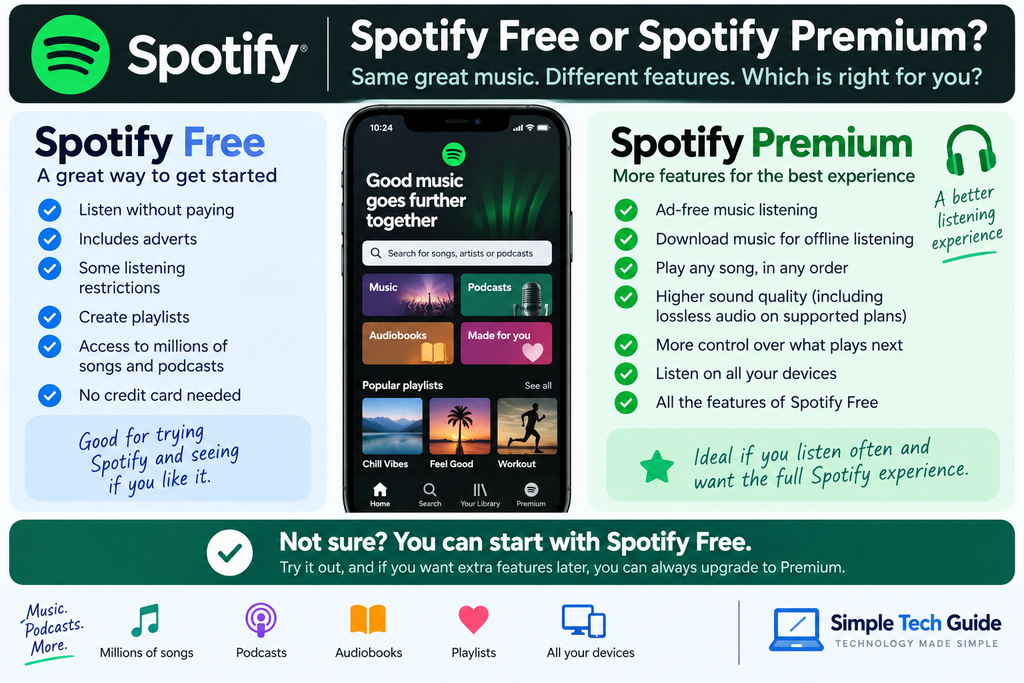
Spotify says its free service lets you play music and podcasts, create playlists, receive recommendations and use features such as Data Saver. No credit card is required to sign up for Spotify Free.
The free version has more restrictions than Premium and includes advertising.
What Is Spotify Premium?
Spotify Premium is the paid version of Spotify.
Premium currently includes features such as:
- ad-free music listening
- downloading music for offline listening
- playing songs in any order
- greater control over what plays next
- higher-end audio features including lossless audio on supported plans/devices
For many beginners, Spotify Free is perfectly reasonable for trying Spotify first.
You can decide later whether the Premium features are worth paying for.
How Much Does Spotify Cost in the UK?
As of September 2026, Spotify lists these standard UK Premium prices:
| Spotify plan | Current UK price |
|---|---|
| Spotify Free | £0 |
| Premium Individual | £12.99/month |
| Premium Student | £5.99/month |
| Premium Duo | £17.99/month |
| Premium Family | £21.99/month |
Spotify currently describes Duo as being for two people living together and Family as supporting up to six family members residing at the same address. Eligibility and promotional offers can change.
Price note: Spotify can change its prices and introductory offers. Check Spotify’s website for the latest price before subscribing.
This note is important because I don’t want the article becoming inaccurate every time Spotify changes a promotion.
What Do I Need to Use Spotify?
You don’t need specialist equipment.
For most people, all you need is:
- A compatible device
- An internet connection
- A Spotify account
You can use Spotify on devices including:
- iPhones
- Android phones
- tablets
- Windows computers
- Macs
- smart TVs
- smart speakers
- games consoles
- some smartwatches
- compatible car systems
Spotify says its service supports more than 2,000 devices.
How Do I Get Spotify?
On a smartphone or tablet, you can download the Spotify app from your device’s official app store.
On a computer, you can use Spotify through a web browser or install the Spotify application.
When installing an app, make sure you’re downloading the official Spotify app, particularly if you’ve reached the download through a web search.
Once you’ve opened Spotify, follow the instructions to create an account or sign in.
How Do I Find Music on Spotify?
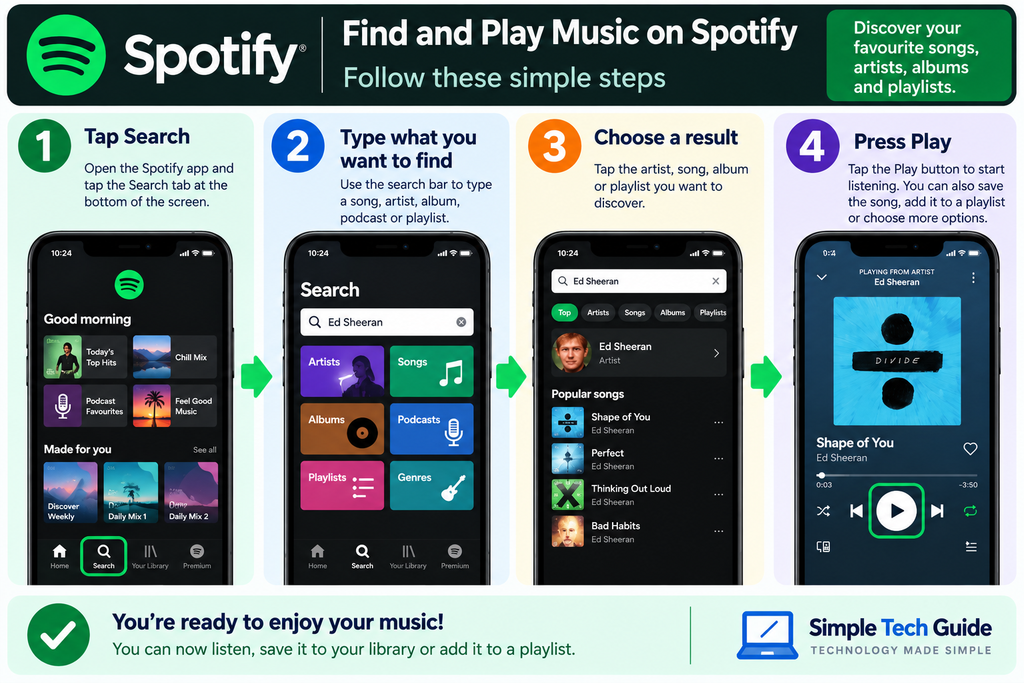
Once Spotify is open, look for Search.
You can type the name of:
- a song
- singer
- band
- album
- podcast
- playlist
For example, if you wanted to hear music by ABBA, you could search:
ABBA
Spotify should then show relevant artists, albums, songs and playlists.
Choose what you want and press the Play ▶ button.
What Is a Spotify Playlist?
A playlist is simply a collection of songs grouped together.
Think of it as making your own digital compilation album.
You could create playlists such as:
- My Favourite Songs
- Music for Driving
- Relaxing Music
- Party Music
- 1980s Favourites
- Songs for the Gym
Spotify also creates and recommends playlists for you.
On mobile, Spotify’s current basic instructions for creating a playlist are to open Your Library, choose Create, give the playlist a name and then add songs.
Does Spotify Use the Internet?
Usually, yes.
When you’re streaming music, Spotify uses an internet connection.
At home this will normally be your Wi-Fi.
If you’re away from Wi-Fi and using Spotify on your phone, Spotify can use your mobile data.
If you have limited mobile data, it’s sensible to use Wi-Fi where possible.
Spotify also has a Data Saver option designed to reduce data usage.
Can I Listen to Spotify Without the Internet?
With Spotify Premium, you can download supported music and other content for offline listening.
That can be useful when you’re:
✈️ travelling on a plane
🚆 on a journey with poor reception
🏖️ somewhere without Wi-Fi
📱 trying to reduce mobile-data use
There is an important distinction:
Downloading something in Spotify doesn’t normally give you an ordinary music file that you own and can move wherever you like.
Spotify explains that its licensing doesn’t allow its content to be exported outside the Spotify app.
Spotify also requires downloaded content to reconnect periodically; its current support guidance says downloads may be removed if you don’t go online at least once every 30 days.
Can I Listen to Spotify in My Car?
Yes, on compatible systems.
Spotify supports systems including Apple CarPlay, Android Auto and other built-in vehicle integrations.
Exactly how you connect depends on your phone and car.
Safety tip: Set up your music before driving whenever possible. Don’t use a handheld phone or become distracted trying to find songs while driving.
Can I Play Spotify on My TV or Speaker?
Yes, if your device supports Spotify.
Spotify works with many:
- smart TVs
- smart speakers
- games consoles
- streaming devices
Spotify also has Spotify Connect, which can allow you to use one device to control Spotify playing through another compatible device.
For example, you might use your phone to choose the music while it plays through a compatible speaker.
Can Spotify Recommend Music for Me?
Yes.
Recommendations are one of Spotify’s main features.
As you use Spotify, it can learn about the artists, songs and types of music you listen to and recommend other things you might enjoy.
You don’t have to use recommendations, though. You can always search directly for what you want.
Does Spotify Have Podcasts and Audiobooks?
Yes.
Spotify isn’t only for music.
It also provides podcasts and audiobooks, although the availability and conditions for audiobooks vary according to account and plan.
For example, Spotify currently includes 15 hours per month of audiobook listening from its subscriber catalogue with UK Premium Individual, while Duo and Family provide that allowance to the plan manager.
If you’re only interested in music, you can simply ignore the other sections.
Is Spotify Safe to Use?
Spotify itself is a well-established mainstream service, but the normal rules for online accounts still apply.
Use a strong, unique password, and don’t give your login details to other people.
Be particularly careful with unexpected emails or messages claiming:
- your Spotify payment has failed
- your account will be closed immediately
- you’ve won free Spotify Premium
- you need to “verify” your password
- you must click a link urgently
If you’re unsure about a message, don’t use the link in the message. Open Spotify normally or go to its official website yourself.
You can also use our Online Safety Checker if something doesn’t look right.
Is Spotify Suitable for Children?
Spotify offers family-related options and parental controls, but parents should still review the service and settings for their own family.
Spotify’s current UK Premium Family plan supports up to six family members living at the same address and includes parental controls. It also supports managed accounts for younger listeners, with controls over areas such as explicit-labelled content and certain artists or videos.
For parents, the important point is not simply whether an app is popular — it’s understanding the account, content and parental settings being used.
Spotify Free vs Premium: Which Should a Beginner Choose?
If you’ve never used Spotify before, I’d usually suggest starting with Spotify Free.
It lets you learn:
- where Search is
- how to play music
- how playlists work
- whether you actually enjoy using Spotify
You can then decide whether Premium features such as ad-free listening and offline downloads are worth paying for.
There’s no need to subscribe to Premium just to learn how Spotify works.
Common Spotify Questions
Is Spotify really free?
Yes. Spotify has a free service as well as paid Premium plans. Spotify says no credit card is required to sign up for the free service.
Do I have to download Spotify?
Not necessarily. Spotify can be used through supported web browsers as well as through its apps, although many people use the app on their phone, tablet or computer.
Do I have to pay for every song?
No. Spotify is a streaming service. You don’t purchase every individual song you listen to.
Can I choose any song on Spotify Free?
Spotify Free allows music listening, but Premium provides greater playback control, including playing songs in any order. The exact Free experience can vary by device and Spotify’s current service rules.
What does Spotify Premium give you?
Current Premium benefits include ad-free music, offline downloads, playing songs in any order and other enhanced listening features.
Can I cancel Spotify Premium?
Yes. Spotify says Premium subscriptions can be cancelled online. After cancellation, a paid subscription normally continues until the next billing date and then switches to Spotify Free. Different rules can apply to promotional trials.
Can two people use Spotify?
Spotify offers a Duo plan for two people living at the same address. Each person gets their own separate Premium account.
Does Spotify have a family plan?
Yes. The current UK Premium Family plan supports up to six family members residing at the same address.
Can I use Spotify without Wi-Fi?
Yes. Spotify can stream using mobile data. Premium also provides offline downloads for supported content.
Does Spotify use a lot of mobile data?
It depends on how long you listen and your audio/settings. Spotify recommends Wi-Fi when possible and provides Data Saver and media-quality controls to reduce data use.
Can I keep songs I download from Spotify?
Not as ordinary music files. Spotify says its content can’t be exported outside the Spotify app because of its licensing arrangements.
What’s the easiest way to start using Spotify?
Create a free account, open Search, type the name of an artist or song you know, choose a result and press Play. You don’t need to understand playlists, recommendations or Premium features before getting started.
Further Help
Use our standard Further Help box here, rather than a plain list.
Official Spotify Help
More Simple Tech Guide Help
Apps & Everyday Tools
More beginner-friendly guides to apps and everyday technology.
Online Safety Checker
Not sure whether an email, text or online message is genuine? Use our simple safety checker.