
Roblox is one of the online gaming platforms children regularly talk about. Some children love building houses, looking after virtual pets, running shops or exploring imaginary worlds.
But for parents and grandparents, Roblox can be confusing and sometimes worrying.
What exactly are children playing? Can strangers contact them? Could an innocent-looking animal game turn out to be frightening? And why can it be so difficult to get a child to stop playing?
These are sensible questions, particularly when you’re responsible for a younger child.
Roblox offers parental controls and safety features, but there are risks that families should understand before allowing children to use it.
This guide explains those risks in plain English. It also shows you how to check games, restrict communication, manage playing time and respond if something concerning happens.
You don’t need to understand computer games to follow it.
Quick Answer: Is Roblox Safe for Children?
Roblox is not automatically safe simply because a game looks suitable for children.
Roblox contains thousands of different games created by users. Some are harmless and creative, while others may contain frightening themes, unsuitable content or opportunities for interaction with other players.
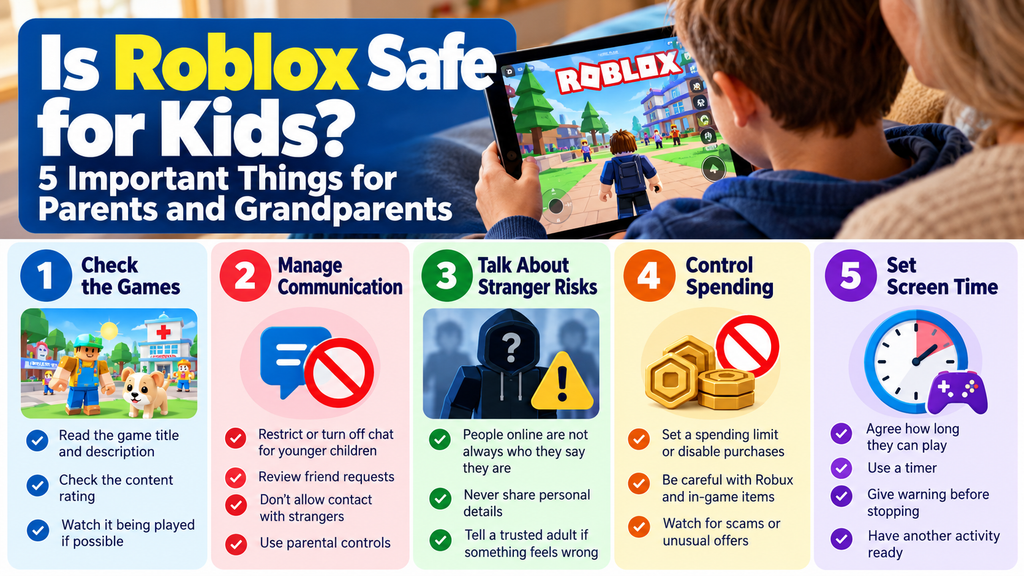
The main concerns for parents and grandparents include:
- Children encountering disturbing or age-inappropriate games.
- Unwanted contact, bullying or potentially dangerous interactions.
- Online grooming and attempts to move conversations onto other apps.
- Spending money on virtual items.
- Difficulty stopping games and arguments over screen time.
- Children accessing experiences adults haven’t checked.
Roblox has introduced additional safety measures, including age checks for chat and controls for content, communication and spending. These are useful protections, but no system can remove every risk.
Our advice: For younger children, particularly those of primary-school age, don’t allow unrestricted Roblox access. Review the games, restrict communication, supervise play and decide whether the platform is appropriate for your particular child.
It’s also perfectly reasonable to decide that your child is not ready for Roblox.
1. What Is Roblox? A Simple Explanation for Grandparents
The first thing to understand is that Roblox is not one single game.
It’s an online platform where people can create games and experiences for other people to play.
Imagine a large virtual shopping centre.
Instead of shops, there are thousands of different games. A child might move from a colourful pet-care game to a racing game, an obstacle course or something much more frightening.
These games are often called experiences on Roblox.
Some allow children to play alone. Others involve many players sharing the same virtual world.
What Does an Open-World Game Mean?
An open-world game generally allows players to explore a virtual environment rather than following one fixed route.
However, an open-world game isn’t necessarily an online game, and it doesn’t automatically allow contact with strangers.
Roblox is different because it combines a large collection of user-created experiences with online social features.
This means parents need to think about both what children see and who they may interact with.
What Are Avatars?
An avatar is the character representing someone inside the game.
It might look like a cartoon person, an animal or something completely imaginary.
The important point is that you cannot tell someone’s real age or identity from their avatar.
A friendly-looking character doesn’t prove that the person controlling it is another child.
What Is a Server?
A server is simply the online space where a group of people are playing.
A public server may contain players your child doesn’t know.
A private server limits who can join, depending on its settings.
Private servers can reduce exposure to unfamiliar players, but they don’t automatically make every experience suitable or safe.
2. Why Some Innocent-Looking Roblox Games Can Be Unsuitable
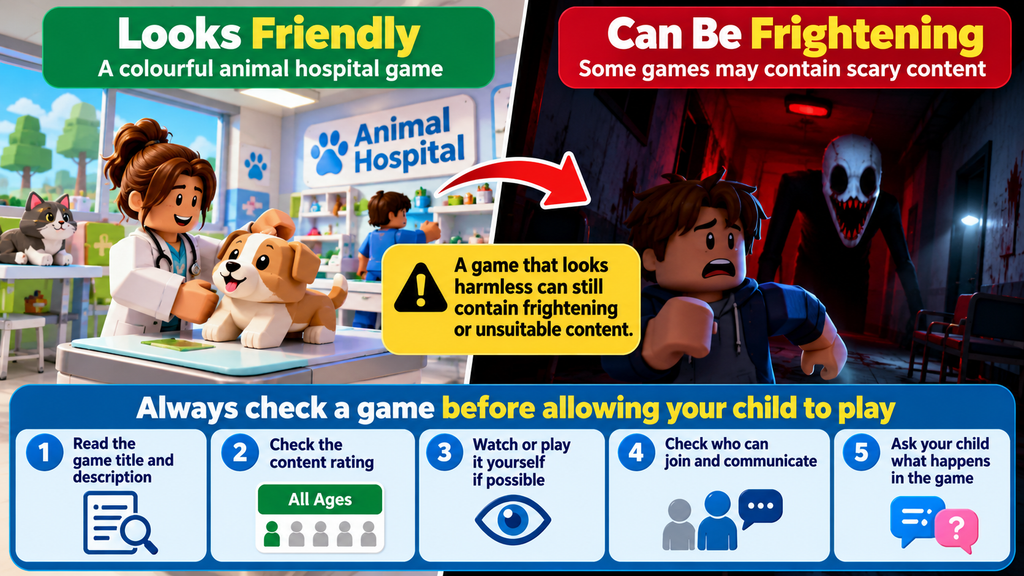
A game doesn’t have to look violent or frightening on its opening screen to deserve checking.
Children may be attracted by colourful pictures, animals, hospitals, nurseries, houses or friendly-looking characters.
However, the appearance of a game isn’t enough to establish its suitability.
Some games may contain sudden frightening scenes, disturbing characters, threatening situations or themes that younger children find upsetting.
What About Animal Hospital Games?
A parent or grandparent might hear a child talking about an animal hospital game and reasonably assume it’s a gentle game about looking after pets.
But names alone can be misleading.
There are different animal-care and hospital-themed games across gaming platforms, and their content can vary considerably.
We have not verified a particular Roblox experience called Animal Hospital as containing horror content. The important lesson is to check the exact game your child is playing rather than relying on its title.
If a child describes frightening scenes, unusual characters or jump scares, ask them to show you the game and its title.
Don’t assume that every animal-care game is dangerous, but don’t assume it’s suitable just because it features animals.
What Is a Jump Scare?
A jump scare is a sudden frightening image, sound or event intended to surprise the player.
For example, a character might unexpectedly appear on the screen accompanied by a loud noise.
Older children may enjoy this type of game. Younger children may find it genuinely upsetting.
If a child is having nightmares, becoming anxious or repeatedly talking about frightening game content, take their concerns seriously.
How to Check a Roblox Game Before Allowing It
- Ask your child to show you the exact game they want to play.
- Read its title, description and available content information.
- Check the game’s content maturity rating.
- Look at whether other players can join or communicate.
- If possible, watch the game being played before deciding.
- Ask your child what happens during the game and whether anything has frightened them.
A useful rule: If you don’t understand a game well enough to judge its suitability, it’s reasonable to delay access until you’ve checked it.
3. Can Strangers Talk to Children on Roblox?
This is one of the most important safeguarding questions.
Roblox is a social gaming platform, and some experiences include communication between players.
Communication can involve text chat, direct messages, group features or other interactions, depending on the user’s age, settings and the particular experience.
What Changed in 2026?
Roblox introduced age-check requirements for access to chat features.
Its system uses age groups and additional restrictions intended to reduce inappropriate communication between adults and children.
For younger users, certain chat features require parental permission.
This is an important improvement, but it doesn’t mean every person a child encounters is safe or that age checks are infallible.
Parents should still review communication settings and talk to children about online contact.
What Does Online Grooming Mean?
Online grooming is when someone builds a relationship with a child in order to manipulate, exploit or abuse them.
It may begin with apparently friendly conversations.
Someone might offer help in a game, give compliments, promise virtual rewards or try to become a child’s special online friend.
Not every unfamiliar player is dangerous, but children need to understand that people online may not be who they claim to be.
Warning Signs Parents Should Recognise
Be particularly concerned if someone:
- Asks a child to keep conversations secret from adults.
- Requests their real name, address, school or telephone number.
- Asks for photographs or personal information.
- Offers Robux, gifts or rewards in exchange for attention or information.
- Suggests moving conversations to WhatsApp, Discord, Snapchat or another app.
- Makes the child uncomfortable, frightened or pressured.
- Tries to arrange an in-person meeting.
A child may not recognise these behaviours as suspicious.
That’s why it’s important to explain them before a problem occurs.
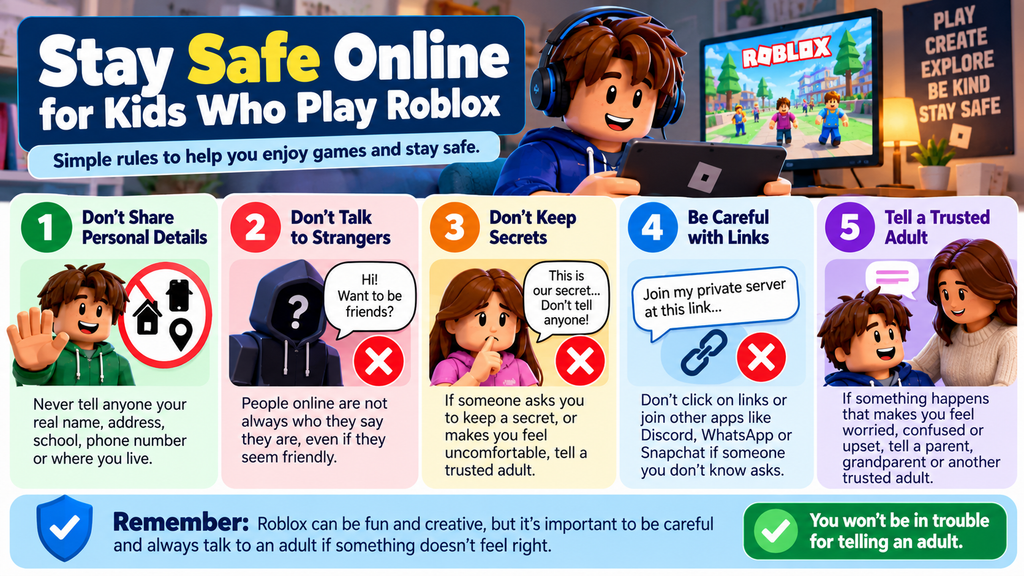
What Should You Tell a Young Child?
Keep the message simple:
“People in games are not always who they say they are. Never give them your name, address, school or phone number. If someone asks you to keep a secret or makes you uncomfortable, tell me. You won’t be in trouble.”
That final sentence matters.
Children need to know they can ask for help without immediately being blamed or punished.
4. How to Set Up Roblox Parental Controls
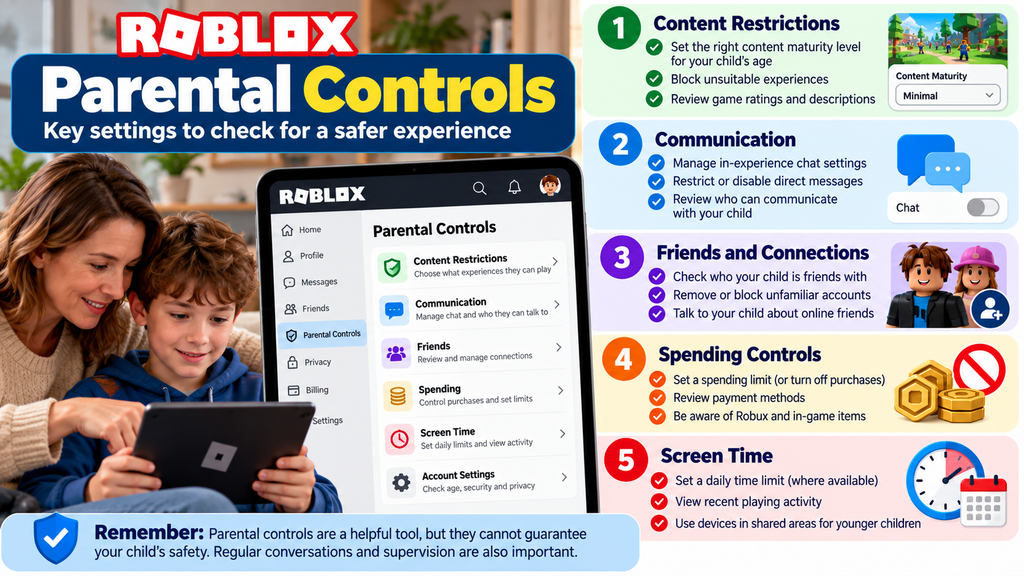
Roblox provides controls that allow parents to manage aspects of a child’s account.
These include content restrictions, communication settings, spending controls and screen-time management.
The exact options available depend on the child’s age and account type.
Step 1: Check Your Child’s Account Age
Make sure your child’s date of birth is recorded correctly.
Roblox uses age information and age checks to determine access to certain features.
A child using an account registered with an incorrect older age may not receive the protections you expect.
Step 2: Open Parental Controls
On the child’s Roblox account:
- Open Roblox.
- Go to Settings.
- Select Parental controls.
- Follow the available instructions for parent management.
Roblox supports linked parent accounts and, for eligible accounts, a Parent mode on the child’s device.
A linked parent account allows parents to manage settings from their own device.
You may be asked to verify your identity as part of setting up parental access.
Step 3: Restrict Game Content
In parental controls, look for Content restrictions and Content maturity.
Choose the most restrictive suitable level for your child.
Roblox uses content maturity categories including Minimal, Mild, Moderate and Restricted.
For a younger child, start with the lowest suitable level rather than allowing everything and trying to remove unsuitable games afterwards.
You can also block individual experiences.
Important: Content restrictions are useful, but they are not a guarantee that every permitted game will be appropriate for your child.
Step 4: Review Communication Settings
Find the Communication section.
Review the available controls for experience chat, direct chat, friends and other communication features.
For younger children, consider keeping optional chat features switched off unless there is a clear reason to enable them.
Remember that communication options and permissions vary by age.
Roblox also distinguishes between its own chat controls and certain communication features that game creators may implement.
Step 5: Review Friends and Connections
Look at who your child is connected to.
Ask whether they know these people in real life.
A username or avatar is not proof of someone’s identity.
Discuss unfamiliar connections together and remove or block accounts where appropriate.
Step 6: Set a Screen-Time Limit
Roblox provides daily screen-time controls for eligible younger accounts.
In parental controls:
- Select your child’s account.
- Find Screen time.
- Select Manage.
- Choose a daily limit where the option is available.
Roblox’s current controls also let parents review recent playing time and commonly played experiences.
For children aged 13 and over, some controls become the teenager’s responsibility, so the available parental settings change.
Step 7: Control Spending
Find Spending restrictions.
Set an appropriate spending limit where supported and review transaction notifications.
A zero spending limit may be suitable for a younger child.
Be aware that Roblox’s spending controls have limitations, including certain purchases and gift-card arrangements. Device-level purchase restrictions are also worth checking.
Step 8: Check the Settings Regularly
Don’t assume that setting up parental controls once is enough.
Review them when your child gets a new device, starts playing different games or reaches an age where account permissions change.
For current instructions, use the official Roblox Parental Controls guide.
Roblox’s own settings are only one part of protecting your child. You can also control app downloads, purchases and device usage through Apple Screen Time or Google Family Link. Our step-by-step guide to setting up parental controls on iPhone and Android explains how to do this in plain English.
5. How to See Which Roblox Games Your Child Has Been Playing
Many adults know their child plays Roblox but have no idea which experiences they actually visit.
That’s a significant gap.
A child may spend time in several completely different games during one session.
With suitable parental access, Roblox provides information about recent playing activity.
What to Do
- Open the Roblox parental controls for your child’s account.
- Find the screen-time or activity information.
- Look for the Top games section.
- Review the games your child has spent time playing.
- Check their content ratings and discuss anything unfamiliar.
Roblox currently describes a view of up to 20 of the child’s most-played games from the previous week.
This is useful, but it isn’t a complete record of everything a child has ever seen or done.
Questions Worth Asking Your Child
Rather than beginning with accusations, try:
- “What’s your favourite game at the moment?”
- “Can you show me how it works?”
- “Who do you normally play with?”
- “Has anything ever frightened you?”
- “Has anyone you don’t know tried talking to you?”
Children are more likely to share concerns when adults show an interest without immediately becoming angry.
6. Why Is It So Difficult to Get Children Off Roblox?
This is a problem many parents and grandparents recognise.
You tell a child that gaming time is over.
They ask for five more minutes.
Then another five minutes.
When you finally insist, they become upset or angry.
This doesn’t automatically mean the child is addicted to gaming.
Why Games Can Be Hard to Stop
Several features can make games especially absorbing:
Unfinished activities: A child may be halfway through building something or completing a task.
Rewards: Games may provide coins, points, new items or achievements.
Friends: A child may feel they’re letting friends down by leaving a multiplayer session.
No obvious stopping point: Some games continue indefinitely rather than reaching a natural ending.
Sudden interruption: Being told to stop without warning can be frustrating, especially for younger children.
Understanding these factors helps adults manage gaming more effectively.
But understanding the frustration doesn’t mean abandoning boundaries.
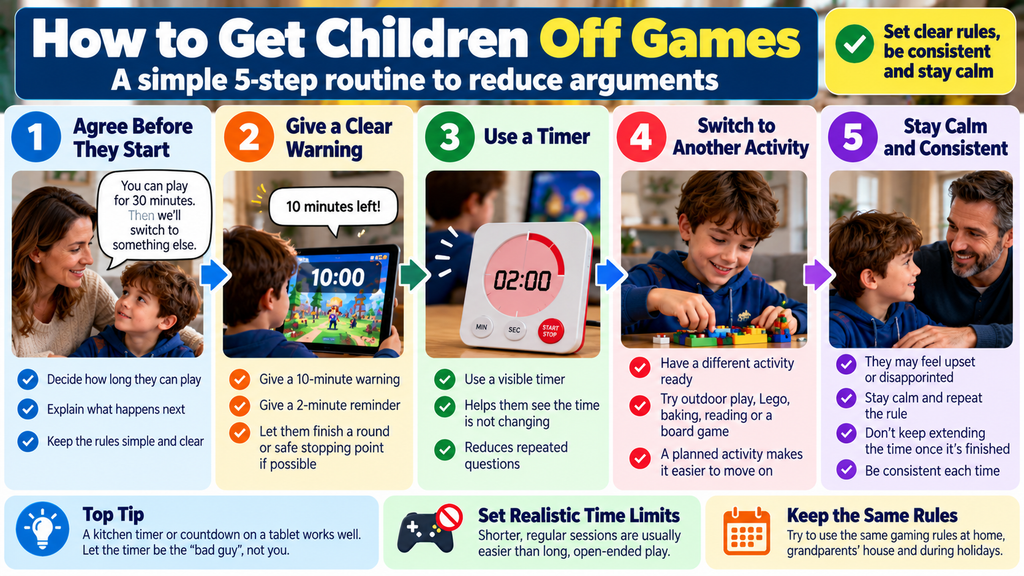
7. How to Get Children Off Games Without Constant Arguments
There isn’t one method that works for every child.
However, a predictable routine can make stopping easier.
Before Playing: Agree on the Rules
Don’t wait until a child has been playing for an hour before deciding how long they are allowed.
Explain the rules before the game starts.
For example:
“You can play for 30 minutes. I’ll remind you when there are ten minutes left, and then we’ll put the tablet away.”
The appropriate amount of time depends on the child’s age, the game, their needs and the family’s routine. Thirty minutes is only an example, not a universal recommendation.
Give Clear Warnings
Try a ten-minute warning followed by a two-minute reminder.
For example:
“Ten minutes left. Please finish what you’re doing.”
Then:
“Two minutes left. Find somewhere sensible to stop.”
For games with rounds or natural finishing points, it may be easier to agree on a number of rounds rather than an exact number of minutes.
Use a Visible Timer
A kitchen timer or simple clock can help.
The child can see how much time remains without repeatedly asking.
The timer supports the rule; it shouldn’t become a punishment.
Have Another Activity Ready
Stopping a game can be easier when the next activity is clear.
Examples include:
- Going outside or to the park.
- Football or another physical activity.
- Lego, drawing or crafts.
- Baking or helping prepare a meal.
- Reading together.
- Playing a board game.
You don’t need to provide constant entertainment, but a planned transition can help.
Stay Calm When the Child Protests
It’s normal for children to feel disappointed when something enjoyable ends.
Acknowledge the feeling without abandoning the boundary.
You might say:
“I know you’re disappointed. You were enjoying that game. Gaming time is finished now, and we can play again at the next agreed time.”
Avoid arguing endlessly or repeatedly changing the rule.
What If the Child Has a Meltdown?
First, make sure everyone is safe.
Speak calmly, reduce unnecessary demands and allow time for the child to settle.
Don’t try to deliver a long lecture while they’re overwhelmed.
Once calm has returned, discuss what happened and how to make stopping easier next time.
If severe distress happens repeatedly, consider whether the game, the amount of time, the transition or other needs are contributing.
Persistent difficulties affecting everyday life may warrant advice from a health professional.
If you’re unsure how much gaming time is appropriate, our guide to children’s screen time and finding a healthy balance explains what to consider, including sleep, exercise, family time and your child’s individual needs.
8. Special Advice for Grandparents Looking After Children
Grandparents can find online gaming particularly difficult to manage.
You may be looking after grandchildren for a few hours, over a weekend or during school holidays.
You may not understand the games they play, and you might not have access to the parental controls on their devices.
You can still establish sensible rules in your own home.
Agree on Rules With the Parents
Before a visit, ask the child’s parents:
- Which games are allowed?
- How long can the child play?
- Is online chat permitted?
- Are purchases disabled?
- What should happen if the child refuses to stop?
Try to agree on consistent expectations.
You Don’t Have to Allow Roblox in Your Home
If you’re uncomfortable supervising Roblox, it’s reasonable to say that it won’t be used during visits.
You don’t have to become an expert in online gaming to make that decision.
For example:
“We don’t play Roblox at Grandma and Grandad’s house. We can play other games or do something together instead.”
Make this clear at the beginning of the visit rather than surprising the child halfway through a session.
Avoid Secretly Changing Account Settings
If the child’s parents manage their device, ask them to adjust the controls.
Don’t change passwords, account settings or permissions without agreement.
Instead, establish household rules about when and where devices may be used.
Keep Devices in Shared Areas
For younger children, gaming in a shared family room makes it easier to supervise.
This is not a substitute for parental controls, but it allows adults to notice if a child becomes frightened, upset or unusually secretive.
Ask the Child to Teach You
A simple question such as “Can you show me what you’re playing?” can be very revealing.
You may learn more from five minutes of watching the game together than from trying to understand unfamiliar gaming terminology.
What If Parents and Grandparents Disagree?
Discuss the concern privately with the parents rather than arguing in front of the child.
Explain specific worries, such as unapproved games, strangers or frightening content.
Agree on a practical approach for future visits.
If you have a credible safeguarding concern, however, don’t ignore it simply because another adult is less worried.
9. What to Do if a Child Encounters Something Frightening
Children may encounter content that upsets them, even when adults have tried to choose suitable games.
If this happens:
- Stop or pause the game.
- Reassure the child that they can tell you what happened.
- Ask what they saw, without forcing them to repeat upsetting details.
- Identify the game and report inappropriate content where necessary.
- Block the experience if appropriate.
- Review content restrictions and future access.
Avoid telling a frightened child that they’re being silly.
Something that seems harmless to an adult can be genuinely frightening to a younger child.
If distress persists, affects sleep or interferes with everyday life, seek appropriate professional advice.
10. What to Do if Someone Suspicious Contacts Your Child
If your child tells you that someone online has behaved inappropriately, respond calmly.
The most important thing is that your child feels safe telling you.
Immediate Steps
- Listen without blaming the child.
- Ask enough to understand what happened, without repeatedly questioning them.
- Stop further contact with the person.
- Preserve relevant usernames, messages, dates and other evidence where safe and appropriate.
- Report the account or content through Roblox.
- Contact the appropriate safeguarding service if grooming, exploitation or abuse is suspected.
Do not confront the suspected person yourself.
Do not forward or redistribute sexual images involving children. If such material is involved, seek advice from the police or a specialist reporting service about preserving evidence safely.
Where UK Parents Can Get Help
Immediate danger: Call 999.
Suspected online grooming or child sexual exploitation: Report to CEOP Safety Centre.
Child protection advice: Contact the NSPCC on 0808 800 5000.
Support for children and young people: Childline on 0800 1111.
For other concerning content or bullying, use the platform’s reporting system and seek additional advice if necessary.
11. Are Other Online Games Safer Than Roblox?
The answer depends on the particular game and its features.
For example, Minecraft can be played in different ways.
A child playing alone in an offline world faces different online-contact risks from a child joining a public multiplayer server.
Similarly, an offline animal-care game may avoid contact with strangers altogether, although its content and in-app purchases still need checking.
When assessing any game, ask four questions:
- What will my child see? Check the content and age rating.
- Who can they interact with? Look for chat, multiplayer and messaging features.
- Can they spend money? Review purchases and payment settings.
- Can we manage the time? Look for natural stopping points and device controls.
For younger children, carefully selected offline games may be easier to supervise than unrestricted social gaming platforms.
But even offline games should be checked for age suitability.
If you’re concerned about Roblox but still want your child or grandchild to enjoy gaming, there are plenty of alternatives worth exploring. Some focus on creativity, building and imaginative play without requiring children to join public multiplayer worlds. Read our guide to the safest games for kids aged 5–10, including five alternatives to Roblox to find age-appropriate options and practical safety advice.
12. A Simple Family Gaming Agreement
A short agreement can prevent confusion and arguments.
It doesn’t need to be complicated.
Our Family Gaming Rules
Child’s name: ______________________
Games we have agreed are suitable:
Where gaming is allowed:
When gaming is allowed:
Agreed playing time:
When the timer finishes, I will:
If someone online makes me uncomfortable, I will tell:
Our rules:
- I will only play games approved by my parent or carer.
- I will not share personal information with people online.
- I will tell a trusted adult if something frightens or worries me.
- I will not buy game items without permission.
- I will follow our agreed stopping routine.
- Adults will listen calmly if I report a problem.
Adult’s signature: ______________________
Child’s signature: ______________________
Date: ______________________
This agreement is a starting point. Adapt it to the child’s age, understanding and individual needs.
13. Parent and Grandparent Roblox Safety Checklist
Before allowing a younger child to play, check the following:
- I know the child’s Roblox account has the correct age.
- I understand which experiences they are playing.
- I’ve checked the content maturity restrictions.
- I’ve reviewed chat and communication settings.
- I’ve checked friends and unfamiliar connections.
- I’ve reviewed spending and purchase controls.
- I’ve agreed on a realistic gaming-time limit.
- I know how to block or report a game or user.
- My child knows never to share personal details or keep online secrets.
- My child knows they can tell me about problems without being blamed.
- We have agreed on a routine for stopping games.
Remember: Parental controls are one part of keeping children safer. Supervision, regular conversations and clear boundaries matter just as much.
Frequently Asked Questions
Is Roblox Suitable for a Six-Year-Old?
Roblox has age-based restrictions and parental controls, but that doesn’t mean every experience is suitable for a six-year-old.
For a child of this age, unrestricted access is not advisable.
A parent may decide to allow only carefully checked experiences with appropriate restrictions and close supervision, or to avoid Roblox entirely.
Both approaches can be reasonable depending on the child and family circumstances.
Can Predators Contact Children on Roblox?
Online gaming can create opportunities for unwanted contact and grooming.
Roblox introduced additional age-check and communication restrictions in 2026 to reduce these risks.
However, parents should still review communication settings, supervise younger children and explain how to recognise inappropriate requests.
Can Roblox Games Contain Horror Content?
Yes. Some experiences include frightening themes, threatening characters or jump scares.
Check the individual game’s content information rather than assuming it is suitable because its pictures look colourful.
Is an Animal Hospital Game on Roblox Dangerous?
Not necessarily.
Different games can have similar names, and we have not established that a particular Animal Hospital experience contains harmful material.
Ask the child to show you the exact game, check its content information and investigate any frightening scenes they describe.
Can I Stop My Child Talking to Strangers on Roblox?
Roblox provides communication controls, and age checks are required for chat access.
Parents can restrict supported chat features according to the child’s age and account permissions.
Review all available communication settings rather than relying on a single switch.
How Do I Stop My Grandchild Playing Roblox?
Agree on the rule before the visit, explain when gaming is permitted and give clear warnings before stopping.
If you cannot supervise Roblox safely, you can establish a no-Roblox rule during visits, ideally agreed with the child’s parents.
Why Does My Child Get Angry When Roblox Is Turned Off?
Games can be difficult to interrupt because of rewards, social interaction and unfinished activities.
This doesn’t automatically indicate addiction.
Consistent limits, advance warnings and predictable routines may help.
If gaming is repeatedly affecting sleep, school, relationships or wellbeing, seek further advice.
Is Minecraft Safer Than Roblox?
Minecraft can be played offline or online.
Offline play avoids many of the risks associated with contact from unfamiliar players, while public multiplayer play introduces additional considerations.
The safest choice depends on the mode, settings, content and level of supervision.
Can Parental Controls Make Roblox Completely Safe?
No.
They can restrict content, communication, spending and playing time, but no technical system can guarantee that a child will never encounter something inappropriate.
Parents still need to remain involved.
Final Advice: You Are Allowed to Say No
Children often say that everyone at school plays a particular game.
That can make parents and grandparents feel pressured to allow it.
But popularity doesn’t automatically make a platform appropriate for every child.
Roblox can offer creative and enjoyable experiences. It also presents risks that families should understand, particularly when children are young.
You don’t need to be a technology expert to protect a child.
You need to know what they’re playing, who they may be interacting with, what safeguards are available and when to establish boundaries.
For some families, carefully supervised Roblox use may be appropriate.
For others, especially with younger children, choosing simpler offline games may be the better option.
The right decision is the one that takes your child’s age, understanding, wellbeing and safety into account.
Trusted UK Resources and Further Reading
For up-to-date information and practical advice:
- Roblox — Official Parental Controls
- NSPCC — Keeping Children Safe While Gaming Online
- NSPCC — Reporting Online Safety Concerns
- CEOP Safety Centre
- Childline
Last reviewed: October 2026. Roblox’s safety features, age restrictions and account settings may change. This guide provides general online-safety information and is not a substitute for professional safeguarding advice.
Back to Simple Tech Guide Homepage.
Need Help With Something Else?
Search our free, easy-to-follow technology guides. Just describe your problem.
Found this useful? Save Simple Tech Guide in your bookmarks for next time.
Pingback: How to Set Up Parental Controls on an iPhone and Android (2026 Guide)
Pingback: What Is Parental Control and Do I Need It? (Simple Parent Guide)
Pingback: How To Set Up A Child's First Smartphone Safely (Complete Parent Guide)