

By TechAdmin / February 2026
Protecting your personal information online is important — but it does not need to feel scary or complicated.
Many people worry about doing something wrong or accidentally sharing too much. That’s completely normal.
This guide explains how to protect your personal information slowly and clearly, using plain language and simple steps.
You do not need technical knowledge to follow this guide.
What Is Personal Information?
Personal information is any detail that could be used to identify you.
This includes things like:
- Your full name
- Your home address
- Your phone number
- Your email address
- Your date of birth
- Passwords or PIN numbers
- Bank or card details
Some information is more sensitive than others, but all personal information deserves care.
Why Protecting Personal Information Matters
Protecting your information helps you:
- Avoid scams and fraud
- Keep your money safe
- Protect your identity
- Stay in control of your online activity
Most problems online happen when information is shared too quickly or without checking first.
Taking your time is the safest habit.
Be Careful What You Share Online
Before sharing information online, pause and ask:
“Do I really need to share this?”
You should be cautious when a website, message, or app asks for:
- Personal details
- Login information
- Payment information
If something feels unnecessary or unclear, it’s okay to stop.
Never Share Passwords or Codes
Your passwords and security codes are private.
You should never share:
- Passwords
- PIN numbers
- One-time codes sent to your phone or email
Real companies will not ask for these details by email, text, or phone call.
If someone asks — it’s safest to say no.
Use Strong, Simple Passwords
A good password helps protect your accounts.
Simple tips:
- Avoid using your name or date of birth
- Do not reuse the same password everywhere
- Longer passwords are safer than short ones
If remembering passwords feels difficult, it’s okay to write them down and keep them somewhere safe at home.
Be Careful With Emails and Messages
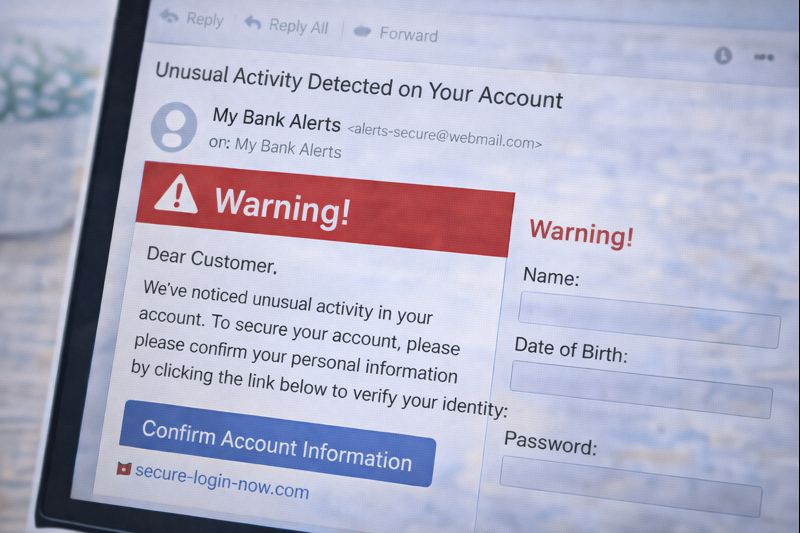
Scam messages often try to rush or worry you.
Be cautious of messages that:
- Ask for personal information
- Say there is a problem with your account
- Create urgency or fear
- Ask you to click a link quickly
If unsure:
- Do not click links
- Do not reply
- Delete the message
You can always check later through the official website.
Check Websites Before Entering Information
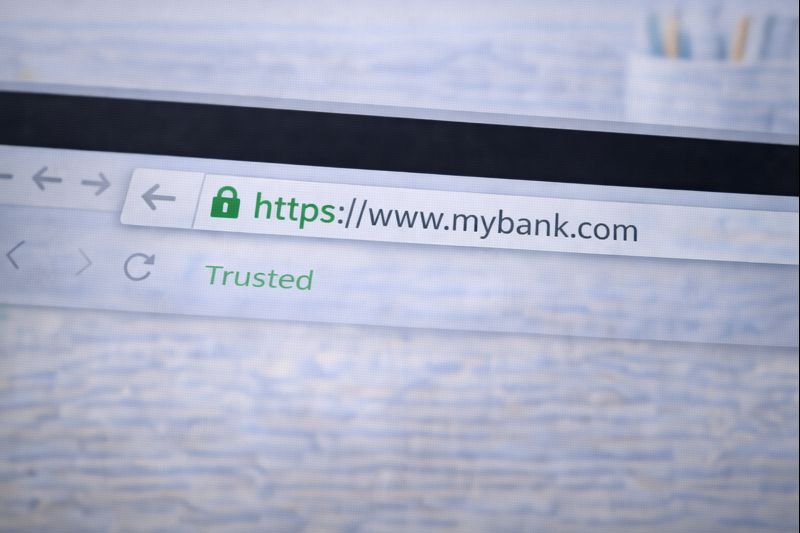
Before entering personal details on a website:
- Check the website name carefully
- Look for spelling mistakes or odd wording
- Make sure the page looks professional and familiar
If something feels wrong, trust that feeling.
Closing the page is always safe.
Use Trusted Devices and Connections
Try to:
- Use your own phone, tablet, or computer
- Avoid entering personal information on public computers
- Be cautious on public Wi-Fi when shopping or banking
Your home internet connection is usually the safest option.
What If You Make a Mistake?
Mistakes happen to everyone.
If you think you may have shared information by accident:
- Do not panic
- Change your password if possible
- Contact your bank or service provider if needed
Acting calmly and early can prevent problems.
A Simple Rule to Remember
If you remember only one thing, remember this:
If you are unsure — do not share.
You can always stop, close the page, and come back later.
Take Your Time
Protecting personal information is not about speed.
It’s about awareness and confidence.
You are allowed to:
- Go slowly
- Ask questions
- Say no
- Change your mind
That is how safe online habits are built.