
Christmas shopping online can save time, help you compare prices and make it easier to find presents without visiting busy shops.
But Christmas and Black Friday are also popular times for scammers. Fake shopping websites, delivery text messages and offers that seem too good to be true can catch people out.
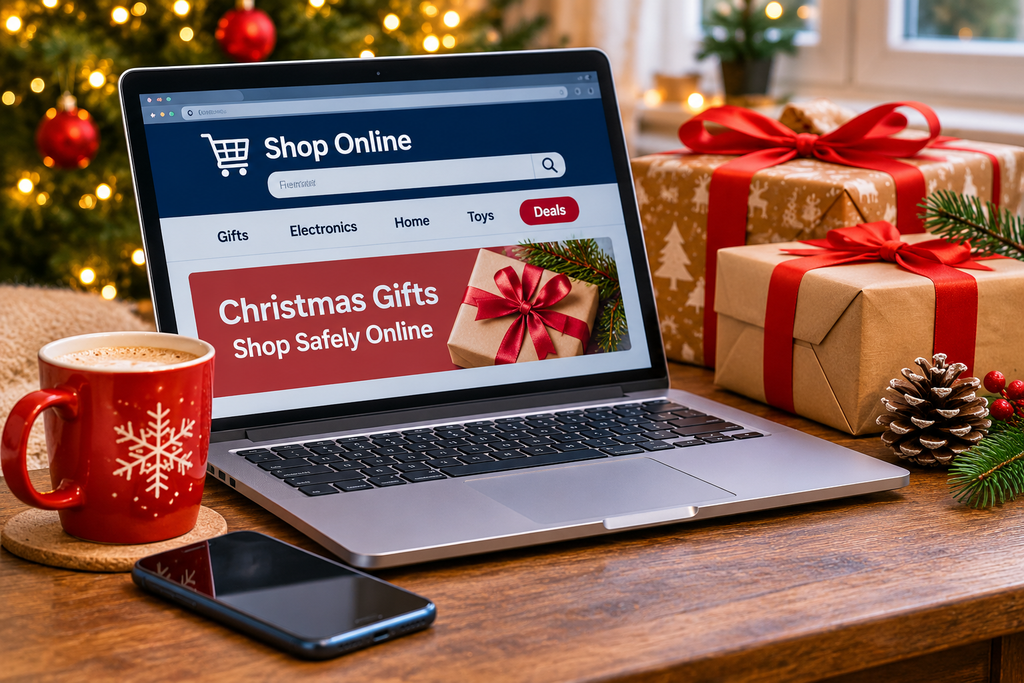
The good news is that you don’t need to be a technology expert to shop safely online. A few simple checks can make a big difference.
This guide explains how to recognise suspicious websites, choose safer payment methods, avoid fake delivery messages and know what to do if something goes wrong.
Whether you’re buying Christmas presents, looking for Black Friday bargains or shopping online for the first time, these tips will help you shop with more confidence.
1. Check That the Shopping Website Is Genuine
Before buying from an unfamiliar website, take a moment to check who is selling the product.
Scammers sometimes create convincing copies of well-known shops. They may use similar logos, professional photographs and website addresses that look almost identical to the real ones.
Before entering your payment details:
- Check the website address carefully for unusual spelling or extra words.
- Look for genuine contact information and a clear returns policy.
- Search for the retailer’s name alongside words such as “reviews” or “scam”.
- Be cautious if the website has no information about the company behind it.
- If you’re unsure, visit the retailer’s website by typing its address yourself rather than following an advert.
A professional-looking website is not proof that a business is genuine.
2. Don’t Trust a Website Just Because It Has a Padlock
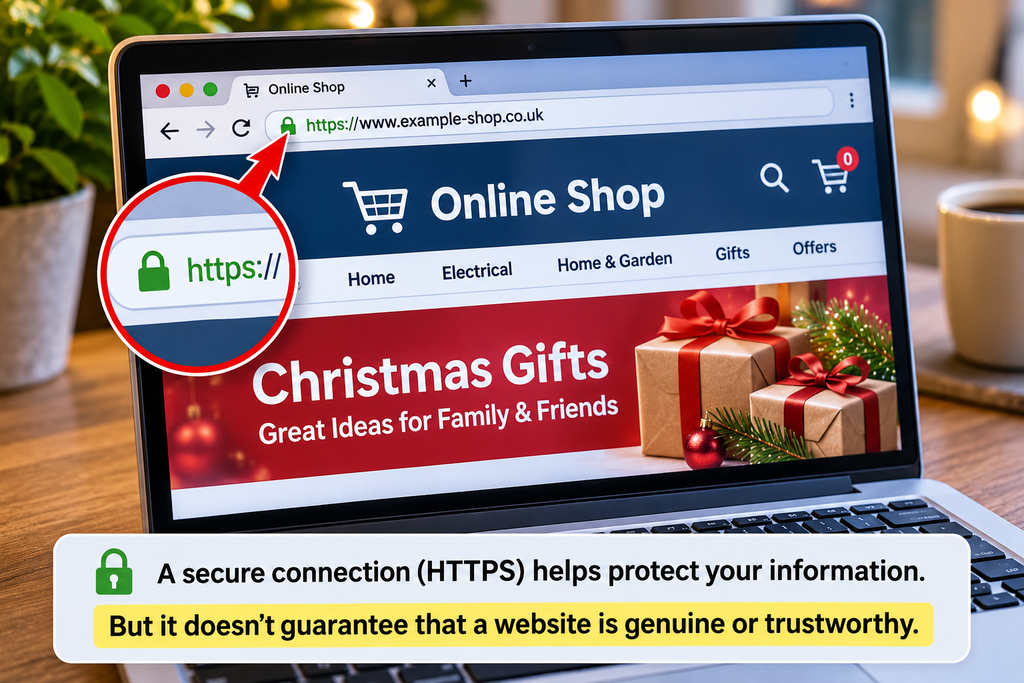
You may have noticed a padlock symbol or a website address beginning with https:// when shopping online.
HTTPS means the connection between your browser and the website is encrypted. This helps protect information travelling between them.
However, a scam website can also use HTTPS.
The padlock does not confirm that the shop is honest, that its products are genuine or that your order will arrive.
Think of HTTPS as one useful security feature, not a guarantee that a retailer can be trusted.
3. Be Careful With Black Friday and Christmas Bargains
Everyone enjoys finding a bargain, particularly when buying several Christmas presents.
Unfortunately, scammers know this.
Fake adverts may promise expensive electronics, designer clothing or popular toys at dramatically reduced prices.
Some advertise limited stock or use countdown timers to pressure shoppers into buying immediately.
Warning signs of a suspicious offer
- The price is far below what established retailers are charging.
- The advert claims the offer will disappear within minutes.
- The website has only recently appeared or has very few credible reviews.
- The seller insists on payment by bank transfer.
- The advert leads to a website with a slightly unusual address.
A useful rule: If an offer seems too good to be true, compare it with at least two established retailers before buying.
A genuine bargain should still give you time to check the seller.
4. Be Cautious With Facebook and Instagram Shopping Adverts
Social media can be a useful place to discover products, but not every shopping advert is trustworthy.
Scammers sometimes create fake pages that imitate established retailers or advertise products that never arrive.
Other adverts may show attractive photographs of products that turn out to be poor-quality imitations.
Before buying something advertised on Facebook or Instagram:
- Check the actual website you’re being sent to.
- Look for independent reviews outside the seller’s own page.
- Check whether the company provides genuine contact details.
- Avoid paying by bank transfer to an unfamiliar seller.
- Be cautious of comments that all sound unusually positive or repetitive.
Remember that a paid advert is not a recommendation or guarantee from Facebook, Instagram or Google.
If you recognise the retailer, it may be safer to visit its official website directly.
5. Choose a Safer Way to Pay
How you pay can make a significant difference if something goes wrong.
When shopping online, using a credit card or a recognised payment service may offer more protection than sending money directly to a stranger.
Credit cards
In the UK, Section 75 of the Consumer Credit Act can provide additional protection for qualifying credit card purchases where the cash price of an item is more than £100 and no more than £30,000.
This protection has conditions and does not apply to every transaction.
Debit cards
Debit card payments may be eligible for a chargeback through your bank if goods don’t arrive or something goes wrong.
Chargeback is a card-scheme process, not the same legal protection as Section 75.
PayPal
PayPal’s eligible Goods and Services transactions may qualify for Purchase Protection, subject to its terms.
Avoid using Friends and Family payments to buy goods from strangers.
Bank transfers
Be particularly cautious when an unfamiliar online seller insists on a direct bank transfer.
Bank transfers generally do not provide the same purchase protections as card payments. Some scam payments may qualify for reimbursement under UK rules, but this is not guaranteed.
For unfamiliar retailers, paying by credit card or another protected payment method is usually preferable to a direct bank transfer.
6. Watch Out for Fake Royal Mail, Evri and DPD Messages
Christmas is one of the busiest times for parcel deliveries.
Scammers take advantage by sending fake text messages or emails claiming to be from delivery companies.
A message might say:
- Your parcel could not be delivered.
- You need to pay a small redelivery fee.
- Your address is incomplete.
- Your package will be returned unless you act immediately.
The message may include a link to a convincing-looking website that asks for your bank card details.
What should you do?
If you’re expecting a parcel, open the retailer’s official website or app and check your order there.
You can also visit the delivery company’s genuine website independently and enter the tracking number supplied by the retailer.
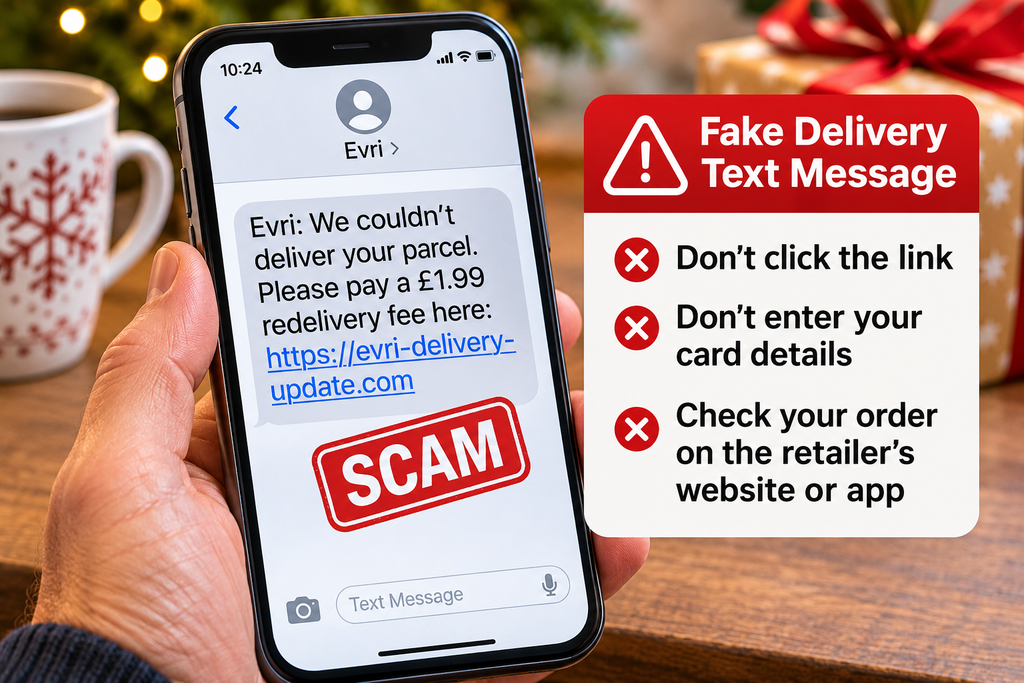
Don’t use a link in an unexpected delivery message just because you’re waiting for a parcel.
If you receive a suspicious text in the UK, you can usually forward it to 7726, the free spam-reporting service supported by mobile networks.
7. Be Careful When Scanning QR Codes
QR codes are square patterns that you can scan using your phone’s camera.
They are increasingly used for payments, parking, restaurant menus and shopping promotions.
Most QR codes are perfectly legitimate.
However, criminals sometimes place fraudulent QR codes over genuine ones or include them in fake emails and adverts.
The code may lead to a website designed to steal passwords or payment information.
How to scan QR codes safely
- Use your phone’s built-in camera or QR scanner.
- Check the website address before opening it.
- Be cautious if a code unexpectedly asks for card details or a password.
- Avoid downloading unfamiliar apps from websites reached through QR codes.
- If a code appears to have been stuck over another sign, don’t use it.
Simply scanning a QR code does not normally infect your phone or change its home-screen layout.
The main danger is being tricked into opening a fraudulent website, installing an unsafe app or sharing sensitive information.
If your phone’s appearance has unexpectedly changed, our guide to why your phone or computer layout has changed explains the common causes and how to put things back.
8. Check Reviews Before Buying From an Unknown Shop
Customer reviews can help you decide whether a retailer is reliable, but they are not always genuine.
Some scam websites display invented five-star reviews or copy testimonials from other businesses.
A more useful approach is to look at reviews from several independent sources.
Search for the company name and check whether customers describe receiving their orders, obtaining refunds and contacting customer service successfully.
Be cautious if:
- Nearly every review is five stars with very similar wording.
- All the reviews appeared within a short period.
- Reviews discuss products that the shop doesn’t actually sell.
- You cannot find any independent information about the retailer.
A new business may have few reviews without being dishonest, so use reviews alongside other checks rather than treating them as definitive proof.
9. Avoid Suspicious Marketplace Sellers
Websites such as eBay and Facebook Marketplace can be useful for finding Christmas presents, including second-hand items.
However, buying from individual sellers requires additional care.
A scammer may advertise a popular games console, smartphone or other expensive item at an attractive price.
They may then ask you to pay outside the marketplace or send money before you’ve had a chance to check the item.
Safer marketplace shopping
- Read the seller’s feedback and transaction history where available.
- Keep payment and communication within the marketplace’s supported systems.
- Check the platform’s buyer protection rules before paying.
- Be cautious if a seller asks you to move the conversation to WhatsApp.
- Never share one-time verification codes with a seller.
- For collection purchases, inspect the item where practical and choose a safe meeting arrangement.
Never assume that a seller is genuine simply because their account has a profile photograph or has existed for several years.
10. Watch Out for Fake Amazon and Retailer Emails
At Christmas, you may receive genuine emails about orders, refunds and deliveries.
Scammers often imitate these messages.
A fake email might claim that:
- Your Amazon account has been suspended.
- A payment for an order has failed.
- You are entitled to a refund.
- An expensive item has been ordered using your account.
- You must confirm your password immediately.
The sender’s name and logo may look convincing.
The safest response
Rather than clicking the email link, open the retailer’s official app or website yourself.
Check your orders and account notifications there.
If the message describes an order you don’t recognise, verify it through the genuine retailer before taking further action.
Don’t call a telephone number supplied in a suspicious email.
If you’re having problems receiving or sending genuine emails, see our guide to fixing common email problems.
11. Keep Your Phone, Computer and Accounts Secure
You don’t need complicated security software to take sensible precautions when shopping online.
A few basic habits can reduce your risk.
Keep your devices updated
Install updates for your phone, computer and web browser.
Updates often include security improvements that help protect against known vulnerabilities.
Use strong, different passwords
Avoid using the same password for your email, shopping and banking accounts.
A password manager can help you create and remember different passwords.
Turn on two-step verification
Where available, enable two-step verification for important accounts.
This provides an additional security check if someone discovers your password.
Avoid unfamiliar downloads
You normally don’t need to install an unusual app or browser extension simply to buy something online.
Download apps from official stores and check that they belong to the genuine retailer.
Be careful on shared computers
Avoid saving payment information or passwords when using a public or shared computer.
Sign out of your shopping accounts when finished.
If you’ve forgotten a password or can’t access an account, our simple password recovery guide explains how to regain access safely.
12. Know What to Do if You’ve Been Scammed
Even careful shoppers can be caught by convincing scams.
If you believe you’ve paid a fraudulent retailer, acting quickly may help limit the damage.
If you’ve paid by card
Contact your bank or card provider immediately using the number on your card or its official app.
Explain what happened and ask whether the payment can be stopped, disputed or investigated.
If you’ve sent a bank transfer
Contact your bank’s fraud team immediately.
Ask whether the payment can be recovered and whether you qualify for reimbursement.
If you’ve entered a password
Change it immediately through the genuine website or app.
If you’ve used that password elsewhere, change it on those accounts too.
Enable two-step verification where available.
If you’ve installed a suspicious app
Stop using the app, avoid granting further permissions and seek trusted guidance on checking your device.
If financial or account information may have been exposed, secure those accounts promptly.
Report the scam
In England, Wales and Northern Ireland, you can report fraud through Report Fraud, the national fraud and cybercrime reporting service.
In Scotland, report fraud to Police Scotland on 101.
Suspicious emails can be forwarded to report@phishing.gov.uk, the National Cyber Security Centre’s reporting address.
If money has been stolen, always contact your bank first rather than waiting for a fraud report to be processed.
Christmas Online Shopping Safety Checklist
Before buying a Christmas present online, take a few seconds to check the following.
- I recognise the retailer or have checked its reputation.
- The website address looks correct.
- The price is realistic compared with other shops.
- The retailer provides clear contact and returns information.
- I have checked independent reviews if the shop is unfamiliar.
- I am using a payment method with appropriate protection.
- I haven’t followed an unexpected delivery or payment link.
- I am not being pressured into making an immediate decision.
- I understand what I’m buying and when it should arrive.
- I have kept my order confirmation and receipt.
You don’t have to complete every check for every purchase. The more unfamiliar the retailer or expensive the item, the more carefully you should investigate.
Frequently Asked Questions
Is it safe to buy Christmas presents online?
Yes. Shopping online is generally safe when you use reputable retailers, check website addresses and choose appropriate payment methods.
The biggest risks often involve fraudulent websites, misleading adverts and messages designed to trick shoppers into sharing personal information.
Can a fake shopping website steal my bank details?
Yes. A fraudulent website may collect card details, passwords or other information entered into its forms.
If you’ve entered payment information on a suspicious website, contact your bank promptly.
Is PayPal safer than paying by bank transfer?
For eligible purchases, PayPal Goods and Services can offer buyer protection. A direct bank transfer generally does not offer equivalent purchase protection, although separate fraud reimbursement rules may apply.
Always check the payment service’s terms.
Is a website safe if it appears first on Google?
Not necessarily.
A website can appear prominently in search results or paid adverts without being a trustworthy retailer.
Check the retailer independently before making a purchase.
What if I’ve clicked a suspicious Christmas delivery link?
Clicking a link does not automatically mean your device is infected or your money has been stolen.
Close the page without entering any information.
If you entered a password or bank details, take the appropriate security steps immediately. If you downloaded an unfamiliar app, seek trusted advice about checking your device.
Can I get my money back after an online shopping scam?
Possibly. It depends on how you paid, what happened and the applicable protection rules.
Contact your bank or payment provider as soon as possible. They can explain whether chargeback, Section 75, purchase protection or fraud reimbursement may apply.
Final Thoughts: Shop With Confidence This Christmas
Online shopping should be convenient, not stressful.
Most retailers, delivery companies and online purchases are legitimate. You don’t need to be suspicious of everything you see.
The most useful habit is to slow down whenever something feels unusual.
Check unfamiliar websites, compare prices, avoid unexpected payment links and use a safer payment method.
A few extra minutes before buying could save you a great deal of trouble later.
And remember, these tips aren’t just for Christmas. They can help you shop more safely throughout the year.
For more straightforward advice about smartphones, email, computers and staying safe online, explore the other guides at Simple Tech Guide.
Useful official resources
- National Cyber Security Centre – Cyber Aware
- Citizens Advice – Consumer advice
- Report Fraud
- Police Scotland
Need Help With Something Else?
Search our free, easy-to-follow technology guides. Just describe your problem.
Found this useful? Save Simple Tech Guide in your bookmarks for next time.