
Are you worried about your child playing Roblox? Perhaps your grandchild spends hours exploring online worlds, and you’re unsure who they might be talking to or what they could see.
Many parents and grandparents want children to enjoy computer games without exposing them unnecessarily to strangers, frightening content, unwanted purchases or endless arguments about screen time.
The good news is that children don’t need access to public online gaming worlds to have fun.
There are creative games where children can build houses, look after animals, solve puzzles and explore imaginary places without joining public servers or talking to unfamiliar people.
In this guide, we’ll explain five games worth considering for children aged 5–10, what makes each one different, and what you should check before allowing your child to play.
We’ll also explain an important point: no game is completely risk-free, and a game’s age rating doesn’t tell you everything about its online features.
Quick Answer: Which Games Are Safer for Children?
For younger children, games that can be played alone, without public chat or contact with strangers, are generally easier for adults to supervise.
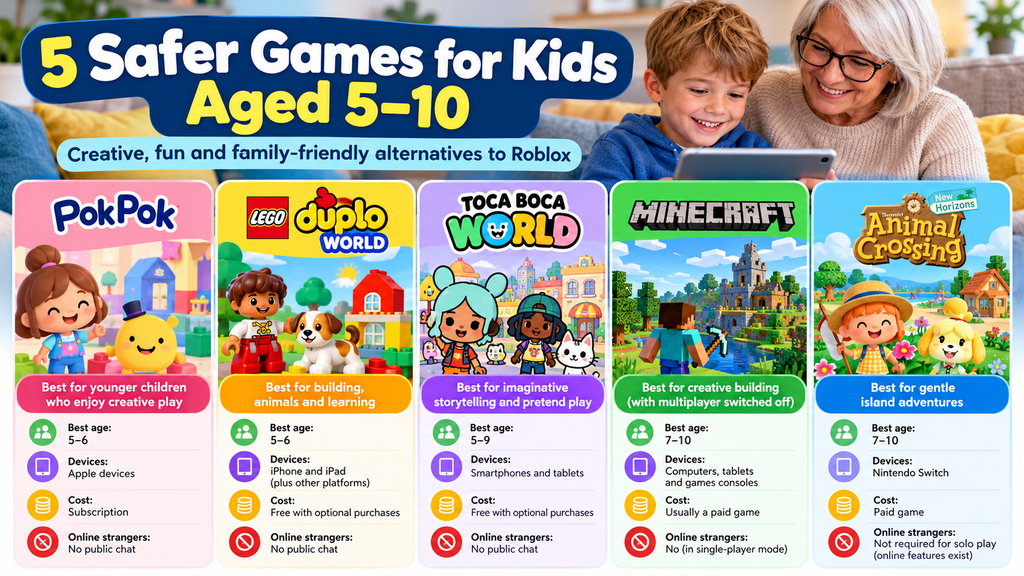
Our five options are:
- Pok Pok: A gentle digital playroom, particularly suitable for younger children.
- LEGO DUPLO World: Colourful building and learning activities for younger children.
- Toca Boca World: Imaginative storytelling, decorating and character play.
- Minecraft in single-player Creative mode: Building and exploring without joining public servers.
- Animal Crossing: New Horizons: A relaxing island-building game on Nintendo Switch, particularly appealing to older children in this age range.
These aren’t all online multiplayer games — and that’s deliberate.
For many families, choosing a game that works without public online interaction is a sensible way to reduce risk.
Our recommendation: For children aged 5–7, start with simple, supervised, single-player games. For children aged 8–10, consider more complex games such as Minecraft or Animal Crossing, while keeping multiplayer features restricted unless you’ve reviewed them.
First, What Makes a Children’s Game Safer?
A game can look friendly and still contain features parents should investigate.
Before choosing any game, consider these five questions.
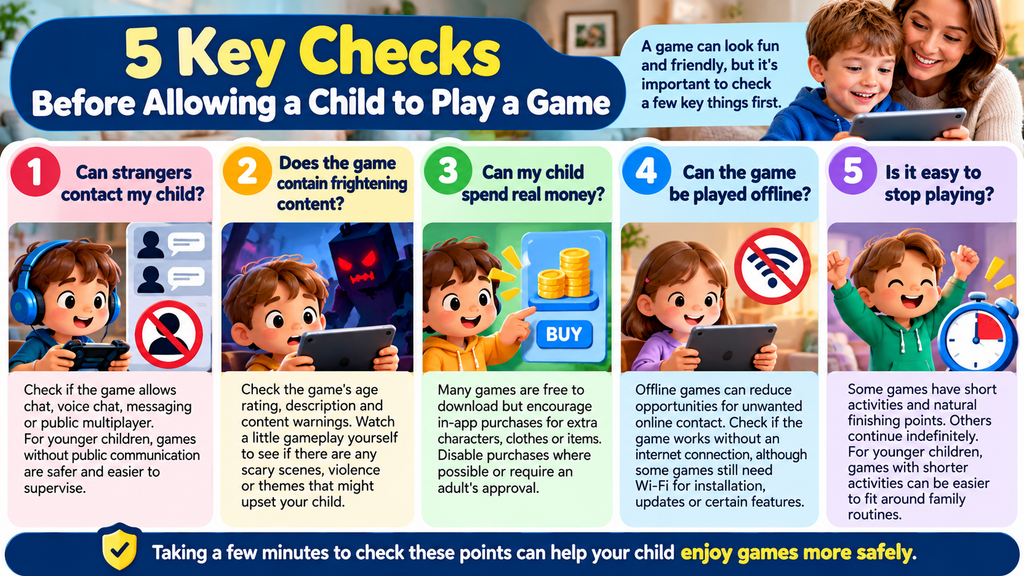
1. Can Strangers Contact My Child?
This is one of the most important differences between games.
Some games are designed for one person to play alone.
Others allow children to join public servers, send messages, use voice chat or interact with unfamiliar players.
For younger children, avoiding public communication features can remove an important source of risk.
2. Does the Game Contain Frightening Content?
Children react differently to frightening scenes.
A cartoon monster that seems harmless to a ten-year-old might upset a five-year-old.
Check the game’s age rating, description and content warnings. If possible, watch a little gameplay yourself.
3. Can My Child Spend Real Money?
Some games are free to download but encourage purchases of additional characters, clothes, buildings or activities.
These are called in-app purchases.
Even small amounts can add up.
Where possible, disable purchases or require an adult’s approval.
4. Can the Game Be Played Offline?
Offline means the game can be played without an active internet connection.
This can reduce opportunities for unwanted online contact, although some games still require an internet connection for installation, updates or certain features.
Simply switching off Wi-Fi doesn’t automatically make every game work offline.
5. Is It Easy to Stop Playing?
Some games have short activities and natural finishing points.
Others continue indefinitely.
For younger children, games with shorter activities can be easier to fit around family routines.
Five Games Worth Considering for Children Aged 5–10
1. Pok Pok — Best for Younger Children Who Enjoy Creative Play
Best starting age: Approximately 5–6, although younger children may also enjoy it.
Devices: Compatible Apple devices; check current availability before subscribing.
Cost: Subscription-based.
Online strangers: No public multiplayer chat as part of its digital playroom.
Why we like the approach
Pok Pok is designed around open-ended digital toys rather than competition.
Children can explore, experiment and invent their own activities.
There aren’t traditional levels to win or lose.
This can appeal to children who enjoy playing with toys, drawing and exploring rather than fast-paced gaming.
Why Parents May Prefer It
Pok Pok says its digital playroom contains no advertisements or in-app purchases for subscribers.
The app can also work offline after its initial setup and subscription.
That makes it a relatively straightforward option for adults who don’t want children entering public online gaming worlds.
Things to Check
Pok Pok requires a subscription, so check the current cost before signing up.
It’s also aimed primarily at younger children, meaning some nine- or ten-year-olds may find it too simple.
Our verdict: A particularly appealing option for younger children whose parents want creative digital play without public gaming chat.
Official information: Pok Pok
2. LEGO DUPLO World — Best for Building, Animals and Learning
Best starting age: Approximately 5–6.
Devices: iPhone and iPad, with availability on other supported platforms to be checked in the relevant app store.
Cost: Free download with optional paid content.
Online strangers: No public player-chat system in its normal play activities.
LEGO DUPLO World brings familiar colourful building blocks onto a screen.
Children can explore different scenes, build objects, play with animals and complete activities designed around early learning.
Its publisher describes it as intended primarily for children aged 3–6.
Why Parents May Prefer It
Unlike a public multiplayer gaming platform, the focus is on guided activities and creative play.
Children aren’t being encouraged to join open servers full of unfamiliar players.
For grandparents, it can also be a pleasant game to explore together.
Things to Check
Although the app is free to download, additional content may require payment.
Check what is included before giving a child the device, and use purchase approval settings.
Older children may quickly outgrow the activities.
Our verdict: A good starting point for five- and six-year-olds who enjoy animals, building and simple interactive games.
Official listing: LEGO DUPLO World on the Apple App Store
3. Toca Boca World — Best for Children Who Love Pretend Play
Best starting age: Approximately 5–9, depending on the child’s interests.
Devices: Supported smartphones and tablets.
Cost: Free starter content with optional purchases.
Online strangers: The core game is centred on individual creative play rather than public multiplayer servers.
Toca Boca World lets children create characters, decorate rooms and invent stories.
A child might design a house, arrange a shop, look after characters or act out an imaginary family adventure.
For children who enjoy dolls’ houses, miniature figures or pretend play, it can be especially appealing.
Why Parents May Prefer It
The main attraction is creativity rather than competing against unknown players.
Children can make up their own stories without needing to communicate with strangers.
It’s worth distinguishing the official app from unrelated websites or imitation games using similar names.
Things to Check
Additional locations, characters and items may be sold separately.
Review the purchase options and ensure your child understands that digital extras cost real money.
Install the official app through your device’s recognised app store rather than an unfamiliar website.
Our verdict: A strong alternative for children who enjoy the imaginative side of Roblox but don’t need public multiplayer features.
4. Minecraft — Best for Creative Building, With Multiplayer Switched Off
Best starting age: Approximately 7–10.
Devices: Computers, tablets and major games consoles, depending on the edition.
UK age rating: PEGI 7.
Cost: Usually a paid game; price depends on the platform.
Online strangers: Avoidable when playing in a single-player world with multiplayer disabled.
Minecraft is one of the most popular building games.
Players use blocks to create houses, castles, farms, villages and almost anything else they can imagine.
It’s sometimes described as digital LEGO.
But there is an important distinction parents should understand.
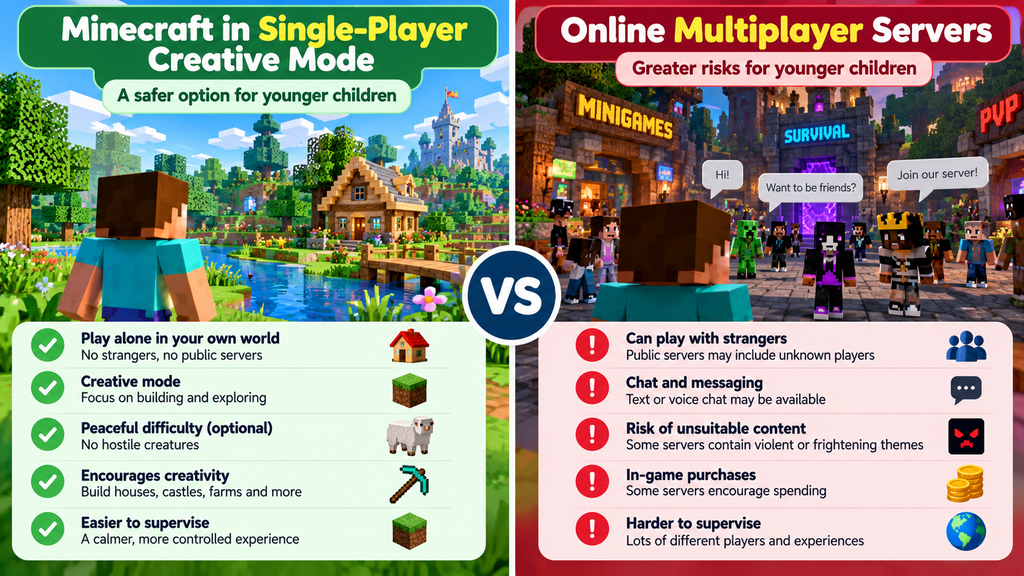
Minecraft can be played alone or online with other people.
Those are very different experiences from a safeguarding perspective.
Creative Mode Versus Survival Mode
In Creative mode, children can concentrate on building and exploring without the normal survival pressures.
In Survival mode, players must gather resources and may encounter hostile creatures.
For younger children, Creative mode is often a more comfortable starting point.
How to Make Minecraft Safer
For a younger child:
- Set up an appropriate child account.
- Create a single-player world.
- Choose Creative mode.
- Consider Peaceful difficulty.
- Keep multiplayer disabled.
- Review the child’s Microsoft/Xbox privacy and safety settings where applicable.
- Supervise any changes to servers or multiplayer access.
Minecraft’s publisher states that multiplayer is disabled by default on child accounts for its main Java and Bedrock editions.
Nevertheless, check the settings yourself.
What Parents Should Watch For
Public Minecraft servers can introduce communication with unfamiliar players.
Children may also watch Minecraft videos on other platforms, where the language or content isn’t necessarily suitable.
The game itself and the videos children watch about it are separate things to supervise.
Our verdict: One of the strongest creative alternatives to Roblox for children aged around 7–10, provided you deliberately use an appropriate single-player setup.
Official information: Minecraft Parents’ Guide
5. Animal Crossing: New Horizons — Best for Gentle Island Adventures
Best starting age: Approximately 7–10, with adult guidance where needed.
Devices: Nintendo Switch family of consoles.
Cost: Paid game.
Online strangers: Not required for ordinary single-player island activities.
Animal Crossing: New Horizons is a gentle life-simulation game where players move to an island.
They can decorate their home, catch fish, collect insects, grow flowers and make friends with animal characters.
The pace is generally relaxed, with a strong emphasis on creativity and collecting.
Why Parents May Prefer It
A child can enjoy many of the game’s activities without visiting other players’ islands online.
The main characters are computer-controlled animals rather than strangers in a public gaming world.
This makes ordinary solo play quite different from unrestricted social gaming platforms.
Things to Check
Animal Crossing does support online multiplayer.
Players can visit other islands and exchange certain messages or user-created content.
If you want to avoid those features, supervise online access and use Nintendo’s parental controls.
The game also includes additional paid content.
Younger children may need help reading instructions and understanding the game’s activities.
Our verdict: A good choice for children who enjoy animals, collecting, decorating and imaginative play, especially when online multiplayer isn’t enabled.
Official information: Animal Crossing: New Horizons — Nintendo UK
Comparison: Which Game Should You Choose?
| Game | Best starting age* | Public chat in recommended play? | Main consideration |
|---|---|---|---|
| Pok Pok | 5–6 | No | Subscription |
| LEGO DUPLO World | 5–6 | No | Optional purchases |
| Toca Boca World | 5–9 | No | Optional purchases |
| Minecraft — solo Creative mode | 7–10 | No | Keep multiplayer disabled |
| Animal Crossing — solo play | 7–10 | No | Online features exist |
These are our suggested starting ages, not official ratings. Always check the current age rating and your child’s individual needs.
The table describes the particular play setup we recommend. It does not mean every version or feature of these games is offline or free from online interaction.
Which Games Are Best for Different Ages?
Ages 5–6: Keep Things Simple
At this age, look for games with:
- Straightforward controls.
- Gentle, age-appropriate content.
- No public chat.
- Short activities.
- Opportunities to play together with an adult.
Good starting options: Pok Pok, LEGO DUPLO World and Toca Boca World.
A five-year-old may enjoy simply decorating a room or helping an animal character.
They don’t need access to large public multiplayer worlds to enjoy digital play.
Ages 7–8: Introduce More Creativity
Children may be ready for games with more independence and problem-solving.
Minecraft in single-player Creative mode can be an appealing choice.
Animal Crossing may also suit children who enjoy reading, collecting and building their own little world.
Continue to review online features and purchases.
Ages 9–10: More Independence, but Not Unrestricted Access
Older primary-school children may be more confident with games and technology.
That doesn’t mean they automatically understand online grooming, scams or the risks of sharing personal information.
Consider giving them greater choice over age-appropriate games while retaining clear rules about:
- Online communication.
- Public multiplayer servers.
- Spending.
- Gaming time.
- Reporting anything uncomfortable.
What Do PEGI Age Ratings Actually Mean?
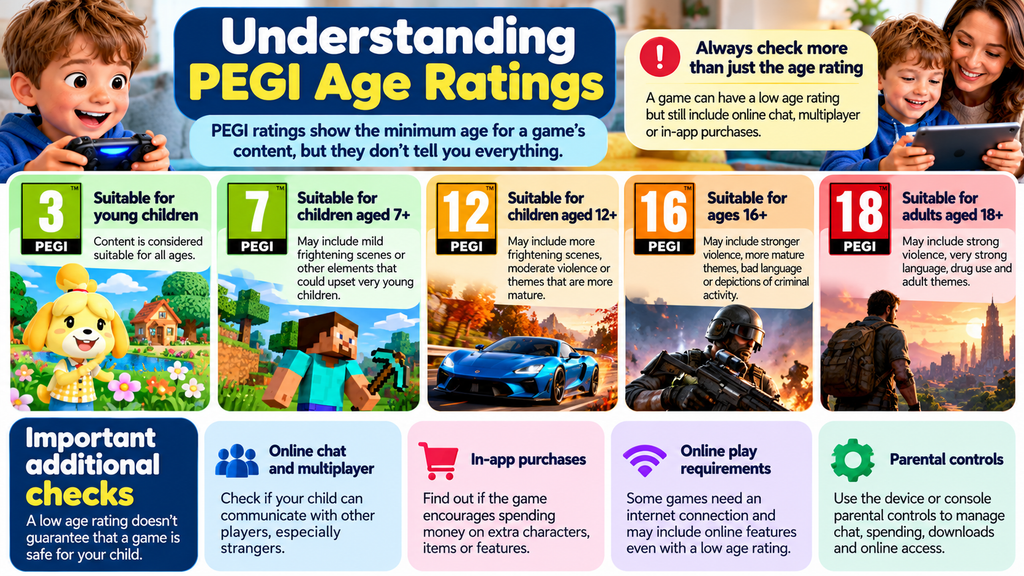
In the UK, many games display a PEGI age rating.
Common categories include:
- PEGI 3: Content considered suitable for young children.
- PEGI 7: Content that may include mild frightening scenes or other elements unsuitable for very young children.
- PEGI 12: Content intended for older children.
- PEGI 16 and PEGI 18: Content intended for older teenagers or adults.
A PEGI 7 rating doesn’t mean every seven-year-old will enjoy the game or find it comfortable.
More importantly, a low age rating doesn’t guarantee that a game has no online communication features.
Parents should check communication settings separately from content ratings.
How to Make Children’s Games Safer: A Five-Minute Checklist
You don’t need to understand every technical detail.
Start with these steps.
Step 1: Check the Exact Game
Ask your child to show you the title and icon.
Games with similar names can be very different.
Step 2: Read the Age Rating
Look in the app store, console store or game information.
Check whether the rating matches your child’s age.
Step 3: Look for Online Features
Check for words such as:
- Multiplayer
- Online play
- Public server
- Chat
- Voice chat
- Friends
- Messaging
These don’t automatically make a game unsuitable, but they tell you where further checks are needed.
Step 4: Turn Off Purchases Where Possible
Use the device’s parental controls to require approval before buying anything.
Avoid leaving payment cards accessible to children.
Step 5: Agree on Playing Time
Decide how long your child can play before they start.
Give a warning before the time ends and help them find a sensible stopping point.
For younger children, gaming in a shared family room also makes supervision easier.
What About Roblox?
Roblox is different from most of the games we’ve recommended because it’s a platform containing a huge variety of user-created experiences.
Some are creative and enjoyable.
Others may contain frightening themes, unsuitable content or opportunities for interaction with unfamiliar players.
Roblox has parental controls, age-based restrictions and communication safeguards, but these don’t eliminate every risk.
If you’re unsure whether Roblox is suitable for your child, read our detailed guide:
Is Roblox Safe for Kids? A Practical Guide for Parents and Grandparents (2026)
It explains frightening games, online strangers, parental controls, warning signs and how to manage gaming time.
For families who don’t want younger children using Roblox, the single-player games above provide alternatives worth considering.
Special Advice for Grandparents
Grandparents often find themselves looking after children who arrive with a tablet, phone or games console.
You may not know what the games are called, how they work or whether they connect to the internet.
That’s understandable.
Ask Three Simple Questions
Before allowing a grandchild to play, ask:
- “What game is that?”
- “Can you talk to other people on it?”
- “Can you show me what happens in the game?”
These questions can reveal a great deal.
You Can Set Rules in Your Own Home
If you aren’t comfortable with public online games, explain that only approved games are allowed during visits.
For example:
“You can play your building game, but we don’t use games where you talk to strangers at Grandma and Grandad’s house.”
Agree on the rules with the child’s parents where possible.
Choose Games You Can Enjoy Together
Children often enjoy showing adults how a game works.
You might help build a house in Minecraft, decorate an island in Animal Crossing or explore a simple creative app together.
Playing alongside a child helps you understand what they’re doing and makes it easier for them to discuss anything worrying.
Don’t Assume Offline Means No Supervision Is Needed
Even offline games can contain content unsuitable for a particular child or encourage lengthy play sessions.
Check the game first and agree on sensible limits.
What If Your Child Says Everyone Else Plays Roblox?
Children may feel they’re missing out when friends are playing a popular game.
You can acknowledge their feelings without giving in to pressure.
Try saying:
“I understand why you want to play it. We’re choosing games that we’re comfortable with for now. Let’s find something else you enjoy.”
You could offer a creative alternative such as Minecraft in a private world or Toca Boca World.
Avoid presenting the alternative as a punishment.
The goal is to help children enjoy games while learning sensible boundaries.
Frequently Asked Questions
What Is the Safest Game for a Five-Year-Old?
There is no single safest game for every child.
For many five-year-olds, a simple, age-appropriate game without public chat or multiplayer access is easier to supervise.
Pok Pok and LEGO DUPLO World are two options worth considering.
What Is a Good Alternative to Roblox for a Six-Year-Old?
Toca Boca World and LEGO DUPLO World may appeal to children who enjoy characters, animals and imaginative play.
Minecraft can also be considered for children ready for its controls and content, but its PEGI 7 rating should be respected.
Can Children Play Minecraft Without Strangers?
Yes.
Minecraft can be played in a single-player world without joining public servers.
Parents should check multiplayer permissions and the child’s account settings.
Is Animal Crossing Safer Than Roblox?
Animal Crossing’s normal solo play doesn’t require joining public gaming worlds.
That can reduce risks associated with unfamiliar players.
However, Animal Crossing also offers online multiplayer and communication features, so parents should check those settings.
Are Free Games Safe for Children?
Some are suitable, but free doesn’t automatically mean safe.
Look for advertisements, in-app purchases, chat features and unsuitable content.
A paid game isn’t automatically safer either.
Can Children Play Games Without Wi-Fi?
Many games support offline play after installation.
However, availability varies by game, device and feature.
Test the exact game before relying on offline access.
Should I Ban Roblox Completely?
That’s a decision for each family.
Some parents may choose supervised use with restrictions. Others may decide their child isn’t ready.
You don’t have to allow a game simply because it’s popular.
How Long Should a Seven-Year-Old Play Video Games?
There isn’t one universal gaming-time limit suitable for every child.
Consider sleep, exercise, school, family activities, wellbeing and the child’s response to stopping.
Agree on a realistic routine and review it if gaming begins to interfere with everyday life.
How Can I Stop My Grandchild Downloading Games?
Ask the child’s parents to set up purchase and download approval through the device’s parental controls.
If you’re responsible for the device, use the relevant Apple, Google or console family settings.
Final Advice: Safer Gaming Starts With Choosing the Right Game
Children can gain enjoyment from digital games.
They can build, create, solve problems, explore imaginary worlds and share experiences with family members.
But not every game offers the same level of protection.
For younger children, single-player games without public chat are often a sensible starting point.
As children grow older, parents can gradually introduce more features when they’re confident the child understands the rules and risks.
You don’t need to become a gaming expert.
You simply need to know what your child is playing, whether strangers can contact them, whether money can be spent and how to establish healthy boundaries.
And remember: it’s perfectly reasonable to say no to a game that doesn’t feel appropriate for your child.
Trusted Sources and Further Reading
- NSPCC — Online Gaming Safety
- Minecraft — Official Parents’ Guide
- Nintendo UK — Animal Crossing: New Horizons
- UK Government — Parental Controls
Last reviewed: October 2026. Games, prices, features, age ratings and parental controls can change. Check the current UK listing and official safety information before downloading or purchasing.
Need Help With Something Else?
Search our free, easy-to-follow technology guides. Just describe your problem.
Found this useful? Save Simple Tech Guide in your bookmarks for next time.