
Do you keep missing phone calls because you can’t hear your phone ringing?
Perhaps the ringtone seems much quieter than it used to, your phone only vibrates, or you’ve turned the volume up but it still doesn’t seem loud enough.
The good news is that you probably don’t need a new phone.
There are several simple settings you can check to make your phone easier to hear. This guide explains them step by step for iPhone, Samsung and other Android phones.
You don’t need to try everything at once. Start with the first step and test your phone after each change.

Quick Answer: How Do I Make My Phone Ring Louder?
If your phone is difficult to hear when someone calls, try these checks:
- 🔊 Turn up the ringtone volume
- 🔕 Make sure Silent Mode is switched off
- 🌙 Check Do Not Disturb or Focus isn’t stopping calls
- 🎵 Choose a louder, clearer ringtone
- 📳 Turn on vibration as well as sound
- 🎧 Check your Bluetooth settings
- 🔈 Check that the speaker isn’t blocked
- ♿ Look at your phone’s accessibility options
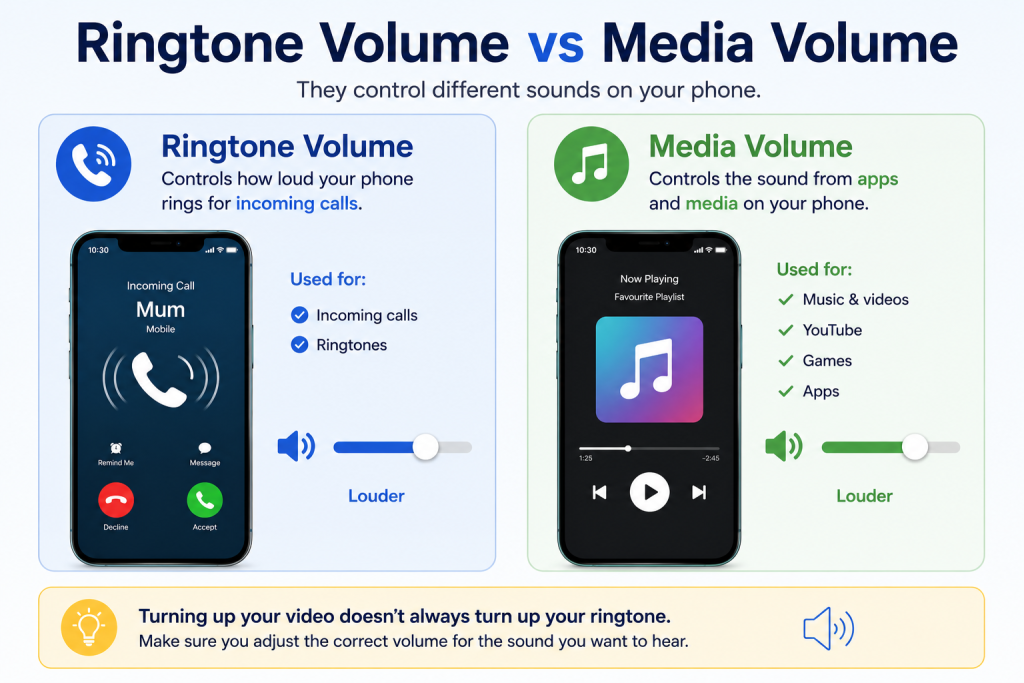
One particularly common mistake is adjusting the media volume instead of the ringtone volume.
Let’s start there.
1. Turn Up the Ringtone Volume
Your smartphone may have several different volume controls.
These can include:
- Ringtone volume
- Call volume
- Notification volume
- Alarm volume
- Music and video volume
This means pressing the volume-up button while watching YouTube, for example, doesn’t necessarily make your ringtone louder.
On an iPhone
Open:
Settings → Sounds & Haptics
Look for:
Ringtone and Alerts
Move the slider towards the right to increase the volume.
Your iPhone should play a sample of the ringtone as you adjust it.
Should I Turn On “Change with Buttons”?
On iPhone, you may also see:
Change with Buttons
When this is enabled, the buttons on the side of the iPhone can adjust the ringtone and alert volume in appropriate circumstances.
If you frequently change the volume accidentally, you may prefer to leave this switched off and set your ringtone volume through Settings instead.
On a Samsung Phone
Press one of the volume buttons.
When the volume control appears, tap the three dots or expanded volume control if available.
You should see separate controls for things such as:
- Ringtone
- Media
- Notifications
- System
Increase Ringtone.
You can also usually find these settings under:
Settings → Sounds and vibration → Volume
The precise wording can vary slightly depending on your Samsung model and software version.
On Other Android Phones
Try:
Settings → Sound & vibration
or:
Settings → Sounds
Look for a control labelled:
Ring & notification volume, Ringtone or something similar.
Move the slider towards the higher end and ask someone to call you to test it.
2. Make Sure Your Phone Isn’t on Silent
If your phone isn’t ringing at all, check whether it has accidentally been put into Silent Mode.
iPhone
Depending on your iPhone model, Silent Mode may be controlled using the Ring/Silent switch or the Action button.
Check that Silent Mode isn’t enabled.
You can also look at the screen when changing this setting — the iPhone normally indicates whether Silent Mode is on or off.
Samsung and Android
Press a volume button and look at the sound symbol.
You may see:
🔊 Sound
📳 Vibrate
🔇 Mute
Make sure the phone is set to Sound if you want to hear incoming calls.
3. Check Do Not Disturb and Focus Modes
Sometimes the volume isn’t the problem at all.
Your phone may be deliberately silencing calls because Do Not Disturb or another Focus mode is active.
On iPhone
Open the Control Centre and check Focus.
You can also go to:
Settings → Focus
Look for modes such as:
- Do Not Disturb
- Sleep
- Personal
- Work
These can control which people and apps are allowed to interrupt you.
On Android
Look in your Quick Settings for:
Do Not Disturb
Or try:
Settings → Notifications → Do Not Disturb
The exact location varies between Android phones.
💡 Simple Tech Guide Tip: If your phone rings normally sometimes but mysteriously goes quiet at particular times of day, check whether Do Not Disturb has been set to turn on automatically.
4. Choose a Louder Ringtone
Not all ringtones are equally easy to hear.
A gentle melody might sound pleasant in a quiet room but disappear completely when the television is on or you’re in another room.
Try choosing a ringtone with a strong, clear and distinctive sound.
On iPhone
Go to:
Settings → Sounds & Haptics → Ringtone
Tap different ringtones to hear them.
Choose one that you can recognise easily.
On Samsung
Try:
Settings → Sounds and vibration → Ringtone
Select a ringtone and listen to the preview.
Other Android phones have similar controls, although the menu names may differ.
Which Type of Ringtone Is Easiest to Hear?
There isn’t one ringtone that’s best for everybody.
Try several.
A ringtone with a clear repeated pattern may be easier to notice than a very soft or gradual sound.
Don’t choose based purely on which one sounds nicest.
Choose the one you actually notice.
5. Turn On Vibration as Well
If you sometimes struggle to hear your phone, don’t rely on sound alone.
Set your phone to ring and vibrate when possible.
The vibration gives you another way of noticing an incoming call, particularly when the phone is:
- In your pocket
- In your handbag
- On a table
- Beside you on the sofa
On iPhone
Look under:
Settings → Sounds & Haptics
Your available haptic options will depend on your iPhone and software version.
On Samsung
Try:
Settings → Sounds and vibration
Look for the vibration settings and adjust them to suit you.
Some phones also allow you to alter the vibration intensity or vibration pattern.
6. Check Your Bluetooth Connections
If your phone behaves strangely when you’re expecting it to ring, Bluetooth is worth checking.
Your phone may be connected to:
- Wireless headphones
- Earbuds
- A car
- A Bluetooth speaker
- A hearing device
- Another accessory
Bluetooth doesn’t necessarily mean your ringtone will always be silent on the phone itself, but if you’re experiencing unexpected audio behaviour, disconnecting Bluetooth devices temporarily is a useful troubleshooting step.
Turn Bluetooth off briefly and ask someone to call you again.
If the problem disappears, check which device your phone was connected to.
7. Check the Phone’s Speaker
If the ringtone volume is set high but the phone still sounds unusually quiet, check the speaker area.
A phone case, dirt or debris can sometimes affect sound.
Look carefully at the speaker openings.
Don’t do this:
❌ Don’t pour liquid into the speaker
❌ Don’t push pins or sharp objects into it
❌ Don’t aggressively scrape the openings
Instead, remove the phone case temporarily and test the ringtone again.
If the sound becomes noticeably clearer, the case may have been obstructing the speaker.
8. Restart Your Phone
It’s simple, but it’s worth trying.
If the sound settings appear correct but the phone isn’t behaving normally, turn it off and restart it.
A restart can resolve temporary software problems.
After restarting, ask someone to call you again.
9. Check Whether Only One Person’s Calls Are Quiet or Silent
This is an important clue.
Ask yourself:
Does my phone fail to ring for everyone, or only for certain people?
If most calls ring normally but calls from one person don’t, the main volume setting may not be the problem.
Check:
- Whether that person is blocked
- Your Focus/Do Not Disturb settings
- Whether certain contacts are allowed or silenced
- Any individual contact settings you may have changed
If nobody’s calls ring, concentrate on the phone’s general sound settings.
10. Make Sure You Haven’t Silenced Unknown Callers
Some phones have features designed to reduce nuisance calls.
That’s useful, but it can also mean you don’t notice legitimate calls from numbers that aren’t saved in your contacts.
On iPhone, for example, there are settings that can affect calls from unknown numbers.
If you’re waiting for a call from somewhere such as:
- Your GP surgery
- A hospital
- A delivery company
- A tradesperson
- A new business
- Someone whose number isn’t saved
check your phone’s call settings if the expected call never seems to ring.
Be cautious, though: unknown-number controls can also help reduce unwanted calls, so understand what a setting does before changing it.
11. Use Visual Alerts as Well as Sound
If making the ringtone louder isn’t enough, your smartphone may offer additional accessibility features.
For example, some phones can use a flashing light or screen notification to help alert you.
This gives you another visual indication that something is happening.
These options can be particularly useful if you have difficulty hearing your phone.
On iPhone
Look under:
Settings → Accessibility → Audio & Visual
Available options can vary by iOS version.
On Samsung
Look under:
Settings → Accessibility → Advanced settings
or search Settings for:
Flash notification
Depending on the model, you may be able to use the camera flash, screen flash or other visual alerts.
💡 Use these features only if they are comfortable for you. Flashing alerts won’t suit everyone.
12. Explore Your Phone’s Hearing Accessibility Settings
Modern smartphones include accessibility features designed to make them easier to use.
These aren’t only for people with a diagnosed hearing condition.
If you find your phone difficult to hear, it’s worth exploring them.
iPhone
Go to:
Settings → Accessibility
Look through the hearing-related options.
Depending on your device, you may find settings relating to:
- Audio
- Hearing devices
- Subtitles and captions
- Sound recognition
- Visual alerts
Samsung
Try:
Settings → Accessibility → Hearing enhancements
The available features depend on your Samsung model.
You may find options that change how your phone handles sound and alerts.
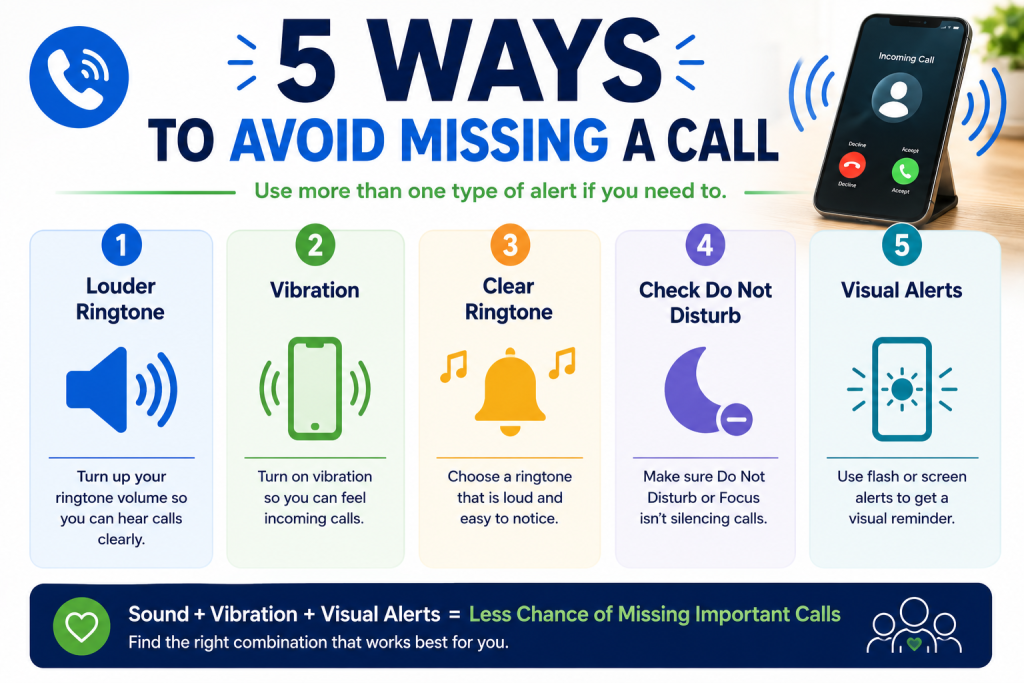
5 Ways to Avoid Missing a Call
🔊 Louder Ringtone
Turn up the correct volume.
📳 Vibration
Feel the phone as well as hear it.
🎵 Clear Ringtone
Choose an easy-to-notice sound.
🌙 Check Do Not Disturb
Make sure calls aren’t being silenced.
💡 Visual Alerts
Use flash or screen alerts if helpful.
Bottom message:
Use more than one type of alert if you need to.
My Ringtone Is on Full Volume but It’s Still Too Quiet
If you’ve turned the ringtone volume all the way up and it’s still difficult to hear, work through these checks:
1. Try a different ringtone.
A different frequency or pattern may be much easier for you to notice.
2. Remove the phone case temporarily.
Check that it isn’t covering or interfering with a speaker.
3. Restart the phone.
This rules out some temporary software issues.
4. Compare other sounds.
Play some music or a video.
Does the speaker sound unusually quiet there too?
If all sound from the phone is very quiet, there could be an issue with the speaker rather than the ringtone setting.
5. Add vibration or visual alerts.
Don’t rely entirely on increasing the volume.
6. Consider having the phone checked.
If the speaker has suddenly become much quieter and none of these steps help, there may be a hardware problem.
What If I Have Difficulty Hearing My Phone?
Making the ringtone louder is only one solution.
A better setup may combine several alerts:
Sound + Vibration + Visual Alert
For example, your phone might:
🔊 Ring loudly
📳 Vibrate strongly
💡 Flash when a call arrives
That gives you several opportunities to notice the call.
You can also keep your phone somewhere you’re more likely to hear or feel it rather than leaving it in another room.
If you use hearing aids or another hearing device, your smartphone may also have connectivity or accessibility options worth exploring.
We will cover those in a separate Simple Tech Guide.
Helping an Older Parent Who Keeps Missing Calls
If a parent or relative frequently misses calls, don’t simply turn every volume control to maximum.
Set the phone up around their needs.
Try:
- Choosing a distinctive ringtone
- Increasing the ringtone volume
- Turning on vibration
- Removing unnecessary notification sounds
- Adding important people to their contacts
- Checking Do Not Disturb
- Exploring visual alerts
- Keeping the Home Screen simple
Then make a test call.
Put the phone where they would normally leave it and call from another room.
Can they hear it?
If not, adjust the settings and try again.
A real-world test is much more useful than simply looking at the volume slider.
Ringtone Volume vs Call Volume: What’s the Difference?
This causes a lot of confusion.
📞 Ringtone volume
This controls how loudly your phone alerts you before you answer an incoming call.
👂 Call volume
This controls how loudly you hear the other person after you’ve answered the call.
If you can hear the phone ringing but struggle to hear the person speaking, increasing the ringtone volume isn’t the solution.
While you’re actually on the call, try using the phone’s volume buttons to increase the call volume.
Ringtone Volume vs Media Volume
Media volume normally controls sounds from things such as:
▶️ YouTube
🎵 Music
🎮 Games
📱 Some apps
Ringtone volume controls your incoming call alert.
So if you keep pressing volume up while watching a video, you may simply be making the video louder.
This is why checking the proper sound settings is so important.
Frequently Asked Questions
Why is my phone ringtone so quiet even on full volume?
Try changing to a clearer ringtone, removing the case temporarily and restarting the phone. Also check whether the phone’s speaker sounds quiet when playing other audio. If all sounds are unusually quiet, the problem may not be limited to the ringtone.
How do I make my iPhone ring louder?
Go to Settings → Sounds & Haptics and increase the Ringtone and Alerts volume. Also check Silent Mode and Focus settings and consider choosing a more noticeable ringtone.
How do I make my Samsung phone ring louder?
Go to Settings → Sounds and vibration → Volume and increase the ringtone volume. You can also choose a different ringtone and enable vibration.
Why isn’t my phone ringing even though the volume is up?
Check Silent Mode, Do Not Disturb/Focus settings and whether the phone is set to vibrate or mute. If only certain callers are affected, check your contact and call settings too.
Can my phone vibrate and ring at the same time?
Most modern smartphones provide options for sound and vibration alerts. The exact setting varies between iPhone and Android devices.
Can I make my phone flash when someone calls?
Many smartphones provide visual or flash notification options through their Accessibility settings. Availability and menu locations vary by phone.
Why can I hear videos but not my phone ringing?
Your media volume and ringtone volume may be set at different levels. Check the ringtone volume separately in your phone’s sound settings.
Why can I hear my phone ringing but not the person speaking?
That’s probably the call volume, not the ringtone volume. Once you’ve answered the call, press the volume-up button to increase the sound of the person speaking.
You May Also Find These Guides Helpful
📱 How to Make Your Phone Easier to See, Hear and Use
12 simple settings that can make everyday smartphone use easier.
🔠 How to Make Text Bigger on a Smartphone
Simple steps if the writing on your phone is difficult to read.
🔲 How to Make Icons and Apps Bigger on Your Phone
Make apps easier to see and tap.
📱 Which Smartphones Are Easiest for Older Adults to Use?
A beginner-friendly guide to choosing a simpler smartphone.
🔔 Why Am I Not Getting Notifications on My Phone?
What to check when messages and other alerts aren’t appearing.
❤️ Accessibility & Health Technology
More Simple Tech Guide articles about making everyday technology easier to see, hear and use.
Final Thoughts
If your phone is difficult to hear, don’t assume you need to replace it.
Start with the simple things:
Turn up the ringtone → check Silent Mode → check Do Not Disturb → choose a clearer ringtone → add vibration.
If that’s still not enough, explore visual alerts and your phone’s accessibility settings.
And remember that you don’t have to rely on sound alone.
Using sound, vibration and visual alerts together can make incoming calls much easier to notice.
Take your time, change one setting at a time, and make a test call after each change.
Latest posts: